
Save Money With Software-as-a-Service (SaaS)/Cloud Applications
Software-as-a-Service (SaaS) Total Cost of Ownership (TCO) Analysis - Outsourcing IT Infrastructure
Understand what it really costs to own, install, and maintain traditional software vs. SaaS/Cloud Software
Learn how to prepare a Total Cost of Ownership Analysis
Executive Summary
According to Gartner Group, a global IT research firm, the annual cost to own and manage software applications can be up to four times the cost of the initial purchase. As a result, companies end up spending more than 75% of their total IT budget just on maintaining and running existing systems and software infrastructure (Timothy Chou, The End of Software, SAMS Publishing, 2005, page 6). The number of software applications that a company may need are almost infinite. The resources to operate these applications however are finite.
The "Cloud" or Software-as-a-Service (SaaS) revolution allows companies to subscribe to software applications and outsource operating the back-end infrastructure to the SaaS vendor. In most cases, the SaaS vendor can do this much more cost effective; providing overall cost savings for the company. As a result, companies can spread their IT budget across many more applications to support and grow their business operations which will in turn contribute to the bottom line.
This guide provides the reader with a comprehensive look at the Total Cost of Ownership (TCO) analysis any decision maker should complete before making a choice between a SaaS or a traditional software deployment.
The key cost drivers for any software implementation are the cost of the software application, the hardware required to run the application and the people services required to design, deploy, manage, maintain and support the application.
- Traditional software pricing is limited to the cost of the software application, in most cases an upfront fee in exchange for a perpetual user license. It is up to the customer to determine the cost of the hardware and the people services.
- SaaS applications are charged on a subscription basis. The subscription fee includes the cost of the software application, the hardware and the people services.
This difference in pricing models can make an apples-to-apples TCO comparison "tricky".
Software and hardware costs are well understood but the people resources associated with traditional software applications are often underestimated or omitted in a TCO analysis. As a result, the usage driven subscription cost of SaaS applications can seem to be the more expensive solution over a multi-year period. However, when these people resources are correctly associated, deploying a SaaS application becomes - in many cases - the more cost effective option.
This guide helps in better understanding all the different cost factors and includes a proposal that Giva perform a TCO calculation for you that will help influencers and decision makers to better estimate the true TCO of a SaaS versus a traditional software deployment. The ultimate goal of this paper is to educate the reader that in some cases traditional software applications remain the right choice, but in other cases deploying SaaS applications provide a better business case.
Cost Drivers in the TCO Analysis
What are the cost drivers companies need to look at when completing a TCO analysis?
Capital Expenses
Traditional Software
Software and hardware, network infrastructure enhancements, monitoring and testing tools, security products, supplies, facilities and other required infrastructure are part of the typical capital acquisition expenditure. In many cases, upgrades to other infrastructure may be required which adds additional capital expense. This capital expense is an up-front cash outlay. There are also recurring lifetime costs that have to be included in the analysis.
Software-as-a-Service
With SaaS, there are no perpetual software licenses to buy. The nature of SaaS is that you pay for what you use. Most SaaS models have a recurring cost structure. You pay a monthly or annual service fee for as long as you use the service. This service fee typically includes maintenance, support, training and upgrades and is inclusive of all hardware, networking, storage, database, administration and other costs associated with SaaS delivery.
Design and Deployment Costs
Traditional Software
Staff and contract labor needed to research, design, integrate, test, tune and launch is a significant cost associated with deploying an in-house solution. Server and network capabilities must be reassessed and augmented. End-user computer hardware, operating systems and applications have to be evaluated for compatibility with the selected server product and upgraded if necessary. System testing and tuning are necessary to make sure performance is acceptable for launch. Training for end-users and IT staff will be required. Launch activities, awareness and pilots all require IT resources.
Software-as-a-Service
Most SaaS applications can be deployed and put into production much faster and for a fraction of the cost compared to a traditional software solution. This is very important when the opportunity costs of getting the application out are high.
Ongoing Infrastructure Costs
Traditional Software
For ongoing operation, network monitoring and management tools are often required to enable real-time problem diagnosis and responsiveness. Additional networking equipment and bandwidth may be needed to accommodate incremental traffic that cannot be efficiently managed on the internal network. Yearly software maintenance and support contracts and system upgrades make a large contribution to the total cost of ownership. Capacity increases, multiple redundant systems, and add-on feature sets further increase cost. Hardware repair and replacement and recurring environmental costs, such as specialized high-availability facilities and power consumption, add further to the ongoing cost. While these expenditures are spread out over the lifetime of the service, they must be considered in a full TCO analysis.
Software-as-a-Service
Other than additional Internet bandwidth needs, there are almost no incremental infrastructure costs to handle the growth of a SaaS application. Depending on the SaaS application, the IT organization application. Finally some API (Application Program Interface) development may be required to configure the application to better integrate with existing enterprise applications. Scaling the infrastructure and the costs associated with growth are fully the responsibility of the SaaS provider.
Ongoing Operations, Training and Support Costs
Traditional Software
IT organizations will have to allocate resources for monitoring, supporting and maintaining the application. If the application is new to the company, the IT organization will have to train and certify existing personnel and/or recruit new personnel with or without pre-existing application certification. The IT organization will also be responsible for monitoring and maintaining the application and trouble shooting the application in case of downtime. In addition, every time a patch or upgrade needs to be deployed, additional IT resources will be required. This is typically the biggest hidden cost that needs to be considered when making the buying decision for a new application. If this cost is incorrectly estimated, any affect on revenue or cost reduction can greatly change.
Initial and ongoing training is another success factor for the broad adoption of a new application. A vendor may offer initial training or a train the trainer session as part of the upfront cost, but with most traditional software applications it is an internal department that is tasked with the initial and ongoing end-user training. Again, incorrect estimates can greatly affect expected revenue or cost reduction.
Support is the final and most critical success factor to the successful adoption and ongoing use of a new application. Whenever end-users have problems with the application, this can lead to a loss in productivity or in the worst case a refusal to use the application all together. This is also known as software turning into shelfware. User issues typically grow with usage and as such the support load in the IT organization grows as well. If you add external use of the application to this equation, support issues and the costs associated with this typically grow exponentially. Again, if this cost is wrongly estimated, any affect on revenue or cost reduction can greatly change.
Software-as-a-Service
SaaS vendors are responsible for the end-to-end delivery of the application. The only responsibility of the IT organization is to make sure that the necessary ports on the firewall are open and that there is enough Internet access capacity available to allow the end-user base to communicate with the application.
SaaS is a recurring service, so for a SaaS vendor the sale does not end when the initial contract is signed. If a customer does not use the application, they can simply choose not to renew the contract at the end of the contract term. This is called churn. A traditional software vendor does not have to worry about churn, since customers buy upfront perpetual user licenses. As a result, SaaS vendors have a vested interest in seeing customers widely adopt and use the application. It is for this reason that almost all SaaS vendors focus on making their products easy to use and offer initial and ongoing end-user training, and this training is in most cases included in the service fees.
Finally, SaaS vendors also offer 1st, 2nd and 3rd line of support to their customers. This is for the same reasons they offer ongoing training services. If customers churn because of training or support issues, it will have an immediate impact to the SaaS vendor's bottom line.
Intangible Costs
While the intangible costs are harder to measure and therefore are more difficult to include in a TCO analysis, they are no less real. Some of the intangible cost factors that affect TCO include:
- Reliability and Availability: Failed interactions mean lost employee time and lost opportunities, and may require repeat efforts to persuade users to retry the technology with increasing resistance. What service level agreements (SLA) does the SaaS vendor offer and how do they compare to the internal SLA the IT organization offers?
- Interoperability: How easy is it to integrate with other applications?
- Extensibility: How easy is it to customize the application to fit the needs of the organization?
- Security: The costs of a security breach can be catastrophic if confidential business information is stolen or made available to competitors. What are the security policies that are in place at the SaaS vendor and how do they compare to the internal policies?
- Scalability: As user needs grow, the original system may not keep up. "Busy signals" or functional limitations consume employee time and mean lost opportunities. How well can the SaaS vendor accommodate growth and what are the costs associated with growing the internal application?
- Capacity: Usage and adoption within the enterprise is difficult to predict, making managing capacity difficult. The tradeoffs are poor performance on the one hand or underutilized infrastructure on the other. With SaaS this is more easily managed when compared to an internal application.
- Opportunity costs: The human resource and capital expenditures required by an in-house implementation come at the expense of other projects or could possibly delay the roll-out of new products and services, both of which have a direct impact on the company's bottom line.
TCO Factors
Traditional Software
The biggest TCO factor of premise-based traditional software applications is the cost of the ongoing people resources that are needed to monitor, maintain and upgrade the application and to provide training and support to the end-user base. These costs are not quoted as part of the cost of deploying the traditional software application and depending on the application, can be between 50 and 85% of the total cost of ownership for the application. Underestimating these costs can have a great impact on the overall TCO predication.
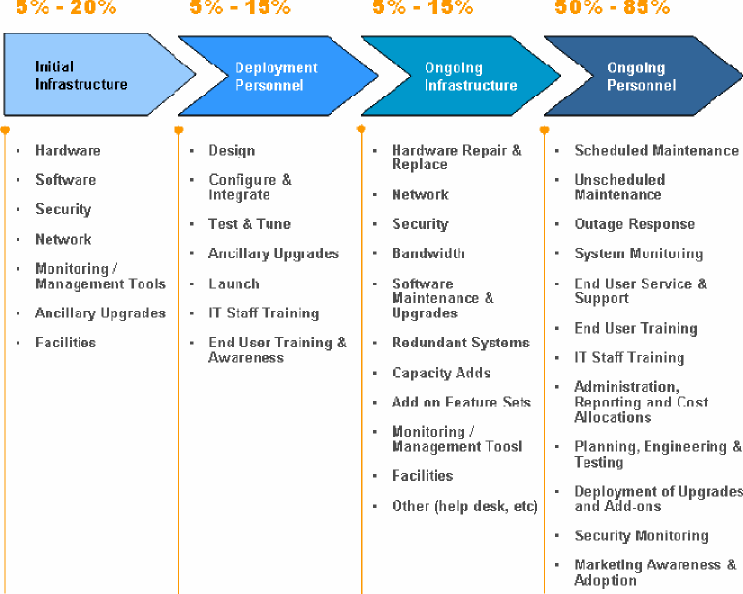
Figure 1: Summary of the cost allocations of a traditional software deployment
SaaS
The biggest TCO factor of SaaS applications are the subscription fees charged by the SaaS vendor. These fees are all inclusive all include the monitoring, maintenance and upgrades to the application as well as the training and support of the end-user base. Compared with the ongoing personnel costs of the traditional software application these costs are quoted as part of the cost of deploying the SaaS application.
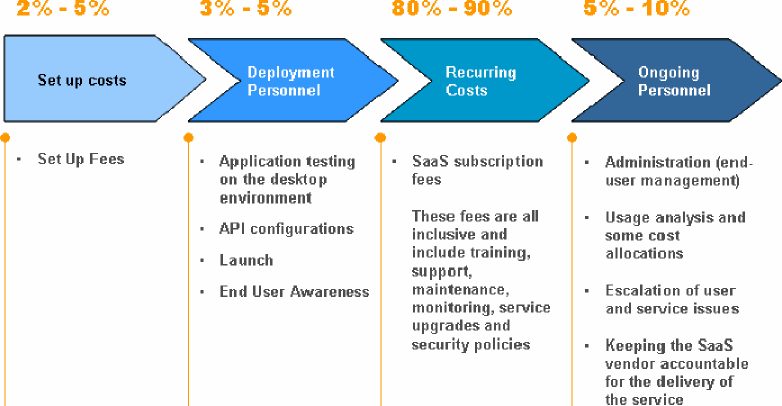
Figure 2: Summary of the cost allocations of a SaaS deployment
The TCO Calculation
Moving Away from "Owning" Software
With traditional software, customers buy a perpetual user license. This gives them the impression that they "own" the software and can use it at will and in perpetuity. With SaaS, instead of "owning" software, customers pay for a subscription to software running on the infrastructure owned by the SaaS provider. The customer's right to use the software goes away once they stop paying for the subscription. They do not loose the rights and ownership of data stored on the infrastructure of the SaaS vendor.
The dynamic between subscription and ownership is used as a TCO argument in favor of buying traditional software. Why rent when you can buy, especially when the plan is to use the application for a long time.
On the contrary, SaaS applications offer many advantages over traditional software including avoiding the huge hidden personnel cost in deploying, running and maintaining traditional software.
The Elusive Break-Even Point
Another argument for "owning" software has been that even with the higher upfront costs, there is a break-even point where traditional software becomes much cheaper than the SaaS subscription model. The analyst firm IDC reviewed several SaaS versus traditional software deployments and found that when people resources and cost of upgrades are correctly taken in consideration, this break-even point may never be realized.
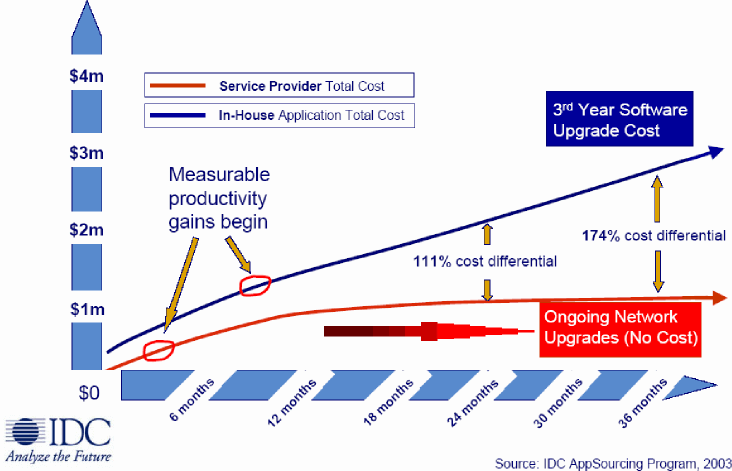
Figure 3: IDC's TCO comparison between traditional software and SaaS
Making the IT Budget Go Further
Note: this section is from the Architecture Strategies for Catching the Long Tail paper published by Microsoft
The first argument in favor of SaaS applications is that SaaS provides a direct and quantifiable economic benefit over the traditional software model.
Cost allocations
In a typical organization, the IT budget is spent in three broad areas:
- Software. The actual programs and data that the organization uses for computing and information processing.
- Hardware. The desktop computers, servers, networking components and mobile devices that provide users with access to the software.
- People Services. The people and institutions that ensure the continued operation and availability of the system, including internal support staff, professional services consultants and vendor representatives.
Of these three, it is the software that is most directly involved in information management, which is the ultimate goal of any IT organization. Hardware and people services, though vital and important components of the IT environment, are properly considered means to an end, in that they make it possible for the software to produce the desired end result of effective information management. (To put it another way, any organization would gladly add software functionality without extra hardware if it could do so effectively, but no organization would simply add hardware without an anticipated need to add software as well.)
In an IT environment based around premise-based software, the majority of the budget is typically spent on hardware and people services, leaving a minority of the budget available for software.
In this model, the software budget is spent primarily on licensed copies of "shrink-wrapped" business software and customized line-of-business software. The hardware budget goes toward desktop and mobile computers for end-users, servers to host data and applications, and components to network them together. The professional services budget pays for a support staff to deploy and support software and hardware, as well as consultants and development resources to help design and build custom systems.
In an organization relying chiefly on SaaS, the IT budget allocation looks much different. In this model, the SaaS vendor hosts critical applications and associated data on central servers at the vendor's location, and it supports the hardware and software with a dedicated support staff. This
relieves the customer organization from the responsibility for supporting the hosted software, and for purchasing and maintaining server hardware for it. Moreover, applications delivered over the Web or through smart clients place significantly less demand on a desktop computer than traditional locally-installed applications, which enables the customer to extend the desktop technology lifecycle significantly. The end result is that a much larger percentage of the IT budget is available to spend on software, typically in the form of subscription fees to SaaS providers.
Leveraging SaaS Economies of Scale
But isn't this result just an illusion? After all, a percentage of the subscription fees paid to SaaS vendors for "software" have to pay for hardware and professional services for the vendor. The answer lies in the multi-tenant architecture and the economies of scale this architecture model offers.
A SaaS vendor with x number of customers subscribing to a single, centrally-hosted software service enables the vendor to serve all of its customers in a consolidated environment. For example, a line-of-business SaaS application installed in a load-balanced farm of five servers may be able to support 50 medium-sized customers. This means that each customer would only be responsible for a tenth of the cost of a server. A similar application installed locally might require each customer to dedicate an entire server to the application-perhaps more than one, if load balancing and high availability are concerns.
This represents a substantial potential savings over the traditional model. For SaaS applications that are built to scale well, the operating cost for each customer will continue to drop as more customers are added. As this is happening, the provider will develop multi-tenancy as a core competency, leading to higher-quality offerings at a lower cost. Therefore, even accounting for the hardware and professional services costs incurred by SaaS vendors, customers can still obtain significantly greater pure software functionality for the same IT budget.
No Underestimation of People Services
The second argument in favor of deploying SaaS applications are the underestimated people costs associated with running premise-based traditional software applications. We briefly touched on this is the previous section, but it is worth looking at some industry and analyst numbers in more detail.
Calculating the real cost of people services is not easy and as a result is sometimes omitted from the TCO analysis. This can lead to an apples-to-oranges comparison. To quote a prospect from one SaaS vendor: "We do not know how to estimate our people services, so we choose not to consider them when comparing the cost of WebEx vs. the premise-based software alternative".
The META Group, a consulting company, determined that "in today's economic environment, even minimal cost savings per seat are tantamount to freeing up discretionary IT investment dollars that might be applied in the enterprise technology portfolio or elsewhere in the organization. Companies no longer have the luxury of looking solely at hardware and software procurement costs and run rates of their technology investments but must examine the purchase decisions across their life cycle as well as how their people are spending their time servicing the application. While companies understand and scrutinize the cost of software and hardware very well, personnel costs are usually not examined as closely as they should be. Examining all these cost factors as a whole and how they impact the total cost of ownership (TCO) is paramount in running an efficient organization."
Personnel Costs Can Be as High as 75%
Gartner Inc, a global analyst firm tracking the high tech market estimates "that more than 75% of the IT budget is spent just maintaining and running existing systems and software infrastructure". In addition, Gartner believes that "customers can spend up to four times the cost of their software license per year to own and manage their applications."
Another data point comes from Microsoft, which in 2007 told the Wall Street Journal: "that the initial purchase is usually only 5% of the total cost of owning and maintaining a program."
IDC, another global analyst firm, came to a similar conclusion when it did an analysis of the web conferencing industry. It determined that "hidden personnel costs can be as high as 70% of the total cost to run premise-based conferencing software."



