As Easy as Setup, Track, Flourish
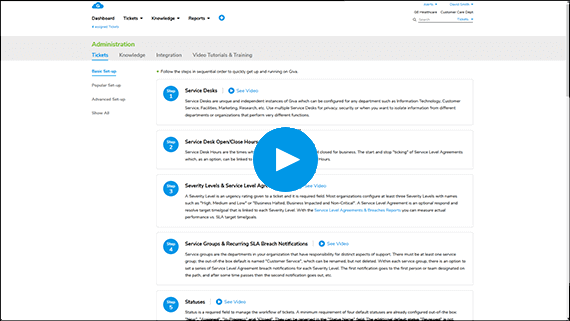
Quick Setup
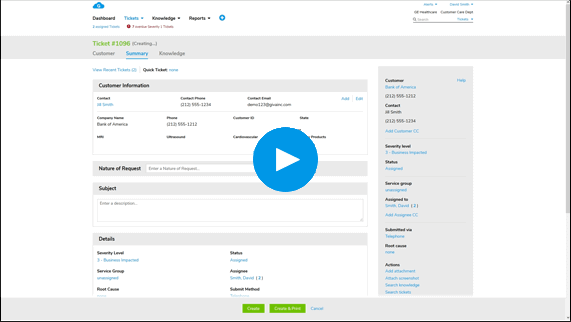
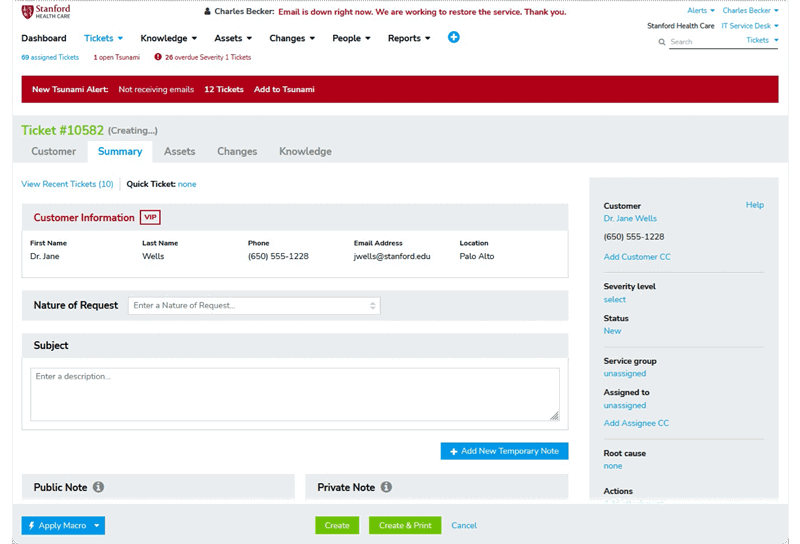
Customer Service Ticket Creation, Simplified
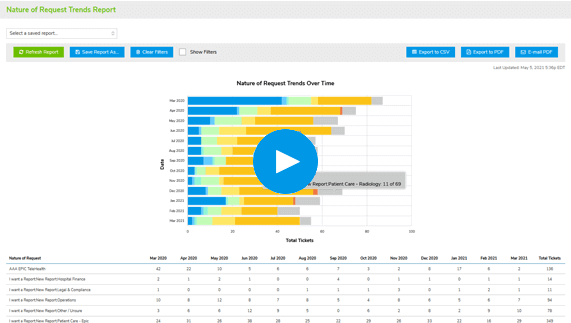
Easy, Robust, Real-Time Reports Monitor & Calibrate Customer Satisfaction


AI Copilots Dramatically Increase Productivity

Customer Service Knowledge Copilot

Customer Service Ticket Copilot
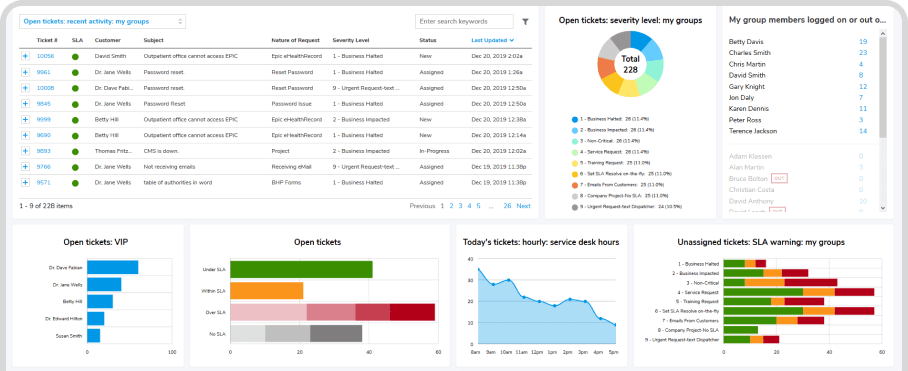
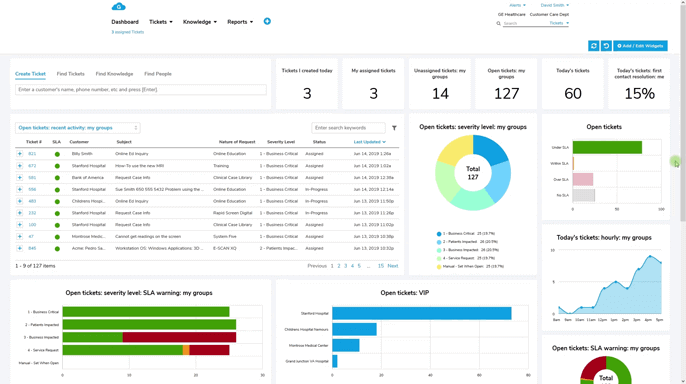
Get Visual Insights with Real-Time Dashboards for Customer Service & Call Centers
- Improve First-Contact Resolution and Response TimesInstant visibility to all open issues, empowering fast resolution, resulting in higher first-contact resolutions and shorter response times
- Increase Customer Satisfaction with Proactive Issue MonitoringThreshold monitoring quickly identifies emerging trends, providing actionable insights before customer satisfaction is impacted
- Optimize Agent PerformanceWith real-time data on agent performance, supervisors can dynamically reassign tasks, adjust staffing, and optimize workflows, ensuring that agents are always focused on priority cases
Get Visual Insights with Real-Time Dashboards for Customer Service & Call Centers
- Improve First-Contact Resolution and Response TimesInstant visibility to all open issues, empowering fast resolution, resulting in higher first-contact resolutions and shorter response times
- Increase Customer Satisfaction with Proactive Issue MonitoringThreshold monitoring quickly identifies emerging trends, providing actionable insights before customer satisfaction is impacted
- Optimize Agent PerformanceWith real-time data on agent performance, supervisors can dynamically reassign tasks, adjust staffing, and optimize workflows, ensuring that agents are always focused on priority cases
Spend More Time Assisting Customers & Less on Setup & Training
- Accelerate Agent Productivity and Reduce Training Costs by 70%Intuitive navigation enables agents to learn our software in hours, not days, cutting training time by up to 70% and empowering agents to assist customers without lengthy onboarding
- Boost Self-Sufficiency with "How-To" Guides for Common Customer ScenariosExtensive library of training videos focuses on frequent customer service situations, enhancing agents' confidence and ability to handle a wide range of customer queries
- Promote Fast Software Adoption with Free Setup AssistanceDuring a 30-day trial and afterwards, receive free setup assistance from USA-based product experts, ensuring your teams can use Giva customized to your workflows with minimal setup time
Stay Focused on Creating Happy Customers Instead of Navigating Complex Software
- Increase Agent Productivity by Up to 40%With streamlined, simple, and intuitive software agents can focus more on assisting customers, leading to greater productivity and faster service
- Reduce Routine Tasks by 56%Automate repetitive actions with tools, including AI Copilots, and one-click responses, freeing agents to spend more time addressing complex inquiries
- Significantly Reduce Resolution Times & Speed Up Responses with AIA Knowledge AI Copilot identifies the single best answer, eliminating the need to review voluminous search results reducing resolution times by up to 47%
Stay Focused on Creating Happy Customers Instead of Navigating Complex Software
- Increase Agent Productivity by Up to 40%With streamlined, simple, and intuitive software agents can focus more on assisting customers, leading to greater productivity and faster service
- Reduce Routine Tasks by 56%Automate repetitive actions with tools, including AI Copilots, and one-click responses, freeing agents to spend more time addressing complex inquiries
- Significantly Reduce Resolution Times & Speed Up Responses with AIA Knowledge AI Copilot identifies the single best answer, eliminating the need to review voluminous search results reducing resolution times by up to 47%
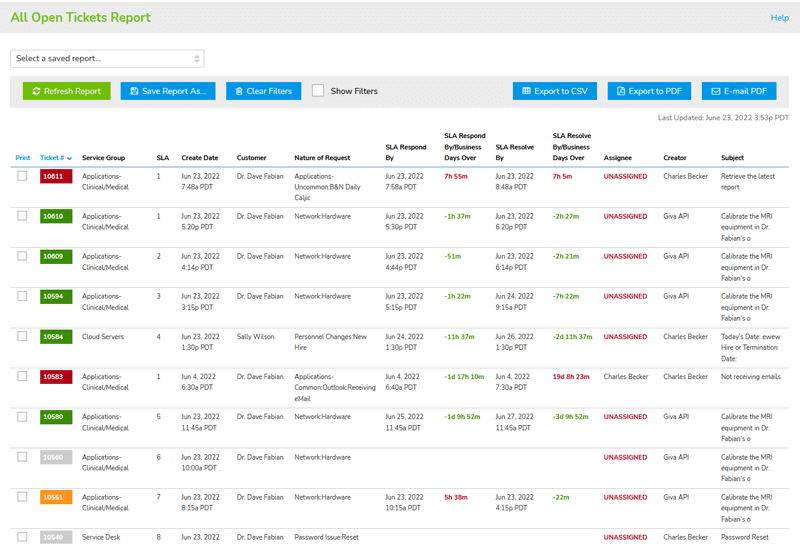
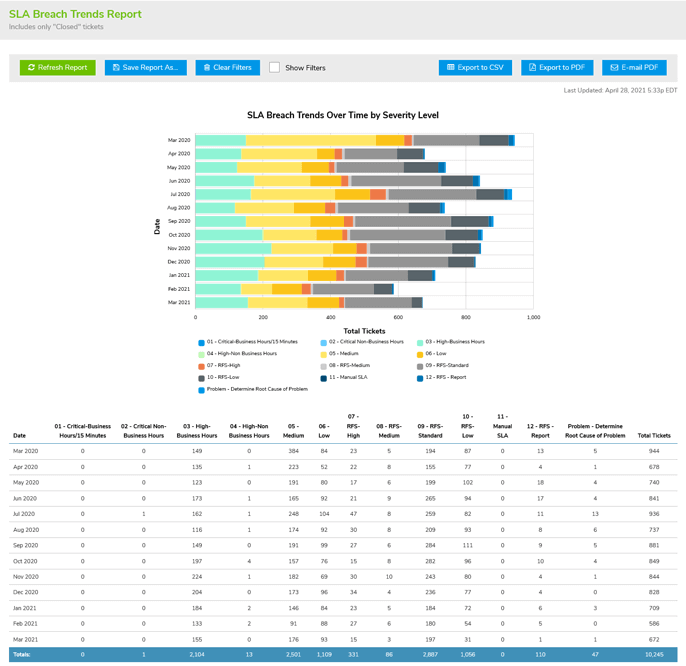
Make Fast Business Decisions With Out-of-the-Box Reporting & Analytics
- Increase Customer Satisfaction by 45%Always-on customer satisfaction scores monitors emerging trends and facilitates immediate action to improve service quality, reducing dissatisfied customers
- Reduce Report Preparation Time by up to 80%With Giva's Easy Three-Click Reporting™, quickly generate insightful reports enabling leaders to free up resources for strategic improvements that enhance customer satisfaction
- Boost Decision-Making Speed by 50%Reports and analytics quickly highlight patterns, such as recurring customer complaints, so teams can proactively address. Fast access to key metrics, allows managers to identify service gaps in minutes instead of hours
Increase customer satisfaction by 45%
Achieve rapid issue resolution, powered by our easy-to-navigate app and smart workflow automation
Boost operational efficiency with AI Copilots by 47%
Knowledge Copilots identify correct answers and AI ticket summaries decrease time to resolution
Reduce training costs by up to 70%
Learn easily with our intuitive design, allowing new team members to become proficient in hours, not weeks

Provide Your Customers with the Safety and Security of HIPAA/HITECH Compliance
HIPAA Compliance Included in All Editions at No Additional Cost & Covered by Cyber Liability Insurance Policy
You know that cyberattacks, data breaches, and malware pose significant threats, so adhering to stringent security and compliance standards is paramount. HIPAA-level security benefits not only healthcare, but any industry, and is crucial for safeguarding customer privacy and personal information.
Get more details on how Giva's HIPAA Compliance keeps your data secure.

Customer Testimonials
<
>

Giva met every single milestone and we made our cut-over on schedule. Giva delivered beyond our expectations. Giva is a great company that stands above many vendors in the industry.
Benson Smith
Customer Services Director
Giva is very easy to use and intuitive, and quick and cost-efficient to set up and customize. It is a highly visual product with icons and 'human friendly formats' that remind me of the Apple genre, with a clean, easy, elegant and simple to use interface.
Michael Kircher
Vice President Customer Service
Giva is a pleasure to use, it is highly functional, we were up and running fast and the technical support is outstanding. We are very pleased with our choice of Giva.
Chris Jerry
Support Center Manager
Giva has helped us reduce our total cost of ownership by approximately 70% with their cloud approach, easy administration, intuitive design, and only 1 hour of training.
Doug Duggan
Director of Customer Service
Giva has a strong track record of continued R&D investments in their Cloud Computing SaaS product line, our experience with Giva's own customer service and technical support has been exceptional.
Tom Sultenfuss
President
Rated 4.9/5 by Verified Customers
Giva holds a 4.9 out of 5 rating from dozens of verified reviews on Software Advice, with customers in healthcare, banking, and government citing HIPAA-ready security, fast setup, and responsive US-based support.
Reviewers consistently point to how quickly teams get comfortable with Giva, training new users in as little as ten minutes and typically within an hour, with one bank going live in just two days. That ease of use tends to translate into lasting relationships, with customers reporting five, six, and even twelve years on the platform, repeat purchases from returning buyers, and, at one children's mental health provider, no unscheduled downtime in six years. Across Giva's full customer base, median customer tenure runs about 12.8 years.
Reviewers also consistently describe switching to Giva from major enterprise platforms including ServiceNow®, Zendesk®, Freshdesk®, Jira®, and BMC®, with one healthcare customer rating Giva "Superior to ServiceNow, Remedy, Freshdesk, Jira, and ZenDesk."
More recent reviews also praise the Giva Copilot, whose AI-generated ticket summaries with customer sentiment and suggested next steps are credited with boosting team productivity.

Simple Pricing
Professional
$76/Per Agent/Month License Cost
(USD, billed annually)
Start a Free Trial
No credit card - Free setup help
- Up to 10 agents
- Up to 1500 end users or customers
- 3 service desks*
- 3 email inboxes for converting emails into service requests
Enterprise
$98/Per Agent/Month License Cost
(USD, billed annually)
Start a Free Trial
No credit card - Free setup help
- No maximum number of agents
- Unlimited end users or customers
- Unlimited service desks*
- Unlimited email inboxes for converting emails into service requests
Plus
- Concurrent & Floating License Tokens available to reduce cost for less active agents and senior personnel.
For more information, see:
- Customer Success Manager
* What is a Service Desk?
Service Desks are unique and independent instances of Giva which can be configured for any department such as Information Technology, Customer Service, Facilities, Marketing, Research, etc. Use multiple Service Desks for privacy, security or when you want to isolate information from different departments or organizations that perform very different functions.
All Plans Provide:
Unlimited Everything — AI Copilot, Storage & Expert Support
- Unlimited storage
- Unlimited usage of AI Copilot
- Unlimited routine technical support
- Unlimited set-up assistance with product experts
- Minimum of 5 licenses required
Enterprise-Grade Security & Compliance Built In
- Advanced data center security for healthcare, banking, legal, & governments or any nonregulated industry
- HIPAA & HITECH compliance
- Giva will sign your Business Associates Agreement (BAA) to ensure full compliance in your state(s)
- SSAE 18 SCO 2 Type 2, GDPR (EU), PIPEDA (Canada) & SOX compliance
- Cyber Liability insurance policy
Giva Customer Service Software FAQs
Giva's Customer Service software is a cloud-based ticketing and case-management platform for customer-facing support and call center teams, with AI Copilots, real-time CSAT dashboards, and HIPAA-level security, built for fast agent onboarding (about one hour of training).
Help Desk and ITSM are built for internal, employee-facing IT support. Customer Service is purpose-built for external customers and includes an architecture specific to that use case, such as being able to open tickets for Companies and individual Contacts in those Companies.
Yes — a Knowledge AI Copilot identifies the single best answer from your knowledge base (rather than a list of search results) to cut resolution times, and AI-generated ticket summaries and tone/clarity rewriting help agents respond faster.
Yes. Giva supports a self-service portal and public web forms where customers can search a knowledge base, submit screenshots/attachments, and create a ticket directly — reducing inbound phone and email volume.
You can embed Giva web forms directly on your public website or intranet for ticket creation and self-service, and Giva's Redirection Service API can connect telephony/IP-phone systems to automatically generate tickets.
HIPAA-level security isn't only for healthcare — it protects any customer's personal and payment information from breaches. Giva includes this level of security in every edition at no extra cost, and it's backed by cyber liability insurance.
SSAE 18 SOC 2 Type 2, GDPR, the EU-U.S. Data Privacy Framework, PIPEDA, SOX, and CCPA, in addition to HIPAA/HITECH and HITRUST — with a signed BAA available if you need one.
Professional is $76/agent/month and Enterprise at $98/agent/month (billed annually, 5-license minimum), with unlimited AI Copilot usage and support included in both tiers.
Yes, Giva runs fully in a mobile browser on iOS and Android with no app download required, including color-coded SLA tracking and ticket history on the go.
Healthcare, financial services/banking, legal, higher education, and nonprofit organizations that need customer support with strong data privacy guarantees, alongside general commercial use.
Schedule a demo now, or start your own free, 30-day trial today.
Get free set-up assistance. At no cost to you, Giva's well-trained product experts will answer questions and make setup/configuration recommendations during the 30-day trial.
Start a Free Trial
Get a Demo