Giva – Web-native IT Help Desk, Customer Service, Knowledge Management, IT Change Management, Service Request, and Sales Request Solutions


Sign up for a free trial of the Giva Service Management Suite™

Sign up for a trial of the Giva Service Management Suite™ Free Giva Trial


Needs Analysis Tool

Clarify your solution requirements Download Needs Analysis Tool


Vendor Evaluation Tool

Compare and evaluate vendors Download Vendor Evaluation Tool


Giva Whitepapers

Learn about current industry best practices Download Vendor Evaluation Tool


Print This Page Send To Colleague

Share/Bookmark Link

Hosted ITIL & SOX Compliant IT Change Management Software RFC Change Summary

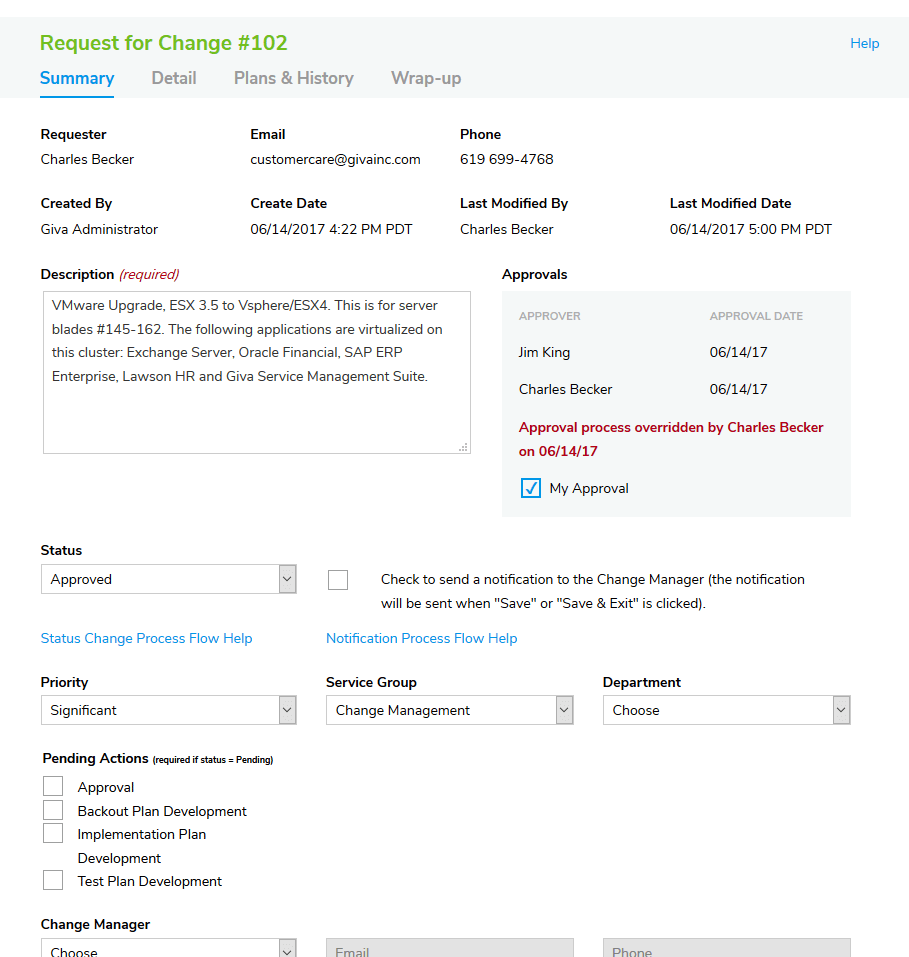
RFC Change Summary-Giva eChangeManager

<< 1 2 3 4 5 6 7 8 9 10 11 12 13 14 15 16 17 18 19 20 21 22 23 24 25 26 27 28 29 30 31 32 33 34 35 36 37 >>

The RFC has four tabs to make editing easier. The four tabs are:

  • Change Summary
  • Change Detail
  • Plans & History
  • Change Wrap-up

The change summary screen makes it easy for the Change Manager to identify the RFC. A check box on the screen allows anyone editing the RFC to automatically notify the Change Manager. For example, the implementer completes the implementation plan and puts a note into the history field. Next, he can check the Change Manager notification checkbox. Giva eChangeManager sends an email to the Change Manager along with the notes that the implementer entered.


Schedule a live demo Free trial Contact me

<< 1 2 3 4 5 6 7 8 9 10 11 12 13 14 15 16 17 18 19 20 21 22 23 24 25 26 27 28 29 30 31 32 33 34 35 36 37 >>