Help Desk Software by Giva
AI Powered & HIPAA Compliant
Support Your Customers, Not Your Software
- Start serving customers after just 1 hour of training
- Resolve issues quickly and effortlessly with AI Copilots, automation & smart workflows
- Get immediate & actionable insights with highly visual dashboards, reports, charts & graphs
- Boost productivity by up to 40%, lower report preparation time by up to 80% & decrease time spent on routine tasks by 56%

Safety and Security of HIPAA/HITECH Compliance




















As Easy as Setup, Track, Flourish
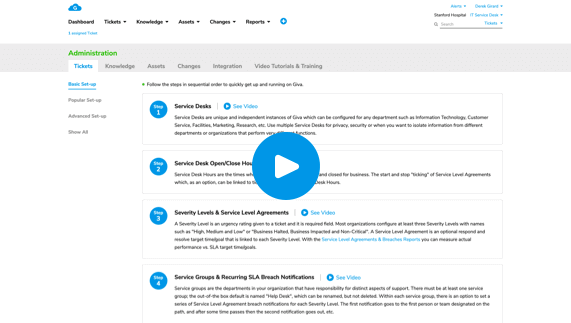
Quick Setup
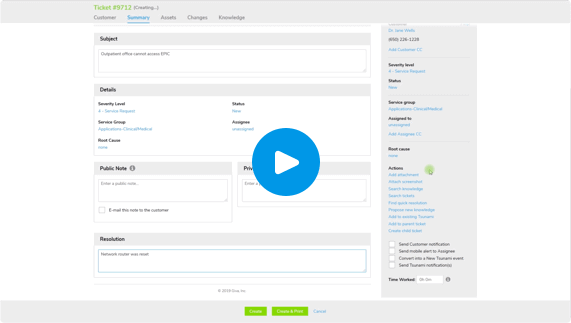
Help Desk Ticket Creation, Simplified
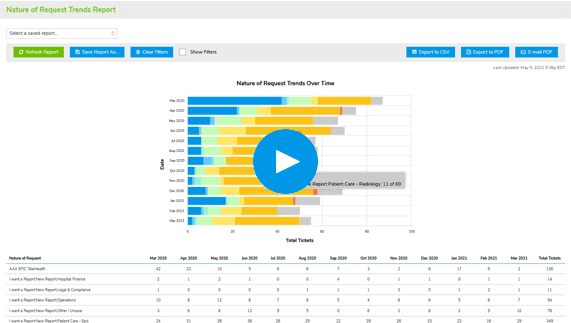
Easy, Robust, Real-Time Reports
AI Copilots Dramatically Increase Productivity
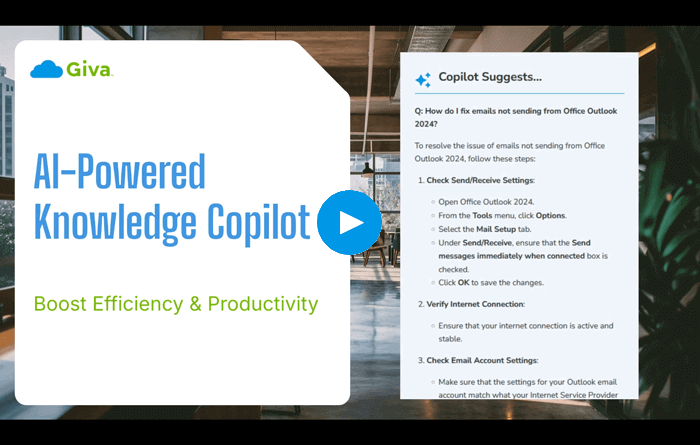
Help Desk Knowledge Copilot
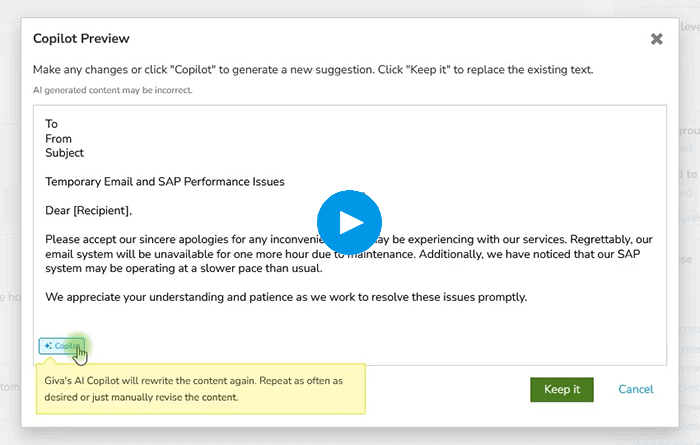
Help Desk Ticket Copilot


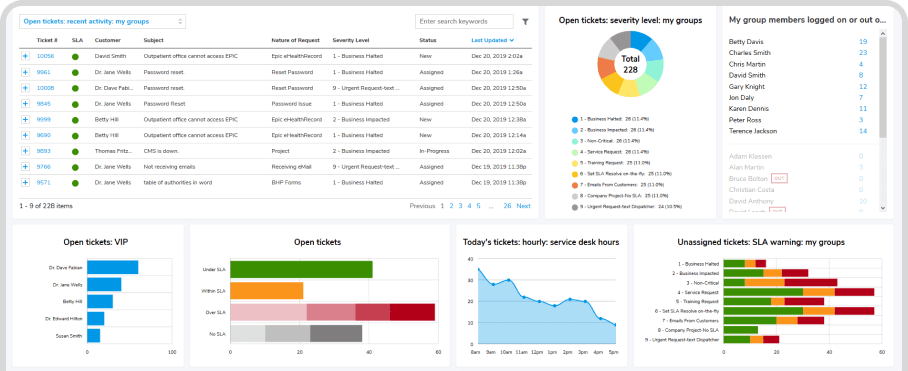
Boost Visibility & Productivity With Real-Time Dashboard
- Gain Strategic AdvantageGet instant visibility into critical issues and operational hotspots
- Minimize Time to ValueCustomize the dashboard with a rapid 3-minute setup using a pre-built library of widgets
- Accelerate Decision-MakingA streamlined, clutter-free dashboard prioritizes speed and simplicity

Boost Visibility & Productivity With Real-Time Dashboard
- Gain Strategic AdvantageGet instant visibility into critical issues and operational hotspots
- Minimize Time to ValueCustomize the dashboard with a rapid 3-minute setup using a pre-built library of widgets
- Accelerate Decision-MakingA streamlined, clutter-free dashboard prioritizes speed and simplicity
Spend More Time With Customers & Less With Setup
- Achieve Rapid ROILightning-fast setup, delivers immediate team productivity while advanced features can be fine-tuned in just hours, not days
- Reduce Training Time by Up to 70%Learn fast with our intuitive design, allowing beginners to become proficient in hours, not weeks, using our library of "How To" videos jump start the learning
- Free Technical Support During a 30-day Trial and AfterwardsEnsures optimal setup and configuration with recommendations from well-trained product experts
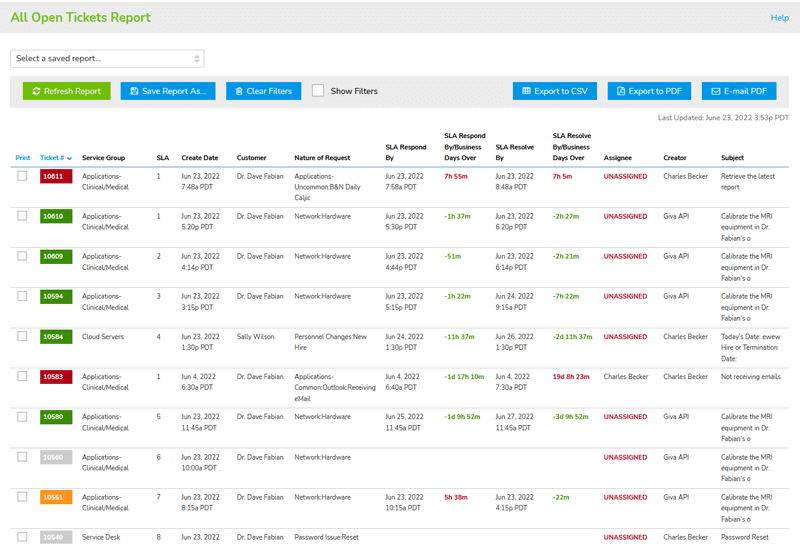
Keep Agents Focused on Making Happy Customers Instead of Software Distractions
- Boost Productivity by Up to 40%Experience our simple, beautiful, and intuitive software. Uncluttered design highlights critical information at a glance
- Decrease Time Spent on Routine Tasks by 56%Use our comprehensive automation suite, including scheduled tasks, macros, and quick resolutions
- Enhance Team Collaboration and Knowledge SharingAdd a AI Copilot knowledge base, cutting resolution times by up to 25%
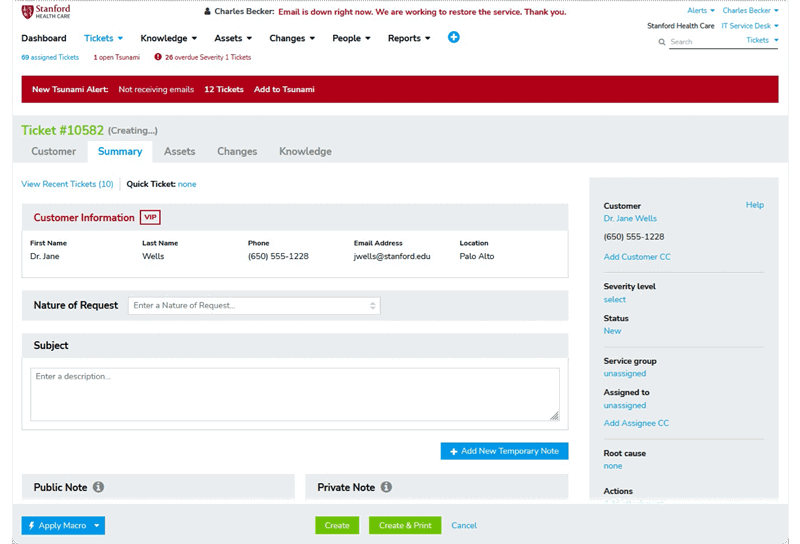
Keep Agents Focused on Making Happy Customers Instead of Software Distractions
- Boost Productivity by Up to 40%Experience our simple, beautiful, and intuitive software. Uncluttered design highlights critical information at a glance
- Decrease Time Spent on Routine Tasks by 56%Use our comprehensive automation suite, including scheduled tasks, macros, and quick resolutions
- Enhance Team Collaboration and Knowledge SharingAdd a AI Copilot knowledge base, cutting resolution times by up to 25%
Make Fast Business Decisions With Deep & Comprehensive Out-of-Box Reporting & Analytics
- Substantially Improve Customer SatisfactionAlways-on/working in the background, real-time customer survey results allow quick action to keep customers happy
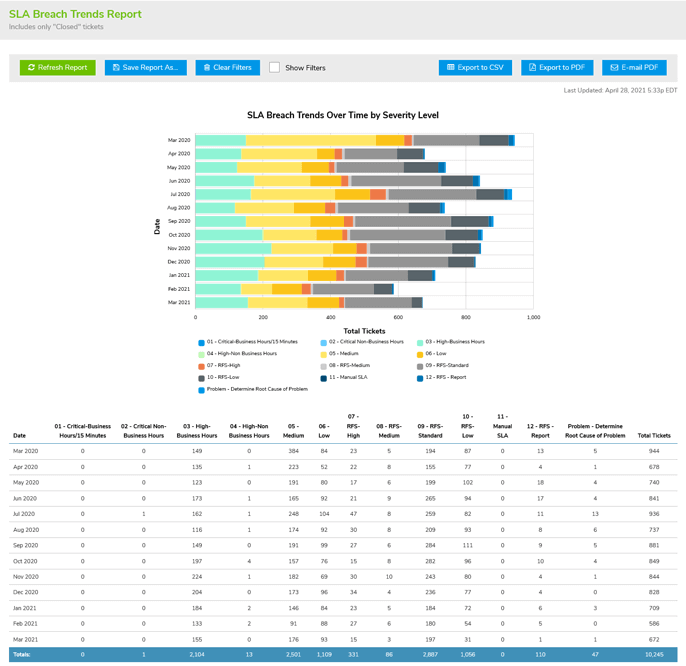
- Lower Report Preparation Time by Up to 80%Get Giva's revolutionary Easy Three-Click Reporting™, to create, share, save, and schedule autorun reports, freeing up valuable resources for strategic initiatives
- Avoid Getting BlindsidedVisual reporting tools allow for early and rapid trend detection facilitating proactive problem-solving with improvements and timely interventions
Increase customer satisfaction by 38%
Achieve rapid issue resolution, powered by our easy-to-navigate app and smart workflow automation
Boost operational efficiency with AI Copilots by 47%
Knowledge Copilots identify correct answers/issue resolutions and AI ticket summaries decrease time to resolution
Reduce training costs by up to 70%
Learn easily with our intuitive design, allowing new team members to become proficient in hours, not weeks

Provide Your Customers with the Safety and Security of HIPAA/HITECH Compliance
HIPAA Compliance Included in All Editions at No Additional Cost & Covered by Cyber Liability Insurance Policy
You know that cyberattacks, data breaches, and malware pose significant threats, so adhering to stringent security and compliance standards is paramount. HIPAA-level security benefits not only healthcare, but any industry, and is crucial for safeguarding customer privacy and personal information.
Get more details on how Giva's HIPAA Compliance keeps your data secure.
Customer Testimonials
<
>

We selected Giva in 2014 because you were $1 million cheaper and had about 80% of the functionality of ServiceNow®, and we could get up and running in many orders of magnitude less time with Giva than ServiceNow.
Mike Norman
Director
Selecting Giva was an excellent choice for Santé Health Systems. Compared with Ivanti® ITSM Help Desk, Giva is more intuitive, easier and faster to customize, more functional, and has outstanding reports and dashboards.
Juan Carlo Muro
IT Director
The Giva Service Management Suite and reports are consistently fast and responsive, proving that Giva has figured out how to build and scale a true cloud application delivered over the public Internet.
David Burne
IT Leader
There are many significant reasons why Giva was selected over other vendors, but the biggest differentiator is that the Giva user interface is uncomplicated, uncluttered, clean and extremely easy to use.
Floyd Withrow
Chief Information Officer
We estimate that we have been able to reduce the total cost of ownership of our IT service desk application by approximately 30% in the first year.
Neil Ferguson
Chief Technology Officer
Giva has implemented their workflows, grids, charts and other monitoring tools in an intuitive, slick and simple way, similar to the Apple Computer iPhone and iPad user interface design.
Ken Adams
Chief Information Officer
We've crunched the numbers. We know we are saving a lot of money using the Giva Service Management Suite versus other enterprise-class knowledge base and help desk software products.
William McDonald
CIO
Giva has had a very positive impact on our business and we are exceedingly pleased with our decision to purchase Giva's Cloud Computing Software-as-a-Service (SaaS) IT help desk application.
Steven Marks
CIO
We are very pleased with our decision to purchase Giva. We get a high level of support and dedication – in fact, they have surprised us with their very high level of responsiveness and attention. Hewlett Foundation is a very well satisfied customer.
Sally Lee
Information Services, Project Manager
Rated 4.9/5 by Verified Customers
Giva holds a 4.9 out of 5 rating from dozens of verified reviews on Software Advice, with customers in healthcare, banking, and government citing HIPAA-ready security, fast setup, and responsive US-based support.
Reviewers consistently point to how quickly teams get comfortable with Giva, training new users in as little as ten minutes and typically within an hour, with one bank going live in just two days. That ease of use tends to translate into lasting relationships, with customers reporting five, six, and even twelve years on the platform, repeat purchases from returning buyers, and, at one children's mental health provider, no unscheduled downtime in six years. Across Giva's full customer base, median customer tenure runs about 12.8 years.
Reviewers also consistently describe switching to Giva from major enterprise platforms including ServiceNow®, Zendesk®, Freshdesk®, Jira®, and BMC®, with one healthcare customer rating Giva "Superior to ServiceNow, Remedy, Freshdesk, Jira, and ZenDesk."
More recent reviews also praise the Giva Copilot, whose AI-generated ticket summaries with customer sentiment and suggested next steps are credited with boosting team productivity.

Simple Pricing
Professional
$69/Per Agent/Month License Cost
(USD, billed annually)
Start a Free Trial
No credit card - Free setup help
- Up to 10 agents
- Up to 1500 end users or customers
- 3 service desks*
- 3 email inboxes for converting emails into service requests
Enterprise
$89/Per Agent/Month License Cost
(USD, billed annually)
Start a Free Trial
No credit card - Free setup help
- No maximum number of agents
- Unlimited end users or customers
- Unlimited service desks*
- Unlimited email inboxes for converting emails into service requests
Plus
- Concurrent & Floating License Tokens available to reduce cost for less active agents and senior personnel.
For more information, see:
- Customer Success Manager
* What is a Service Desk?
Service Desks are unique and independent instances of Giva which can be configured for any department such as Information Technology, Customer Service, Facilities, Marketing, Research, etc. Use multiple Service Desks for privacy, security or when you want to isolate information from different departments or organizations that perform very different functions.
All Plans Provide:
Unlimited Everything — AI Copilot, Storage & Expert Support
- Unlimited storage
- Unlimited usage of AI Copilot
- Unlimited routine technical support
- Unlimited set-up assistance with product experts
- Minimum of 5 licenses required
Enterprise-Grade Security & Compliance Built In
- Advanced data center security for healthcare, banking, legal, & governments or any nonregulated industry
- HIPAA & HITECH compliance
- Giva will sign your Business Associates Agreement (BAA) to ensure full compliance in your state(s)
- SSAE 18 SCO 2 Type 2, GDPR (EU), PIPEDA (Canada) & SOX compliance
- Cyber Liability insurance policy
Giva Help Desk Software FAQs
Giva's Help Desk software is a cloud-based ticketing and support platform IT teams use to log, track, and resolve employee technical issues, backed by AI Copilots, automation, real-time dashboards, and HIPAA-compliant security — deployable in days with as little as one hour of agent training.
Help Desk is built around a single, focused service desk — typically one IT support queue. ITSM is designed for organizations running multiple independent service desks (IT, HR, Facilities, etc.) under one ITIL-aligned platform. Both share the same core ticketing, AI Copilot, and reporting engine; ITSM adds the multi-department structure and broader ITIL process coverage.
Help Desk is designed for internal, employee-facing IT support. Customer Service is designed for external, customer-facing support and includes functionality specific to that use case, such as being able to open tickets for Companies and individual Contacts in those Companies.
Yes. Giva's Knowledge uses Retrieval-Augmented Generation (RAG), meaning answers are generated only from your organization's own knowledge base — not the open internet. Both Knowledge and Ticket Copilots AI runs in a private, dedicated Microsoft Azure/OpenAI environment; your data is never used to train Microsoft, OpenAI, or any third-party models, and Giva maintains a BAA with Microsoft for HIPAA compliance.
It provides a REST-based API for syncing with Active Directory, LDAP, SAP, Oracle, or HR systems, an LDAP/AD sync tool for automated user provisioning, and web forms for HR, Facilities, or project-request intake into Giva tickets.
Giva is HIPAA/HITECH and HITRUST compliant, SSAE 18 SOC 2 Type 2 audited (via data center partner DataBank), and compliant with GDPR, the EU-U.S. Data Privacy Framework, PIPEDA (Canada), SOX, and CCPA. Giva will sign a Business Associate Agreement (BAA) with any customer that needs one.
Professional is $69 per agent/month and Enterprise at $89 per agent/month (USD, billed annually), with a 5-license minimum. Both tiers include unlimited AI Copilot usage, unlimited storage, and unlimited support. Fixed, Concurrent, and Floating license types can be mixed to reduce costs for less active users.
Yes — Giva is fully browser-based on mobile, so it works on any iOS or Android device with no app to download, install, or update.
Most teams can start serving customers after about one hour of training, with full setup typically completed in days rather than weeks or months. Giva also provides free setup assistance from U.S.-based product experts during and after the 30-day trial.
Giva serves organizations that need high security and compliance, including healthcare, banking and financial services, legal, higher education, nonprofits, and state and local government — though HIPAA-level security is included in every edition regardless of industry.
Schedule a demo now, or start your own free, 30-day trial today.
Get free set-up assistance. At no cost to you, Giva's well-trained product experts will answer questions and make setup/configuration recommendations during the 30-day trial.
Start a Free Trial
Get a Demo