The Knowledge Management Process: Best-Practices How-To Guide for IT and Support Teams
 By Ron Avignone
Every IT and support team holds critical knowledge, such as how to troubleshoot recurring problems, which procedures cover common incidents, and the system quirks only the senior staff know about. The challenge is getting that knowledge out of people's heads and into a system where anyone can find it.
A structured knowledge management process is how organizations close that gap. This guide covers the full cycle, from what the process involves and how many stages different frameworks define to the models that explain how knowledge converts between types and how to put it into practice for an IT or customer service team.
What Is the Knowledge Management Process?
The knowledge management process is a structured, repeatable cycle for identifying, capturing, organizing, storing, sharing, and applying an organization's information and expertise so teams can deliver services more effectively and drive better-informed decisions. Organizations typically implement this cycle through knowledge base software integrated directly into their support and service management platforms. Think of it as building a system that turns your team's expertise into assets everyone can use.
You'll often see it called the knowledge management cycle as well, where both terms describe the same repeating loop, with "cycle" emphasizing that the process is continuous. Each pass through the stages generates new knowledge that feeds the next round.
Support professionals work with three types of knowledge every day:
- Explicit knowledge includes procedures you've documented. These are your change management workflows, incident troubleshooting steps, and knowledge base articles. You can write these down and store them in systems. Your support software platform naturally manages this type of knowledge.
- Tacit knowledge is harder to capture. It represents the expertise your experienced technicians carry. This includes how they diagnose problems quickly, recognize patterns in system behavior, and make judgment calls when procedures don't exactly cover a situation.
- Implicit knowledge falls between the other two. It's information that hasn't been written down yet, but could be with a little effort and time. When your team solves a tricky problem, the notes they take contain implicit knowledge. It exists in emails or Slack messages about the solution.
A senior support agent might instantly know that a particular error message means the database is actually running out of disk space, knowledge that comes from years of experience.
Once organized and refined, tacit knowledge becomes explicit knowledge that benefits the whole team.
Your knowledge management process turns these different types of information into real value. It prevents knowledge loss when team members retire or move to new roles.
Knowledge base or knowledge management processes break down information silos where one team doesn't know what another team has learned. It ensures your staff always have accurate, up-to-date information when they need it.
The importance of the right knowledge management process is measurable. According to Salesforce's Sixth State of Service report, a survey of more than 5,500 service professionals across 30 countries, 58% of agents at underperforming organizations toggle between multiple screens to find information during ticket resolution, compared to just 36% at high-performing organizations. That 22-point gap illustrates the difference between knowledge (among other issue-related information sources) that is integrated into daily workflows and knowledge that is stored somewhere else entirely.
Next, we look at the 5 core stages of effective knowledge management.
3 Types of Knowledge the KM Process Manages
Before stepping through the stages, it helps to understand what you're working with. Organizations deal with three types of knowledge, each requiring a different approach to capture and storage:
Knowledge Type |
What It Is |
How to Capture It |
|---|---|---|
Explicit |
Documented, structured information you can write down and store directly: procedures, runbooks, FAQs, ticket resolutions, training manuals |
Directly into the knowledge base via templated articles; extracted automatically from resolved tickets |
Tacit |
Deep expertise and intuition held in individuals' minds, built over years of experience; the hardest type to capture |
Structured interviews, shadowing sessions, mentoring programs, video walkthroughs before employee departure |
Implicit |
Practical know-how that exists but has not been formally documented: informal workarounds, unwritten rules, habits |
Process observation, ticket pattern analysis, asking team members "how do you actually handle this?" |
The conversion of tacit and implicit knowledge into explicit form is the most labor-intensive part of Stage 1 (Knowledge Creation). Organizations that skip this step typically end up with knowledge bases full of formal procedure documents but empty of the judgment-based guidance that makes experienced agents effective.
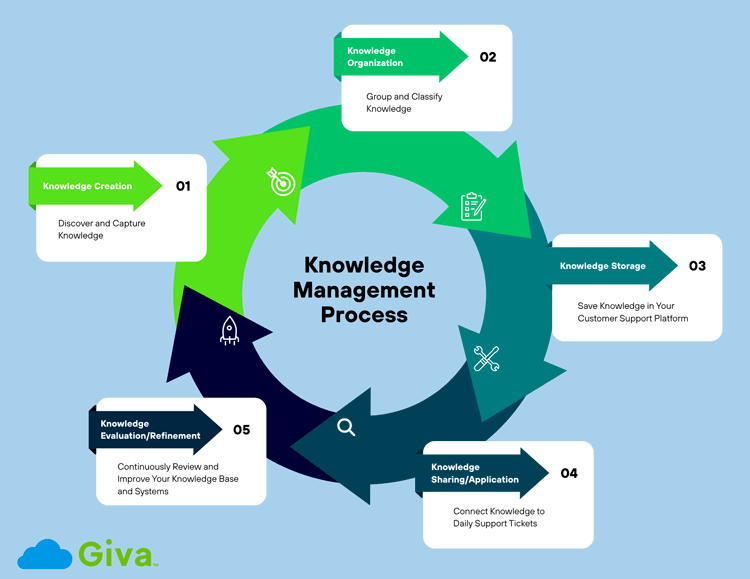
Five Core Stages of the Knowledge Management Process
Different frameworks describe the KM process in 5, 6, or 7 stages depending on how granularly they separate the "identify," "share," and "apply" steps. The five stages below represent the core cycle. Extended frameworks typically add "Identify & Prioritize" as an explicit first step before Knowledge Creation, and separate "Share" and "Apply/Reuse" as two distinct stages.
Here is how the five core stages map:
Stage |
Name |
Core Activity |
What Success Looks Like |
|---|---|---|---|
1 |
Knowledge Creation |
Audit existing knowledge, identify gaps, capture content from people, tickets, and documents |
A prioritized backlog of documented articles; tacit expertise converted to written procedures |
2 |
Knowledge Organization |
Tag, categorize, and structure captured content for search and browse |
Content is findable by keyword and navigable by category with consistent naming standards |
3 |
Knowledge Storage |
Store curated content in an integrated, versioned repository |
One authoritative repository, version-controlled, backed up, no outdated copies in circulation |
4 |
Knowledge Sharing and Application |
Surface knowledge in the agent workflow; connect articles to open tickets; enable self-service |
Articles appear in tickets at creation; First Contact Resolution (FCR) rates improve; self-service deflection increases |
5 |
Knowledge Evaluation |
Review, update, and retire content on a defined schedule; track usage data and knowledge gaps |
Knowledge base remains current; low-use or inaccurate articles are improved or removed on schedule |
Most successful support departments follow these interconnected stages. Each stage builds on the previous one to create a complete system.
-
Knowledge Creation: Discover and Capture Knowledge
-
Start by identifying the knowledge in your department and the gaps. This means doing a thorough audit of your expertise.
Not all knowledge delivers equal value however. A practical starting point is the 80/20 principle, where around 20% of your documented knowledge will address 80% of your support queries. Before capturing anything, define your goals and pinpoint the knowledge that matters most, such as the recurring problems, common questions, and complex procedures your team handles most frequently. Prioritizing that 20% first means your knowledge base delivers measurable value far sooner than if you try to document everything at once.
Then, begin by interviewing experienced technicians across different areas:
- Infrastructure
- Applications
- Network
- Security
- Support
Ask your team what they troubleshoot most often. Ask what problems take the longest to solve. Ask what knowledge they wish new hires had when they started.
- Review your incident ticket history. Look at the tickets that get reopened because the issue wasn't really solved. Look at recurring tickets. These patterns show you what knowledge matters most. If you see the same problem appearing in tickets month after month, that knowledge deserves a documented solution.
- Talk to your team about what documentation already exists. You may have knowledge and information scattered across email, wikis, shared drives, and individual files. Identify what's useful and what's outdated.
- Identify your expert team members. These are the people others call when they get stuck. Recognize that their expertise is valuable and needs to be captured before they leave the organization.
- Giva's incident management systems help here. You can analyze ticket patterns to see which issues appear most frequently. You can identify which types of problems cause the longest resolution times. This data shows you exactly which knowledge areas provide the most value when documented.
-
-
Knowledge Organization: Group and Classify Knowledge
- Raw information becomes useful when appropriately structured. Create an organization system that reflects how your IT department actually works.
-
For IT teams, build knowledge categories that match your ITSM structure. You might organize along the following lines:
- Technology area (networking, database, applications)
- Service (email, file sharing, collaboration tools)
- Incident type (login issues, printer problems, performance degradation)
- Your structure should match how your technicians think about problems.
- Use clear naming standards for your knowledge articles. Make titles searchable. Instead of "Email Issue Fix," use "How to Resolve Outlook Connection Timeout Errors on Windows 10." This approach helps technicians find what they need quickly.
- Tag content with keywords. Include alternative terms your team might search for. If technicians sometimes call a problem "slow network" and sometimes "high latency," tag articles with both terms. This improves search results.
- Link related knowledge together. An article about a database connection error might link to articles about common database settings, firewall configuration, and how to check error logs. These connections help technicians find relevant information they didn't know existed.
-
Knowledge Storage: Save Knowledge in Your Customer Support Platform
- Store organized knowledge where your entire team can access it. This means implementing a knowledge base within your software system, not separate from it.
- Your software platform should support various content types. Some knowledge is highly structured data. Some are procedure documents. Some are video tutorials. Your system needs to handle all of these formats.
- Set up version control so outdated information doesn't get shared by mistake. When you update a procedure because of a system change, the old version should no longer appear in search results.
- Create backup procedures to protect your knowledge assets. Your documented procedures are now critical to how your department operates. Losing them would hurt more than losing old incident tickets.
- Build search functionality that actually works. A technician under time pressure won't read through category listings. They'll search for keywords. Your knowledge base should find relevant articles even if the search terms don't match exactly.
-
Knowledge Sharing/Application: Connect Knowledge to Daily Support Tickets
- Knowledge only creates value when people apply and reuse it. The goal of this stage is to embed knowledge directly into daily tasks, ticket resolution, and decision-making, so that documented expertise actively drives performance rather than sitting in a repository that technicians remember to check occasionally. Your software platform should put knowledge in front of team members exactly when they need it.
- When a technician creates an incident ticket, your system should suggest relevant knowledge articles. For example, if a ticket is opened about an Office 365 login error, the system can display troubleshooting guides as soon as the ticket is opened.
- Make knowledge accessible during the ticket-solving process. Don't force technicians to switch between your software system and a knowledge base. Integration means knowledge appears within the ticket itself.
- Build knowledge into your runbooks and procedures. When a technician follows a documented procedure, that procedure should link to knowledge articles that explain why specific steps matter. Support your new technician training with knowledge resources. Make it easy for new team members to find learning materials as they encounter different ticket types.
- Track which knowledge articles team members keep using. This usage data shows which resources provide real value and which don't help solve problems. Also, you can try connecting this to self-serve resources if the problem is something customers can fix themselves.
-
Knowledge Evaluation/Refinement: Continuously Review and Improve Your Knowledge Base and Systems
- Your knowledge base isn't finished once you've created resources for team members. Technology changes. Your systems evolve. The needs of your customers change. Your processes improve. Your knowledge needs to keep pace.
- Regular review means checking that information remains accurate and timely. When a system is upgraded, procedures may need to be updated to reflect this. If a workaround gets replaced by an official fix, your knowledge should reflect that.
- Listen to your agents. Ask which knowledge articles help them most. Ask which topics are missing. Your team working in the field knows where knowledge gaps exist.
- Analyze search patterns and ticket trends. If searches keep failing, it means essential knowledge is missing or poorly organized. If specific articles are consistently viewed, make sure they're accurate and well-written.
- Use your software platform's analytics to understand what's working. Giva provides Knowledge Management reporting that shows which articles help close tickets fastest. This data guides your improvement efforts.
- At the same time, maximize the use of AI Copilots to help your IT team members find the knowledge they're looking for.
These five stages form a continuous cycle, not a one-time implementation project:
- New knowledge is constantly generated as your team resolves incidents and handles requests
- That knowledge feeds back into the creation stage, where it gets captured, organized, and made available for the next ticket
Each pass through the cycle strengthens the knowledge base, making the system progressively faster and more accurate over time. Organizations that treat knowledge management as an ongoing practice rather than a setup task see compounding returns, where resolution times fall, first contact resolution rates increase, and institutional knowledge stops walking out the door when experienced team members leave.
Two Important Knowledge Management Models
If you've been reading about knowledge management, you've likely encountered references to two specific frameworks. Neither is required to run a KM program, but both explain things the stage approach doesn't: how knowledge converts between types and why moving from raw data to genuinely useful knowledge is harder than it looks:
-
The SECI Model
Developed by researchers Ikujiro Nonaka and Hirotaka Takeuchi, the SECI model describes four modes of knowledge conversion between tacit and explicit forms:
- Socialization (Tacit to Tacit): Knowledge transfers through shared experience and direct interaction, as a senior agent working alongside a junior one, passing judgment through observation rather than documentation
- Externalization (Tacit to Explicit): Individual expertise gets converted into documented form, with an expert writing a troubleshooting guide, or a structured interview turned into a knowledge base article
- Combination (Explicit to Explicit): Documented knowledge is reorganized into new structures, such as merging two procedure guides, synthesizing incident reports into a pattern analysis, building a training module from existing articles
- Internalization (Explicit to Tacit): Documented knowledge becomes internalized expertise through practice, like a new hire reading the knowledge base until the procedures become second nature
The SECI model is most useful when designing Stage 1 (Knowledge Creation). It clarifies why capturing informal expertise is hard, where the socialization mode happens in real time between people, and converting it to documented form (externalization) requires deliberate effort through interviews, shadowing programs, and structured exit reviews.
-
The DIKW Pyramid
The DIKW pyramid describes how raw organizational data becomes actionable wisdom through four levels: Data, Information, Knowledge, and Wisdom.
In a support context:
- A ticket log is data
- Patterns in that log are information
- Documented solutions are knowledge
- Knowing which solutions to prioritize based on business impact is wisdom
Most KM software operates at the Knowledge level. What AI-powered systems are beginning to do is shorten the path from Data to Knowledge by automatically detecting patterns in ticket data and surfacing them as emerging knowledge gaps before a human analyst would spot them.
How Software Platforms Enable the Knowledge Management Process: Key Capabilities Your Team Needs
Platforms designed for ticket management understand that knowledge management isn't separate from incident, change, and request management, it's integrated with them.
-
Integrated Knowledge Search
Your knowledge articles should be searchable from the same platform where your team works daily. When creating an incident, technicians should find knowledge without leaving the incident screen. When documenting a change, they should access relevant procedures immediately.
-
AI-Powered Search and Intelligent Suggestions
Modern knowledge management platforms use machine learning to find relevant articles based on ticket content, going beyond keyword matching to understand the context of an incident. But the AI capabilities in leading KM systems have moved well past reactive search.
Generative AI features now draft knowledge articles automatically from resolved ticket data, cutting the manual effort of Stage 1 significantly. Semantic search understands what an agent is looking for even when their search terms don't match the article's wording.
Emerging agentic AI features go further, where they scan your knowledge base for gaps, flag outdated articles before agents encounter them, and suggest updates based on patterns in recent tickets, without waiting for a scheduled audit.
Built-in analytics track which articles close tickets fastest, flag content that frequently leads to escalations, and identify emerging knowledge gaps before they become recurring problems. The global AI-driven knowledge management market reached $7.66 billion in 2025 and is projected to grow to $11.24 billion in 2026 (The Business Research Company), which reflects how central automated KM capabilities are becoming to modern support operations.
-
Change Management Integration
For IT teams, when you document a procedure change, link it to knowledge articles. When technicians need to understand how a change affects troubleshooting, relevant knowledge is automatically displayed.
-
ITIL-Aligned Workflow
For ITSM teams, your knowledge management should follow ITIL practices. This means:
- Supporting knowledge links through incident, change, and request management
- Tracking knowledge ownership and review cycles
- Maintaining knowledge as part of your service management process
-
User-Friendly Interface
Your team adopts knowledge management faster when the platform is intuitive. If creating and updating knowledge articles is complicated, technicians won't contribute. If searching is confusing, technicians won't bother. A platform designed for support teams, not generic document storage, gets better results.
-
Performance and Reliability
Your software platform needs to be fast. When agents or technicians are solving tickets under time pressure, a slow knowledge search frustrates them. Cloud-based software products like Giva's deliver consistent performance whether you're supporting five technicians or fifty.
Contact Giva today to learn how integrated knowledge management within your help desk, customer service or ITSM platform can help your support teams deliver better service, resolve tickets faster, and achieve your SLA goals.
Get a demo or start your own free trial to see for yourself.
Next, we look at how you can build your knowledge management strategy.
Best Practices for Building Your Knowledge Management Process Strategy
Technology provides the foundation. But success requires attention to the human and organizational factors that enable knowledge management.
-
Create a Knowledge-Sharing Culture
Your team won't contribute to knowledge management unless it feels valued. Building a knowledge-sharing culture means:
- Get leadership support from the start: When your executive team emphasizes knowledge management, your team takes it seriously. Allocate time for technicians to contribute. Don't expect knowledge creation to happen only in spare moments.
- Recognize and celebrate knowledge contributions: When a technician documents an excellent troubleshooting guide that saves others time, acknowledge that work. Include knowledge contributions in performance conversations.
- Make finding and using knowledge easy: When technicians reach for the knowledge base before searching elsewhere, you know the culture is working.
- Show quick wins: When a new technician uses a knowledge article to resolve their first ticket independently, celebrate that. When knowledge management helps meet an SLA, highlight it. Stories about how knowledge helped create momentum.
-
Establish Clear Governance
Knowledge needs structure to remain reliable. Governance in knowledge management means:
- Assign knowledge owners: Each area of your knowledge base should have someone responsible for keeping that knowledge up to date. The database administrator owns database-related knowledge. The network team owns network knowledge. The billing department owns billing processes.
- Create standards for what gets documented: You won't document every ticket, but you will document recurring problems, common questions, and complex procedures.
- Set review cycles: Knowledge that hasn't been reviewed in the past 6 months should be checked. If it's outdated, update it. If it's no longer relevant, remove it.
- Define who can create and edit knowledge: Some organizations let all agents contribute. Others have a small knowledge team that creates articles based on Level 2 or 3 support teams' input. Find what works for your organization.
-
Focus on User Adoption
Even the best knowledge management system fails if people don't use it. Drive adoption by:
- Training your team on both the tool and the knowledge itself: Show agents where to search for the information they need, and use AI integrations to help them find it more easily. Show them how to link knowledge to tickets.
- Creating quick reference guides: While you're building comprehensive knowledge articles, create one-page guides for the most common issues. These quick wins show immediate value.
- Appointing knowledge champions: In each team, identify someone who embraces knowledge management. These champions help their peers adopt the system.
- Connecting knowledge to solving real problems: When technicians see that knowledge articles help them close tickets faster, they naturally use them more.
-
Align with Organizational Goals
Connect knowledge management to your service management objectives:
- Improve ticket resolution time: Measure how knowledge management affects your average resolution time. This is often one of the first improvements organizations see.
- Increase first contact resolution rate: When your help desk has instant access to solutions, more issues get resolved in the first interaction.
- Reduce SLA breaches: Knowledge management often helps meet service level agreements because solutions are available instantly.
- Support technician growth: Effective knowledge management helps new team members become productive faster. It helps all technicians expand their capabilities.
- Reduce the total cost of ownership: Better ticket resolution reduces overtime. Faster onboarding of new technicians means you need fewer open positions. Lower turnover means retaining expertise.
Knowledge Management Process Challenges (and How to Overcome Them)
Your team will face obstacles. Plan for them:
- Capturing tacit knowledge before team members leave: Conduct structured interviews with experienced agents. Ask them to explain how they diagnose problems. Ask about the decisions they make. Document that expertise before it's lost.
- Breaking down knowledge silos: Use your software platform to make infrastructure knowledge visible across teams. Cross-functional projects naturally share knowledge. Regular knowledge reviews help different teams learn about each other's areas.
- Keeping knowledge as timely as possible: Set review schedules. When system changes happen, update related knowledge immediately. Ask technicians to flag outdated information they encounter.
- Scaling knowledge across multiple teams: Start with one area of your support department. Perfect the process. Document what works. Then expand. This approach reduces the risk of overwhelming your team with a massive knowledge management project.
Knowledge Management Process: FAQs
-
What is the knowledge management cycle?
The knowledge management cycle and the knowledge management process describe the same underlying concept.
The word "cycle" emphasizes that the process is continuous, where each pass through the stages produces new knowledge that feeds the next round. Most frameworks describe it in 5 to 7 stages depending on how granularly they separate the "share" and "apply" steps. You'll also hear it called the KM lifecycle or the knowledge management loop. All of these terms refer to the same repeating loop of creating, capturing, organizing, storing, sharing, applying, and reviewing organizational knowledge.
-
What is the difference between knowledge management and a knowledge management system?
Knowledge management (KM) is the process and methodology for how an organization identifies, captures, organizes, and shares its knowledge. A Knowledge Management System (KMS) is the software platform that supports that process.
Think of KM as the strategy and the KMS as the tool. You can design a KM process before selecting a platform, and the same underlying process can run on different systems. Without an integrated KMS, the process is difficult to scale beyond a small team. Without a defined process, even the best software fills with disorganized content that agents stop using.
-
How many stages are in the knowledge management process?
The number of stages depends on the framework, but 5 to 7 stages is most common.
A 5-stage model typically covers Creation, Organization, Storage, Sharing and Application, and Evaluation. A 7-stage model adds "Identify & Prioritize" as an explicit first step before creation, and separates "Share" and "Apply/Reuse" into two distinct stages. Both models describe the same underlying cycle, but the difference is how granularly they define the handoffs between stages.
-
What is ITIL knowledge management?
ITIL knowledge management applies the KM process within the ITIL service management framework.
In ITIL v3, knowledge management is the final process in the Service Transition stage of the ITIL service lifecycle. ITIL defines knowledge management through the DIKW model (Data, Information, Knowledge, Wisdom) and the Service Knowledge Management System (SKMS), which is the integrated repository where all service knowledge is stored. In ITIL 4, knowledge management is classified as a management practice within the Service Value System. Giva's ITIL Knowledge Management resource page covers the ITIL KM practice in full detail.
-
What are the three types of knowledge in knowledge management?
The three types are explicit knowledge, tacit knowledge, and implicit knowledge.
Explicit knowledge is documented and structured: procedures, runbooks, FAQs, and ticket resolutions that you can write down and store directly. Tacit knowledge is the deep expertise held in individuals' minds, built through years of experience and hard to write down. Implicit knowledge falls between the two, with practical know-how that exists but has not yet been formally documented, such as informal workarounds or unwritten rules. The primary challenge in any KM program is converting tacit and implicit knowledge into explicit form before experienced team members leave.
Conclusion: The Benefits of the Right Knowledge Management Process — Your Competitive Advantage
Your support team's knowledge is valuable. It's the reason experienced technicians can solve problems quickly. It's why your best team members are so productive. The right knowledge management system makes that expertise available to everyone.
By following these stages, from capturing knowledge through continuous improvement, you create a foundation for better customer support service delivery:
- Faster ticket resolution: Agents can access proven solutions instantly instead of troubleshooting from scratch.
- Improved first contact resolution: Quick access to the right knowledge enables more issues to be resolved on the first interaction.
- Reduced SLA breaches: Accurate, searchable information minimizes delays and helps meet service-level goals.
- Streamlined onboarding: New agents ramp up faster with structured knowledge resources instead of shadowing experienced staff.
- Higher technician satisfaction and retention: When agents can find answers quickly and spend less time on repetitive lookups, frustration decreases, reducing agent-burnout factors.
- Lower operational costs: Reusable knowledge reduces repetitive work, freeing your team to focus on high-value tasks.
- Consistent customer experience: Customers receive uniform, accurate responses across all touchpoints.
- Improved innovation: When knowledge is organized and accessible across teams, your organization builds on what it has already learned rather than re-solving the same problems. Cross-team knowledge sharing surfaces patterns, informs process improvements, and creates the conditions for your team to develop better approaches to recurring challenges.
- Preserved institutional knowledge: Expertise remains within the organization even when key employees leave or change roles.
In the end, a strong knowledge management process becomes a competitive advantage and lets your support team deliver faster, more reliable service at scale.
Success requires commitment. You need leadership support. You need to allocate time for knowledge creation. You need to build a culture that values sharing expertise. But the payback comes quickly. Your team works smarter. Your service improves. Your department runs more efficiently.
Start your knowledge management journey today:
- Review what knowledge exists in your department
- Identify the gaps
- Implement a system that captures expertise, organizes it clearly, and delivers it to your technicians when they need it most
Knowledge Management Process Resources
- Guide to Knowledge Management Best Practices, Tools and Features
- The Complete Guide to Customer Service Knowledge Management
- ITIL Knowledge Management Practice
- Knowledge Management Return On Investment (ROI) Overview
Giva Can Help Streamline Your Knowledge Management Processes
When you combine the above practices with Giva's support software platforms, you transform information into a competitive advantage for your department.
Giva's intuitive design means your team actually uses the system. Our cost-effective approach means you get enterprise capabilities without enterprise expenses, Giva's knowledge management integrates naturally with incident, change, and request management, and is further enhanced by AI Copilots.
Contact Giva today to learn how integrated knowledge management within your support software platform can help your team deliver better service, resolve tickets faster, and achieve your SLA goals.
Get a demo to see Giva's solutions in action, or start your own free, 30-day trial today!

Categories: Help Desk, Customer Service