Agentic AI for Customer Service: Types, Use Cases and Innovative How-To Guide
 By Ron Avignone
Your customers want one thing from a support interaction: Solve my problem, completely, and I don't want to have to explain it twice or wait on hold while your computer systems try to talk to each other in figuring out a solution.
Every time a customer re-explains their account number, restates what went wrong, or receives a response that answers the wrong question, the relationship takes a small hit. Multiplied across thousands of interactions, those hits show up in churn, lost revenue, and support teams working harder to deliver less.
Agentic AI for customer service is the approach designed to address the root cause, not just layer more automation on top of broken processes.
This article covers:
- What agentic AI actually is and what makes it different from chatbots and generative AI tools
- The five types of AI agents that show up in customer service environments
- How to determine which interactions to automate first and at what level of autonomy
- How to build the guardrails that make autonomous action trustworthy
- What your human team focuses on once the routine work is handled

Key Takeaways
- Agentic AI is distinct from both traditional chatbots (rule-based, scripted) and generative AI (reactive, text-only): it can perceive context, reason across multiple steps, take action in connected systems such as your CRM or order management platform, and verify its own results.
- Five types of agentic AI agents serve customer service: Reactive resolution agents, Proactive outreach agents, Agent-assist (copilot) agents, Orchestrator agents, and Multi-agent networks.
- A practical framework called the AI Service Autonomy Matrix helps teams map each interaction type to the right level of AI autonomy, based on the stakes involved and how repeatable the interaction is, before deployment begins.
- Human agents don't disappear in an agentic AI model. Their role shifts to complex, emotionally sensitive, and high-stakes issues that fall outside what automation can reliably handle.
What Is Agentic AI for Customer Service?
Agentic AI for customer service is an AI system that perceives an incoming customer request, reasons through the steps required to resolve it, takes action in connected systems such as your CRM, order management platform, or billing tool, and confirms the outcome, all without requiring a human to direct each step.
"Agentic" refers to the concept of agency, meaning the capacity to act independently toward a goal. Most AI tools in use today are reactive. They wait for a prompt, generate a response, and stop. An agentic system sets a goal and works through the steps to achieve it, adjusting as new information arrives.
From a customer's perspective, the difference is marked. Ask a traditional chatbot about your return policy and:
- It tells you what the policy says
Give the same request to an agentic AI, and all in the same conversation, without a handoff to anyone:
- It locates your order
- Verifies the return window
- Initiates the return
- Confirms a refund,
- Sends you a summary
This is an obvious step up in the ability to provide streamlined customer service.
How Agentic AI Works in Customer Service
-
The Perceive-Reason-Act Loop
An agentic AI system runs on a continuous four-stage loop. Understanding it makes it easier to see where integration, data quality, and guardrails each matter:
-
Perceive
- The system reads the incoming request, whether text, voice, email, or an automated trigger, and builds a working context.
- It pulls in supporting data from connected systems: the customer's account history, open tickets, previous interaction summaries, and relevant records.
-
Reason
- The Large Language Model (LLM) at the core of the system analyzes the context, identifies the goal, and plans the sequence of steps needed.
- For a multi-step issue, it determines which tools to use and in what order.
-
Act
- The system executes by calling APIs, retrieving data, updating records, sending messages, triggering workflows, or routing the case to a specialist.
- Each action runs through a connected tool rather than through a human intermediary.
-
Reflect
- After acting, the system checks whether the goal was achieved:
- If the issue is resolved, it closes the interaction and logs the outcome.
- If it encountered an obstacle or uncertainty, it adjusts and loops back, or escalates to a human with full context.
- After acting, the system checks whether the goal was achieved:
Each stage feeds into the next. The loop continues until the issue is resolved or the system determines a human needs to take over.
-
-
Memory and Context Persistence
Two kinds of memory determine how well an agentic system performs:
- Short-term memory covers the current conversation. It tracks what the customer said, which steps the system has already taken, and what data has been retrieved so far.
- Long-term memory draws on your CRM and ticketing system, covering purchase history, past support interactions, account status, and open issues.
Long-term memory is what transforms a transactional exchange into one that feels like the system knows the customer. When an agent can reference a customer's open issue from the previous week and pick up where that conversation left off, the interaction produces better outcomes and a fundamentally different impression.
-
Tool Access and System Integration
An agentic AI system's resolution capabilities are limited by the tools it can access. A system connected to your CRM, order management platform, knowledge base, and billing system can resolve most common requests autonomously. A system with no backend integrations can hold a conversation but cannot take action.
That's why data infrastructure is a prerequisite for deploying agentic AI, not an optional enhancement. The AI's reasoning is only as useful as the systems it can reach.
The distinction between read-only and read-write integration access matters more than most organizations realize when evaluating systems. A system with read-only access can retrieve data and answer accurately but cannot execute any action. A system with read-write access completes the full resolution by updating records, processing refunds, closing tickets, and scheduling appointments autonomously. Various levels of automation require different levels of access to the relevant systems, and these need to be mapped when designing automation workflows.
Agentic AI vs. Traditional Chatbots vs. Generative AI
Most customer service organizations have already used at least one of these technologies. Understanding where each sits in the evolution helps clarify what makes agentic AI distinct and when it makes sense to move toward it:
- Traditional chatbots use rules and decision trees. They are consistent and predictable, but brittle. One unexpected customer input and they stall or fall back to a generic response.
- Generative AI tools use Large Language Models (LLMs) to produce flexible, natural-language responses to almost any input, but they are reactive. They generate text when prompted and take no further action.
- Agentic AI combines the flexible reasoning of generative AI with the ability to take action in systems, execute tasks, and pursue a goal across as many steps as it takes to reach resolution. It's the most capable form of automated customer self-service available today.
Comparing Agentic AI, Generative AI, and Traditional Chatbots
Attribute |
Traditional Chatbot |
Generative AI |
Agentic AI |
|---|---|---|---|
Response approach |
Follows predefined script or decision tree |
Generates contextual responses to any prompt |
Reasons through a problem and executes multi-step actions |
Autonomy level |
None: follows rules only |
Low: responses only, no independent action |
High: sets a goal and works through steps to achieve it |
Memory |
Session-only or none |
Limited to the current conversation turn |
Short-term (conversation) plus long-term (CRM and ticket history) |
System access |
Limited scripted integrations |
Typically none |
Full API and tool integration |
Handles multi-step tasks |
No |
Rarely |
Yes |
Best for |
FAQs and simple routing |
Drafting, explaining, answering single questions |
End-to-end issue resolution with action in connected systems |
Channel availability |
Typically single-channel or limited integration |
Primarily chat-based, limited multichannel |
Omnichannel: deployed across chat, email, voice, and digital channels |
One distinction that often goes unnamed is conversational AI. Conversational AI powers natural language interfaces such as chatbots, virtual assistants, and voice channels. It's the communication layer. Agentic AI adds autonomous execution and reasoning on top of that layer. Most production-grade agentic deployments use conversational AI as the customer-facing interface and agentic AI as the execution engine underneath.
5 Types of Agentic AI Agents in Customer Service
Customer service environments typically work with one or more of five distinct AI agent types, each suited to a different role. Knowing the differences helps teams make deliberate decisions about where each type belongs:
-
Reactive Resolution Agents
Reactive resolution agents are triggered by an incoming customer request and handle it from start to finish without human involvement. They receive the request, pull the relevant data, take the required action in connected systems, and confirm resolution. Most early agentic AI deployments start here.
Real-world example: In February 2024, Klarna announced that its AI assistant, built on OpenAI's models, handled 2.3 million conversations in its first month, representing two-thirds of all customer service chats. The system performed the equivalent work of 700 full-time agents, with customer satisfaction scores on par with human agents and a 25% reduction in repeat inquiries.
-
Proactive Outreach Agents
Rather than waiting for a customer to reach out, proactive outreach agents monitor data streams and initiate contact when something warrants it. Common triggers include:
- A shipment that missed its delivery window
- A subscription or contract approaching renewal
- A known service outage or degraded performance
- A payment method about to expire
This agent type requires real-time data integration and clearly defined trigger logic. The agents that earn customer trust are the ones that are specific, timely, and offer a clear path to resolution in the same message, rather than just sending a notification and waiting. When those conditions are met, a proactive message converts a potential complaint into a demonstration of competence.
-
Agent-Assist (Copilot) Agents
Agent-assist agents work alongside human agents in real time. The human remains in control of the conversation while the AI handles background tasks, including:
- Retrieving the customer's account history and recent interactions
- Pulling up relevant knowledge base articles
- Identifying next best actions, including suggested responses, step-by-step resolution guidance, and escalation recommendations, so agents spend less time searching for the right path forward
- Logging the outcome when the conversation ends
Real-world example: Verizon deployed a Google Gemini-powered AI assistant for its 28,000 customer service representatives. The system, trained on approximately 15,000 internal documents, answers 95% of agent questions in real time. Following the full rollout in January 2025, service-led sales rose by nearly 40%.
-
Orchestrator Agents
An orchestrator agent manages a workflow that spans multiple specialist sub-agents. When a customer's issue involves billing, technical support, and account management simultaneously, the orchestrator routes the relevant parts to the appropriate specialist agents, combines their outputs, and delivers a coherent resolution. This type is particularly valuable for organizations with complex, multi-department service structures where no single agent has full context across all systems.
-
Multi-Agent Networks
Multi-agent networks are collections of interconnected specialist agents that share context and hand off between each other dynamically. Rather than one agent handling everything, the network assigns each sub-task to the agent best equipped for it, and an orchestration layer coordinates the collaboration and assembles the final resolution.
This architecture suits large enterprise environments with distinct service domains such as IT support, billing, logistics, and customer success that must work together on a single customer issue.
Summary: 5 Types of Agentic AI Agents in Customer Service
Type |
How It Works |
Best Use Case |
Autonomy Level |
|---|---|---|---|
Reactive Resolution Agent |
Triggered by request; resolves end-to-end with no handoff |
High-volume, structured requests (order status, password resets, billing inquiries) |
Full |
Proactive Outreach Agent |
Monitors data streams; initiates contact before customer reaches out |
Shipment delay notifications, renewal reminders, known outage alerts |
Full |
Agent-Assist (Copilot) Agent |
Works alongside a human agent in real time; human stays in control |
Complex or high-stakes interactions requiring human judgment |
Supervised |
Orchestrator Agent |
Coordinates specialist sub-agents across departments; aggregates outputs |
Multi-department issues with distinct resolution paths |
High |
Multi-Agent Network |
Interconnected specialist agents share context and hand off dynamically |
Large enterprise environments with distinct service domains |
High |
8 High-Value Use Cases for Agentic AI in Customer Service
These use cases represent the interactions where agentic AI consistently delivers measurable results across industries:
-
Order and Shipment Management
When a customer reports a delayed or missing order, an agentic AI can handle the full resolution sequence:
- Look up the order and verify the details
- Query the carrier API for the current shipment status
- Initiate a replacement or refund if the situation warrants it
- Send the customer a confirmation with the resolution details
An interaction that once required a 10-minute call with a human agent typically resolves in under two minutes.
-
Account and Billing Updates
Payment updates, billing corrections, charge explanations, and plan changes are among the most common service requests. Agentic AI can handle the full sequence:
- Verify the customer's identity through the established authentication method
- Access the billing system and retrieve the relevant records
- Make the requested update or correction
- Confirm the change and send a summary to the customer
The result is same-session resolution, with no handoff to a specialized billing team and no need for the customer to re-verify their identity with a second agent.
-
Tier-1 Technical Troubleshooting
For support teams handling IT or product issues, agentic AI can run the full diagnostic sequence:
- Pull the customer's device or account configuration from connected systems
- Run through a structured diagnostic process
- Resolve known issues through automated steps such as restarts, resets, or reinstalls
- Escalate with a full context summary when the issue requires human judgment
This is where the combination of system integration and reasoning matters most. The AI does not just recite troubleshooting steps but also retrieves the specific configuration data and applies the logic to the individual case.
-
Password and Access Resets
Password and access resets are among the most fully automatable interaction types. The process follows the same fixed path every time:
- Verify the customer's identity through your established authentication method
- Execute the reset in the identity management system
- Confirm that access has been restored
No queue, no human required.
-
Proactive Service Notifications
Agentic AI monitors for conditions that will affect customers and reaches out before the customer contacts support. Common triggers include:
- Shipment delays and delivery exceptions
- Expiring payment methods
- Scheduled maintenance windows and known outages
- Contracts approaching renewal
This converts reactive support volume into proactive care. The customer who receives a specific, actionable heads-up before they notice a problem is not just less frustrated, but more likely to regard the interaction as a positive signal about the organization.
-
Knowledge-Based Q&A
For questions that require gathering information across multiple sources, such as policy documents, product documentation, and troubleshooting guides, an agentic system retrieves and synthesizes the relevant content into a direct answer. This is substantially more useful than pointing a customer to a search tool and hoping they find what they need.
The underlying mechanism is Retrieval-Augmented Generation (RAG), which pairs the AI's language reasoning with real-time retrieval from your knowledge base and documentation. Answers are grounded in your actual content rather than generated from general training data alone.
-
Complaint Assessment and Resolution
Agentic AI can manage the full assessment and resolution workflow for incoming complaints:
- Detect sentiment to flag frustration or urgency
- Classify the issue type and identify the right resolution path
- Resolve directly if the issue falls within the AI's authorized scope
- Route to the right human with full conversation context if it doesn't
This reduces escalations driven by routing failures rather than actual issue complexity. A clean triage that routes the right cases to the right place is itself a service quality improvement.
-
Appointment and Scheduling Management
Booking, rescheduling, and cancellation requests follow a predictable path every time. The system checks availability, confirms the customer's preference, makes the booking in the scheduling system, and sends a confirmation, at any hour, with no queue and no hold time.
Use Case Summary
Use Case |
Interaction Type |
Recommended Autonomy Level |
Typical Outcome |
|---|---|---|---|
Order and Shipment Management |
Reactive |
Full |
Resolution in under 2 minutes, no hold time |
Account and Billing Updates |
Reactive |
Full or Supervised |
Same-session resolution, reduced agent load |
Tier-1 Technical Troubleshooting |
Reactive |
Supervised |
Faster resolution, cleaner escalations with context |
Password and Access Resets |
Reactive |
Full |
Instant resolution, zero agent time |
Proactive Service Notifications |
Proactive |
Full |
Reduced inbound volume, improved CSAT |
Knowledge-Based Q&A |
Reactive |
Full |
Accurate, synthesized answers without agent involvement |
Complaint Triage and Resolution |
Reactive/Mixed |
Supervised |
Faster routing, better context at handoff |
Appointment and Scheduling |
Reactive |
Full |
24/7 availability, no hold time |
Benefits of Agentic AI in Customer Service
In March 2025, Gartner forecast that agentic AI will autonomously resolve 80% of common customer service issues without human intervention by 2029, leading to a 30% reduction in operational costs. That is not a distant prediction. Organizations that begin deploying now will be positioned to realize most of that impact within the next two to three years.
The specific benefits break down across eight areas:
- Faster resolution time: Agentic AI operates 24/7 without queue wait for routine requests. An interaction that took eight minutes with a human agent can resolve in under two minutes with full automation.
- Lower cost per interaction: Automating high-volume, low-complexity requests reduces labor costs for the work that does not require human judgment. That freed capacity is available for the work that does.
- Consistent quality: Human agents' performance varies with fatigue, training gaps, and information access. An agentic AI applies the same logic and process every time, across every channel.
- Scalability without headcount growth: Demand spikes from seasonal volume, product launches, or service incidents are absorbed without adding staff. A Cisco global research survey on agentic AI in customer service of 7,950 global business and technical decision-makers found that 68% of customer service and support interactions with technology vendors are expected to be handled by agentic AI by 2028.
- Better experience for human agents: Agents who spend less time on password resets, status checks, and FAQ responses have more capacity for complex, high-value work. That shift matters for retention and engagement.
- Richer operational data: Every interaction handled by agentic AI is logged, timestamped, and analyzable. Over time, the data reveals patterns in failure modes, volume drivers, and resolution pathways that manual logging rarely captures at scale.
- Continuous improvement: Unlike static rule-based systems, agentic AI refines its reasoning from resolved interactions. Patterns in successful resolution paths feed back into the system over time, reducing failure rates on the same interaction types without manual reprogramming.
- Multilingual service: Agentic AI can handle customer interactions in multiple languages, making consistent, autonomous service accessible across global markets without the operational complexity of maintaining separate multilingual teams.
And the same Cisco survey found that 93% of respondents expect agentic AI to enable more personalized, proactive, and predictive service experiences.
How to Implement Agentic AI in Customer Service: A Step-by-Step Guide
Agentic AI deployments that underperform almost never fail because the technology is wrong. They fail because the organization skipped the groundwork. Teams that start with a clear interaction inventory, deploy on a narrow scope, and measure before expanding consistently outperform teams that launch broad and fix problems reactively:
-
Step 1: Map Your Interaction Landscape
Build an inventory of your top 20 to 30 interaction types by volume, noting Average Handling Time (AHT), First Contact Resolution (FCR) rate, escalation rate, and Customer Satisfaction Score (CSAT) for each. This data drives every prioritization decision that follows. If your help desk or CRM does not track interactions at this level of specificity, generating that data is your first task before any AI configuration begins.
-
Step 2: Apply the AI Service Autonomy Matrix
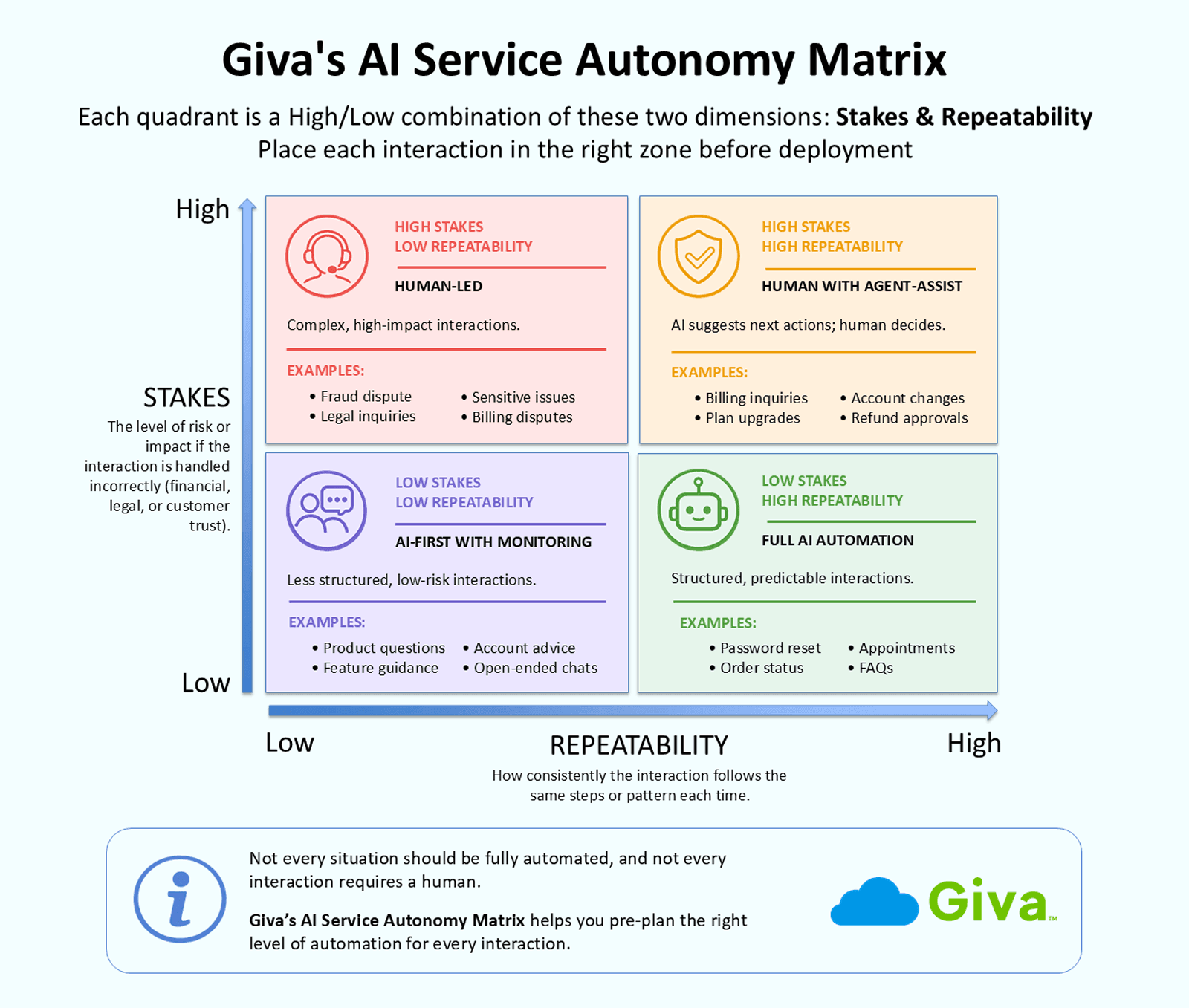
Not every interaction should be fully automated, and not every interaction requires a human. But how do you decide where each one belongs? Giva's AI Service Autonomy Matrix is a framework for placing each interaction type in the right zone before deployment.
It maps each interaction on two dimensions:
- Stakes: How costly is it, financially, legally, or emotionally, if the AI gets this wrong? A password reset handled incorrectly is a minor inconvenience. A fraud dispute handled incorrectly is a serious problem.
- Repeatability: How predictable and structured is the interaction? A password reset follows the same three steps every time. A billing dispute can go in many directions.
Each quadrant is defined by the combination of these two dimensions.
The AI Service Autonomy Matrix
Quadrant
Stakes
Repeatability
Recommended Approach
Interaction Examples
Full Automation
Low
High
Fully autonomous AI; no human in the loop
Password resets, order status checks, simple FAQ responses, appointment scheduling
AI-First with Monitoring
Low
Low
AI-first with an easy escalation path; watch closely in the first weeks
General product questions, unstructured knowledge queries
Agent-Assist
High
High
Human in the loop; AI does the research and suggests the next action
Complex billing inquiries, plan upgrades, account changes with financial impact
Human-Led
High
Low
Human-led with AI providing background data and context only
Fraud disputes, regulatory complaints, escalated relationship issues
Start with the Full Automation quadrant. When autonomous resolution rate and CSAT in that zone reach your target thresholds, expand to adjacent zones.
Practical examples:
- A password reset (low stakes, high repeatability) belongs in Full Automation.
- An order status check belongs there too.
- A charge dispute involving a multi-month billing error (high stakes, lower repeatability) belongs in Human-Led, with AI retrieving the transaction history while the agent handles the conversation.
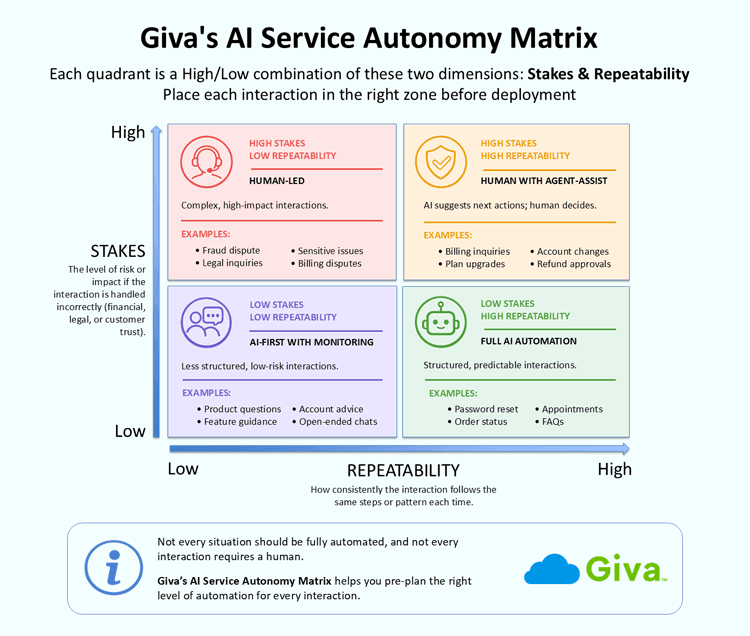 (Click the image to open a larger version)
 -
Step 3: Get Your Data and Integrations Ready
"Data ready" means the following conditions are met:
- Customer records are complete and up to date in your CRM or help desk system
- Knowledge base articles are accurate and current
- Interaction history is structured and searchable
- Backend systems are accessible via API
A well-structured help desk or customer service platform is a significant asset here. Historical ticket data tells the AI what good resolution looks like for each interaction type, how long resolution typically takes, and at what point escalation is warranted.
-
Step 4: Define Your Guardrails Before You Deploy
Three types of guardrails govern what the AI can do:
- Input guardrails control what data the system can receive and act on
- Action guardrails define what it can execute without human authorization
- Output guardrails define what it can communicate
The Guardrails section below covers each type in detail.
Establish escalation triggers before going live:
- Sentiment thresholds for rising frustration or distress signals in the customer's messages
- Repeated failed attempts to resolve the same issue within a session
- Explicit customer requests for a human agent
- Topic flags that require compliance review, such as legal disputes or regulatory complaints
Teams that take guardrail design seriously before launch are the ones that avoid the high-visibility failures that set programs back. This is not a detail to address after failures appear. It is a requirement before the AI goes live.
-
Step 5: Start Narrow, Measure, and Expand
Deploy on one or two interaction types from the Full Automation quadrant. Track five metrics from day one:
- Autonomous resolution rate: The percentage of interactions fully resolved by AI with no human involvement
- CSAT for AI-handled interactions: Compared to your human-agent baseline
- Escalation rate: The percentage of interactions transferred to a human
- Average resolution time: Compare AI-handled versus human-handled for the same interaction types
- Cost per resolved interaction: The financial efficiency metric
As a starting point, target an autonomous resolution rate above 70% and CSAT within 5 percentage points of the human-agent baseline before expanding to additional interaction types. Expanding before you hit those thresholds is how small problems become large ones.
Before expanding to an additional interaction type, test the candidate type against your 20 to 30 hardest real customer queries from that category. That is when differences between well-built systems and under-built ones will show up.
-
Step 6: Redesign the Human Role
This step is not optional. When agentic AI absorbs the routine workload, human agents' roles must be actively redesigned around the work the AI cannot reliably do:
- Emotionally complex conversations requiring empathy and judgment
- High-stakes decisions with financial, legal, or reputational consequences
- Escalated cases where customers are frustrated or at risk of churning
- Relationship management for high-value accounts
Organizations that deploy agentic AI without deliberately redesigning the human role tend to encounter two distinct problems:
- Agents feel displaced and lose engagement
- And the quality of service on escalations declines because those interactions were not set up to be handled exclusively by the most capable people on the team.
Those that see the most durable results invest more purposefully in the human role, not less, training agents for higher-complexity, higher-stakes work that actually requires a person in the conversation.
Guardrails and Governance for Agentic AI in Customer Service
What stops an autonomous AI from approving a refund it shouldn't, or committing to an outcome it can't deliver? Guardrails. These are the operating constraints that define what an agentic AI system is permitted to do. They're what makes autonomous action trustworthy. Companies that build guardrails before deployment consistently outperform those that add them in response to problems.
As noted above, the three types of guardrails are:
- Input
- Action
- Output
-
Input Guardrails
Input guardrails control what data the system can receive and act on. Common examples:
- Blocking unprotected access to Personally Identifiable Information (PII) and sensitive account data until identity has been verified
- Restricting the AI's topic scope to defined service domains so it cannot be prompted into areas outside its authorization
- Requiring multi-factor authentication before acting on account-specific data such as payment changes or plan cancellations
- Using sentiment analysis to detect rising customer frustration or distress in real time, triggering an escalation protocol before the interaction deteriorates further
-
Action Guardrails
Action guardrails define the boundaries of what the system can execute without human confirmation. Examples:
- A maximum refund amount the AI can approve autonomously, with anything above that threshold requiring human sign-off
- Account changes it can make (contact information, payment method updates) versus changes that require human authorization (account closures, contract terminations)
- A defined list of transaction types that always require human initiation, regardless of context
-
Output Guardrails
Output guardrails govern what the AI can communicate. Large language models can generate plausible-sounding but factually incorrect responses, a phenomenon called "hallucination." Output constraints are what prevent those inaccuracies from reaching customers:
- Prohibited topics: Legal advice, medical guidance, competitor comparisons, any claim the system cannot verify
- Required disclosures: Informing the customer they are interacting with an AI system before the interaction begins
- Tone constraints: Preventing responses that could be read as dismissive, confrontational, or as promising an outcome the system cannot deliver
Some teams formalize this as what they call a "Resolution Contract," an explicit operating specification that defines what the agent is permitted to do, when it checks in with a human, and how the customer can request human assistance at any point. This document goes beyond an internal policy. It is a customer-facing communication design that sets accurate expectations at the start of each interaction.
Governance matters beyond compliance. The same Cisco survey found that 99% of respondents said vendors using agentic AI must show strong ethical governance practices, which means that building visible, auditable guardrails isn't just a risk management requirement; it's a competitive signal.
5 Common Mistakes to Avoid When Deploying Agentic AI in Customer Service
These are the failure patterns that appear most consistently across early deployments:
-
Automating Without Mapping First
Deploying agentic AI on interaction types before understanding their stakes, complexity, and data requirements is how teams end up with autonomous AI making decisions it was not prepared for. The AI Service Autonomy Matrix is the antidote. Plot your interactions before you build, not after you discover the hard ones.
-
Ignoring Handoff Quality
Escalation failures almost never happen because the AI couldn't resolve the issue. They happen because the transfer to a human was context-free. The human agent received the call knowing only that the AI "couldn't help," with no summary of what was already tried or what the customer said. Warm handoffs that carry the full conversation history, the steps already taken, and the reason for escalation are the difference between a customer who feels helped and one who feels abandoned.
Building this into the design requires a defined fallback strategy for every interaction type the AI is deployed on. The fallback specifies the handoff path, the context package sent to the human, and the escalation trigger conditions before the AI goes live on that interaction type.
-
Optimizing for Deflection Instead of Resolution
Measuring success by how many interactions the AI "deflected" from human agents creates the wrong incentive structure. An AI that closes cases rather than solves them drives down inbound volume in the short term and drives up churn over time. Track autonomous resolution rate and CSAT for AI-handled interactions, not raw deflection rate.
This is one of the central lessons from early large-scale agentic AI deployments. Volume handled is not the same as problems solved. Teams that re-evaluated their success metrics after their first year of deployment typically found that CSAT told a different story than deflection rate did.
-
Skipping the Human-Role Redesign
Treating agentic AI purely as a headcount reduction tool without redesigning what human agents do leads to demoralized teams and a widening quality gap on complex escalations. Teams that get this right treat the redesign as a talent investment, not an afterthought, defining the specific work only a person can do and then building the training, escalation paths, and performance incentives around that redefined role.
-
Deploying Before Guardrails Are in Place
Action guardrails in particular are frequently treated as something to add after a problem appears. One AI-generated incorrect refund, one unauthorized account change, or one inadvertent disclosure of a customer's account data to the wrong party is enough to set back an entire program and damage customer trust in ways that take a long time to recover from.
Guardrails are not requirements for when the AI is live. They are requirements before it goes live.
Frequently Asked Questions About Agentic AI for Customer Service
-
What is the difference between agentic AI and a chatbot?
A chatbot follows a predefined script or decision tree; agentic AI reasons through a problem, chooses its own next steps, and acts in connected systems to resolve it.
So what does that look like in practice? A chatbot can answer "what is your return policy?" An agentic AI can process the return.
But traditional chatbots are built around anticipated inputs. You map out likely questions, build corresponding responses, and train the system on that material. When a customer says something outside the expected flow, the bot stalls or returns a generic fallback.
Agentic AI uses an LLM to understand what the customer wants regardless of how they phrase it, then determines which steps to take and executes them through integrated tools without requiring a human to manage each step.
-
Is agentic AI safe for sensitive customer data?
Agentic AI is safe for sensitive data when the right architecture, access controls, and guardrails are in place, but data security is a design choice, not a default feature.
The AI model itself doesn't store customer data. What matters is how your deployment handles data in transit, specifically whether it uses role-based access controls to limit what the AI can retrieve and act on, whether it logs every action for audit purposes, and whether it complies with relevant regulations such as the General Data Protection Regulation (GDPR), the California Consumer Privacy Act (CCPA), or the Health Insurance Portability and Accountability Act (HIPAA) for healthcare applications.
Organizations in regulated industries should work with vendors who can document their compliance posture and provide audit-ready logs of every action the AI takes on customer data. The architecture matters as much as the model.
-
How long does it take to implement agentic AI in customer service?
A single well-defined use case with existing integrations can go live in four to eight weeks; a multi-channel, multi-use-case deployment typically takes six to twelve months.
The most common reason implementations take longer than expected is data preparation, not AI configuration. If CRM records are incomplete, knowledge base articles are outdated, or backend systems require custom API work to expose, those constraints drive the timeline more than the AI itself does.
The step-by-step approach in this article, starting with one or two interaction types from the Full Automation quadrant and expanding only after hitting performance targets, isn't just a risk management strategy, but it also gets you live faster because the scope of the initial deployment is small and well-defined.
-
What KPIs should I track for agentic AI in customer service?
The five most important metrics are autonomous resolution rate, Customer Satisfaction Score (CSAT) for AI-handled interactions, escalation rate, average resolution time, and cost per resolved interaction.
These five together give you a complete picture of how the program is performing:
- Autonomous resolution rate (also called containment rate or deflection rate): The percentage of interactions the AI handles to completion without human escalation. This is your primary capacity metric.
- CSAT for AI-handled interactions: Benchmark this against your human-agent CSAT. A higher resolution rate paired with lower satisfaction signals a quality problem, not a success.
- Escalation rate: The percentage of interactions transferred to a human. A persistently high escalation rate may mean the AI is deployed on interaction types it is not ready for.
- Average resolution time: Compare AI-handled versus human-handled for the same interaction types to quantify the speed difference.
- Cost per resolved interaction: The financial metric that ties the program to business impact and justifies continued investment.
-
Can small businesses use agentic AI for customer service?
Yes. Small and mid-market organizations can benefit from agentic AI, though the most practical entry point is a single, well-defined use case on a platform that does not require custom engineering to deploy.
Implementation costs vary widely depending on scope. Single-use-case deployments with limited integrations typically start in the $10,000 to $50,000 range. Mid-scale deployments integrated with a CRM and order management system run from $50,000 to $250,000. Full enterprise-scale multi-agent deployments go higher. The lower tiers are accessible to smaller organizations and, in many cases, deliver a positive return on investment within 12 months.
Three readiness factors matter most for smaller teams:
- Clean customer records in your CRM or help desk system
- At least one knowledge base or FAQ database with accurate, current content
- API access to the backend systems the AI will need to query or update
A well-organized help desk system that structures ticket data is a meaningful head start.
-
What should I look for when choosing an agentic AI platform for customer service?
Prioritize read-write integration depth, reasoning quality on your hardest interaction types, and the governance and audit tooling the platform provides out of the box.
Four evaluation criteria matter more than anything else vendor demos will show you:
- Integration depth: Does the platform support read-write access to the systems your team uses, or only read-only queries? A system that can retrieve data but cannot update records, process transactions, or close tickets cannot deliver full autonomous resolution.
- Reasoning quality under edge cases: Ask the vendor to run their system on your hardest 20 real customer queries, not curated examples. Autonomous resolution rates across generic use cases look similar across platforms. Edge-case accuracy is where the real differences show up.
- Governance and audit tooling: Does the platform provide complete audit trails of every action taken, configurable escalation thresholds and action limits at the integration level? Enterprise deployments require this from the start, not as a later add-on.
- Containment rate benchmarks by interaction type: Ask vendors for containment rates on use cases that match yours specifically, not aggregate platform-wide figures. A platform optimized for one interaction type may perform differently on yours.
Related Giva Resources
- How to Use AI for Customer Service: 7 Strategies + Benefits
- Service Desk Automation: 15 Innovations + Solutions to Challenges
- Help Desk AI Fully Examined + Effective Use Cases & How-To's
Putting Agentic AI for Customer Service to Work
The organizations that deploy agentic AI successfully share one trait: They treated it as a structured program, not a technology switch. They mapped their interactions, identified the right starting zone with the AI Service Autonomy Matrix, built their data foundation, defined their guardrails, and deployed narrowly before expanding.
The Gartner forecast of 80% autonomous resolution by 2029 sets the direction. What it does not tell you is which 80% of your interactions to automate first, or how much autonomy each one warrants. That determination requires the interaction-level analysis described in this guide, and it is the work that separates deployments that deliver on their promise from those that generate impressive demos and leave the same password reset calls unanswered.
Agentic AI does not replace service quality. It extends it, giving customers the immediate, complete resolution they have always wanted, and giving human agents the space and the mandate to do work that actually requires a human being in the conversation.
Ready to Build Toward Agentic AI? Giva Can Help
Customer service teams are under more pressure than ever to resolve issues faster, with fewer resources, and across more channels. Agentic AI offers a real path forward, but only when it is built on a foundation of reliable software, clean data, and well-designed integrations.
Giva's Customer Service and Help Desk Software is built around the infrastructure that agentic AI depends on:
- Structured ticket history that captures every interaction type and outcome
- Integrated knowledge bases with Copilots that the AI can draw on for accurate answers
- Automated workflows that extend into backend systems
- Organized customer records that give the AI the context it needs to act
Whether you are early in your AI journey or planning how to move from agent-assist to full autonomy on your highest-volume interactions, Giva gives your team the organized data layer that makes that progression possible.
Get a demo to see Giva's solutions in action, or start your own free, 30-day trial today!


Categories: Customer Service