What Is First Response Time: How to Calculate and Improve It Plus Benchmarks
Most teams measure First Response Time (FRT) as a single aggregate number. But that's misleading. FRT is actually a nuanced metric that should vary by ticket priority. In other words, FRT is not one number. It should be at least three or four, matched to your ticket priority tiers.
In this article, we'll define FRT and discuss its subtle differences. We'll provide guidance about how to calculate FRT as well as benchmarks by channel and industry. Then we'll dive into recommendations to improve your team's FRT, along with mistakes to avoid.
What Is First Response Time (FRT)?
First Response Time (FRT) is the elapsed time between a customer submitting a support request and a support agent's first meaningful reply, this reply being a direct response to the specific issue raised, not an automated confirmation.
What Counts As a "First Meaningful Reply?"
A meaningful reply is a personalized human (or AI agent) engaging with the ticket and not an automated confirmation. This applies to email, chat, phone, social, and IT ticketing systems. To be clear, automated acknowledgment emails (auto-replies) do not count.
The first response time "timer" should stop only when an agent genuinely engages with the ticket. It is recommended that you specifically configure this in your software. Otherwise, your team may inadvertently count auto-replies, which will artificially deflate the FRT.
How to Calculate First Response Time
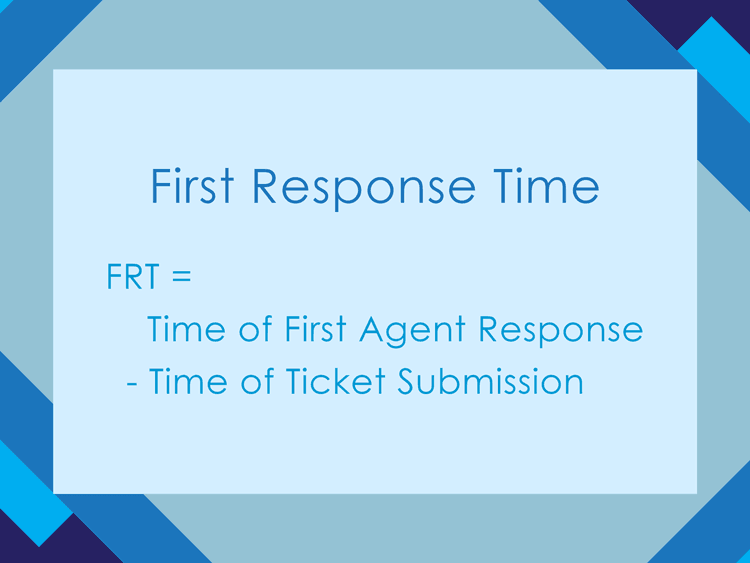
You can calculate a single FRT by subtracting the exact time a customer submitted a ticket from the first time an agent meaningfully interacted with the ticket.
FRT = Time of First Agent Response - Time of Ticket Submission
For example, let's say a customer sends a support ticket via your software's email feature at 10:25 AM. Then, at 10:37 AM, a human agent interacts with the ticket and sends a reply confirming receipt and affirming the issue is in capable hands. The FRT in this scenario would be 12 minutes.
Going one step further, the aggregate FRT is the sum of all individual FRTs, divided by the total number of tickets in the period.
Aggregate FRT = (the sum of all individual FRTs) / total # of tickets
For example, let's say you want to find the aggregate FRT for a 24-hour period. In that 24-hour period, you had five tickets. The individual FRTs for those tickets were 12, 15, 7, 23, and 5 minutes. The aggregate FRT would be 12.4 minutes.
Aggregate FRT = (12 + 15 + 7 + 23 + 5) / 5 = 12.4 minutes
Here's an important note: for simplicity, we've introduced the FRT calculation as a single value, or Key Performance Indicator (KPI). But remember our argument from the introduction: a single aggregate FRT is misleading. You should actually have at least three, maybe four, FRT values that match your ticket priority tiers. We'll explain that in-depth below.
Why Median FRT Often Matters More Than Average FRT
Average First Response Time can sometimes create a misleading picture because a small number of unusually long tickets may heavily skew the calculation.
Median FRT often provides a more realistic view of the typical customer experience because it represents the midpoint response time across all tickets.
For example:
- Average FRT: 4 hours
- Median FRT: 35 minutes
In this scenario, most customers likely received fast responses, but a handful of extreme outliers inflated the average dramatically.
Many mature support organizations monitor:
- Median FRT
- 90th percentile FRT
- Service Level Agreement (SLA) compliance percentage
- FRT by priority tier
- FRT by support channel
Together, these metrics provide a more complete operational picture.
Why First Response Time Matters
FRT is an important KPI for three reasons:
- It impacts the operational efficiency of the customer service team.
- FRT affects the customers' experiences in the short term.
- In the long term, FRT drives customer satisfaction (CSAT) and customer retention (loyalty).
-
Operational Efficiency
Slow FRT often generates follow-up contacts from the customer. For example, when a customer needs to send a "just checking in" email because they haven't heard from anyone. This may sound mundane, but customer follow-ups increase ticket volume, which adds to agents' workload.
Faster FRT can reduce secondary contacts. This can mitigate ticket volume and boost the overall operational efficiency of the IT team.
-
Customer Experience
A customer's waiting experience starts the moment a message is sent or a ticket is submitted online. A fast acknowledgment signals that the customer's issue has been received and has been properly routed to the appropriate agent. The psychological effect of lowering their perceived wait time by being acknowledged improves the customer experience, even if resolution is still hours away.
-
Customer Satisfaction and Retention
Faster FRT is consistently linked with higher CSAT, lower churn or attrition, and stronger customer loyalty.
- Shorter-than-expected wait times produce a disproportionate increase in customer satisfaction. Most people value being surprised by speed more than they are penalized for moderate delays.
- Academic churn analyses and surveys find that negative service experiences (which include slow responses) are common antecedents to customer defection, making faster FRT a preventive factor against churn.
First Response Time Benchmarks
Let's talk about FRT benchmarks. To get the full picture, two benchmark dimensions are needed: by channel and by industry. Let's cover both.
Benchmarks by Channel
FRT benchmarks should vary by channel. The channels your team operates will depend on your ITSM software or contact center tool. Potential channels include:
- Chat
- Phone
- Social media
Live chat and phone need near-real-time replies and minute-level FRTs. On the other hand, asynchronous channels, such as email and ticket channels, tolerate longer hourly FRTs but still aim for the same business day.
Typical Benchmark |
Top Performer Target |
|
|---|---|---|
Chat |
≤5-15 minutes |
Near-real-time (seconds) |
Same business day, ≤ 12-24 hours |
≤1-2 hours for high-priority customers or urgent issues |
|
Phone |
Answer within 3 minutes |
Immediate routing to the agent |
Social Media |
≤ 1-4 hours |
≤ 30-60 minutes |
Benchmarks by Industry
Like the various channels and their associated FRTs, FRT benchmarks will also vary by industry. Examples of industries include:
- SaaS
- E-commerce
- Healthcare
- Financial services
In general, there are tighter benchmarks for high-stakes industries, like financial services and healthcare, as well as for real-time channels like live chat. Slightly looser benchmarks are acceptable for SaaS and e-commerce industries and support channels like email.
For example:
- SaaS companies may focus on uptime-related incidents and enterprise customer SLAs.
- E-commerce organizations often prioritize fast responses during peak shopping periods and order-related issues.
- Healthcare organizations often require extremely fast responses for patient-impacting incidents.
- Financial institutions prioritize rapid responses for security, fraud, and payment issues.
The higher the operational or financial risk, the more aggressive the FRT target typically becomes.
These benchmarks are a starting point, not a target. Let's take a look:
Live Chat or Phone |
||
|---|---|---|
SaaS |
Under 5 minutes |
Between 1 and 4 hours |
E-commerce |
30 minutes or less |
Between 4 and 12 hours |
Critical Urgency |
Non-Critical Urgency |
|
Healthcare |
Within 1 to 2 hours |
Within 24 hours |
Financial Services |
Within 1 to 4 hours |
Between 4 and 12 hours |
First Response Time Targets by Priority Tier
A single aggregate FRT tells a misleading story. That's because a single FRT KPI masks priority-level performance. For example, a critical incident waiting 45 minutes can be invisible if the average is pulled down by fast responses to routine tickets.
That's why a priority-level "one" critical outage and a priority-level "three" routine request should never share the same FRT target.
Setting FRT Targets by Tier
Let's take a look at FRT targets per priority level. These are representative targets, not universal standards. The right numbers depend on your SLA commitments, staffing model, and industry:
Priority Levels |
Incident Examples |
FRT Targets |
|---|---|---|
1 |
|
15 minutes or less |
2 |
|
Between 30 and 60 minutes |
3 |
|
4 hours or less |
4 |
|
Within 24 hours |
First Response Time vs. Other ITSM KPIs
FRT is just one key performance indicator in IT service management. There's a seemingly endless list of other KPIs that are also helpful to track. To clear up any confusion, we'll compare FRT with other help desk KPIs you may know:
-
FRT vs. Average Reply Time (ART)
FRT measures how long it takes to send the first meaningful reply after a customer's initial contact. On the other hand, ART measures the average time customers wait for replies across all messages in a conversation.
The distinction is important because the two KPIs help you track separate data: single and ongoing experiences. FRT is a leading signal that shapes first impressions and immediate satisfaction. On the other hand, ART captures the full responsiveness of the support experience over the entire interaction.
-
FRT vs. Resolution Time
FRT is the elapsed time between a customer's initial contact and the support team's first meaningful reply. On the contrary, resolution time (also known as Time to Resolution, or TTR) is the total time from ticket creation to full resolution.
FRT is about first impressions and immediate satisfaction. Therefore, resolution time is about determining whether the underlying problem was actually fixed and how long the customer had to endure the issue.
-
FRT vs. First Contact Resolution (FCR)
FCR measures the percentage of customer contacts that are fully resolved on the first interaction, while FRT measures how long it takes to send the first meaningful reply.
Both FRT and FCR are important. Fast FRT lowers immediate frustration and improves perceived responsiveness. High FCR reduces churn and increases satisfaction because problems don't recur.
What It Measures |
When to Use It |
|
|---|---|---|
First Response Time (FRT) |
The time it takes to send the first meaningful reply after a customer's initial contact |
To set SLA targets and escalation rules |
Average Reply Time (ART) |
The average time customers wait for replies across all messages in a conversation |
To optimize staffing and conversation flow |
The total time from ticket creation until the issue is fully resolved and verified |
For root-cause analysis and product quality improvement |
|
The percentage of customer contacts that are fully resolved on the first interaction |
To diagnose knowledge and training gaps |
How to Improve First Response Time
- Define Clear SLAs: Precise SLA targets focus your team's effort and enable them to rapidly escalate certain tickets
- Measure Median FRT: Median reporting avoids skew from outliers
- Use skill-based routing: Faster routing reduces time-to-first-meaningful-reply by avoiding handoffs
- Implement automated acknowledgments: Immediate acknowledgment reduces perceived wait time and allows time for triage without harming CSAT
- Centralize customer context and knowledge with ITSM and CRM software: Having robust customer context, or background data, reduces research time and enables a faster, first-meaningful reply
- Use workforce management data to efficiently staff: Efficient staffing at peak times directly lowers median FRT
- Apply automation for triage: AI-powered triage speeds the identification of tickets that require immediate first replies (more on that below)
- Empower agents with escalation paths and authority: This reduces time spent awaiting approvals or multiple handoffs before a meaningful reply
- Monitor, analyze, and take action using FRT data: Data-driven analysis and adjustments identify bottlenecks and deliver measurable FRT gains
When Improving Your FRT, Faster is Not Always Better
In the ITSM and online customer service industries, there is a tension between speed and quality. When grappling with the interplay between speed and quality of service, it can be helpful to ask yourself, "Can speed become counterproductive?"
The short answer is: yes.
To drive this idea home, let's imagine an agent rushing to acknowledge a ticket. In their haste, they send off a templated reply to the customer that misses the issue. Subsequently, a follow-up is required, or perhaps multiple follow-ups. As a result, even though the FRT was fast, the total resolution time is inflated, and the average FCR is negatively affected.
In hindsight, it would have been better for the agent in the scenario to slow down and avoid the urge to send off a templated response too quickly. Instead, a little extra attention to detail and time could have resolved the issue faster and, most importantly, delivered a more positive customer experience.
How AI and Automation Improve First Response Time
As noted above, AI and automation tools can significantly reduce First Response Time by accelerating ticket routing, prioritization, and agent assistance.
Examples include:
- AI-powered ticket triage
- Intelligent priority scoring
- Automated routing to the correct team
- Suggested replies for agents
- Knowledge-base recommendations
- Chatbots for routine requests
For example, AI systems can identify keywords indicating a critical outage and immediately escalate the ticket to the correct support queue without manual review.
However, automation should support meaningful engagement, not replace it with generic auto-responses that frustrate customers.
Common First Response Time Measurement Mistakes
FRT measurement mistakes create misleading data. Common FRT measurement mistakes usually come from:
- Counting the wrong events
- Using inappropriate averages
- Ignoring channel context
- Failing to account for automation or time zones
-
Counting Automated Acknowledgments As The "First Response"
Why it's misleading: Auto-responses, like confirmation emails and bot pings, don't provide a meaningful agent reply. But they can artificially lower FRT if they are included in your calculation. Instead, measure time to the first meaningful agent response.
-
Reporting Average FRT Instead of Medians or Percentiles
Why it's misleading: The arithmetic mean is skewed by outliers (very long tickets) and can disguise the typical customer experience. On the other hand, focusing on FRT medians and percentiles gives a more accurate picture of customer wait times.
-
Mixing Channels or Priorities Into One FRT Metric
Why it's misleading: Chat, phone, and email have different realistic response expectations. Therefore, combining them obscures problem areas and produces inappropriate SLA targets. Instead, you must segment FRT calculations by channel and priority, as discussed above.
-
Including Auto-Resolved Tickets Or Automatically Closed Tickets
Why it's misleading: Tickets auto-resolved by background processes or closed by system rules can distort FRT and resolution metrics. To avoid this, you can filter out auto-resolved tickets so that your FRT measurements reflect only real human responses.
-
Ignoring Business Hours, Time Zones, and Service Schedules
Why it's misleading: Calculating FRT across 24/7 windows without applying business-hours logic can penalize teams unfairly. Instead, it's best to apply business-hour calendars or report FRT separately during business hours.
Frequently Asked Questions About First Response Time
-
What is a good First Response Time?
It's best to set channel-specific FRTs. For example, aim for seconds on live chat, minutes on phone or messaging, an hour on social, and same-day to a few-hour targets for email. Then measure median FRT and % by channel.
-
Does an automated acknowledgment count as a first response?
No, an automated acknowledgment should not count as a meaningful response (unless your SLA explicitly defines it as such). Automated acknowledgments are useful for setting expectations, but they usually misrepresent true responsiveness.
-
How do I calculate First Response Time?
FRT = Time of first meaningful reply - Time of initial customer contact
Remember, for the most accurate FRT data, it's best to calculate distinct FRTs for each channel. It's also helpful to measure the median or a percentile of FRT to control for outliers.
-
What is the difference between First Response Time and Resolution Time?
FRT is the time it takes to send the first meaningful reply after a customer contacts support. Resolution time is the total elapsed time from ticket creation until the issue is fully solved and the ticket is closed.
-
Should First Response Time be measured in calendar hours or business hours?
The answer is both.
Calendar FRT shows the real elapsed time customers experience. This is important for 24/7 promises and external reporting. On the other hand, business-hours FRT shows how your team performs during its working schedule, which is important for fair SLAs, staffing, and operational improvements.
-
How can AI help reduce First Response Time?
AI technology can reduce FRT in a couple of ways. One is with automated resolution for routine queries. Another is with AI triage and priority scoring, so high-impact tickets surface immediately in the right queues. Similarly, AI-skill-based routing can connect the ticket to the agent or team with the right skill set.
-
What is a realistic First Response Time for a priority-level one incident?
A realistic response time for a priority-level "one" incident varies by industry.
For financial institutions and healthcare organizations, the FRT for an urgent matter should be immediate, but no longer than 15 minutes. For industries like e-commerce and Saas, the benchmark FRT for urgent issues is between 5 and 60 minutes.
First Response Time Is Not a One-Dimensional Metric
FRT is a foundational metric in IT service management. But it's not a one-dimensional or singular value.
Calculating your FRT is nuanced and most meaningful when it's measured accurately. For example, not counting auto-replies and organizing FRT data by channel and priority level. In addition, to paint a complete picture of your service quality, it's helpful to track FRT alongside other important KPIs, such as FCR and resolution time.
Giva Helps You Streamline Support So You Can Respond Quickly
Software should support teams in their efforst to respond quickly. Giva's ITSM software is intuitive, easy to use, and quick to set up.
Streamlining features include:
- Giva's ticketing system, with customizable dashboards, and customer self-service portal also have an easy-to-use and intuitive interface, allowing agents to quickly service customers, and customers themselves to self-serve.
- AI Copilots for tickets and knowledge base summaries create an even smoother experience.
Let Giva partner with your support teams! Get a demo to see Giva's solutions in action, or start your own free, 30-day trial today!



Categories: Help Desk