IT Service Catalog: How to Build, Organize, and Manage One
A new hire needs Adobe Acrobat installed before her first day. There's no catalog item for it, so the request goes out as an email. The help desk forwards it to software licensing. Licensing asks for a cost center nobody mentioned. By the time an answer comes back, she's three days into the job and working around a PDF she can't edit. None of that delay came from a hard problem. It came from a request with nowhere defined to land.
This article breaks down what an IT service catalog actually is, and how it's different from a self-service portal, a service portfolio, and a product catalog. You'll get the components that make up a single catalog item, a standard way to organize one, a five-stage maturity model for gauging where yours actually stands, a step-by-step build process, who should own it, and where AI is starting to change catalog design itself.

Key Takeaways
- Most catalogs fail on ownership, not features: An item with no defined owner breaks down the same way an unstructured ticket does the moment something in its workflow needs fixing.
- Catalog maturity runs in five stages, not two: The 5-stage model in this article shows exactly which piece, ownership, automation, or AI readiness, is actually missing, instead of treating a catalog as pass or fail.
- AI agents are already taking on more catalog fulfillment work: They can only act on items that are clearly and completely defined. A vaguely specified catalog item is just as unusable for a machine as it would be confusing for a new hire.
- The way you browse a catalog and the way tickets get classified aren't the same thing: A catalog's categories are built around how people search for what they need, while the backend request types that route and prioritize tickets can group those same items differently.
What Is an IT Service Catalog?
An IT service catalog is a structured list of the services and requestable items an organization offers, each with a description, an intake form, an owner, and a defined path to fulfillment. Because it's one of the main IT Service Management (ITSM) practices, you'll also see it called an "ITSM service catalog."
ITIL 4 treats this as one of its 34 official service management practices, called Service Catalog Management, and keeps it distinct from Service Request Management even though the two work closely together in practice.
The Service Catalog vs. the Service Request Catalog
Here's a distinction that's often skipped past. A service is a capability IT provides at the category level, something like email. The catalog entry for email describes what that service is and who it's for. But nobody actually submits a ticket asking for "email" in the abstract. What they request is something specific:
- A new mailbox
- A shared calendar
- A distribution list
- More mailbox storage
Those specific, requestable items make up the service request catalog, and one service in the broader catalog can back several items in the request catalog.
In everyday conversation, most IT teams collapse this distinction and just say "service catalog" to mean the whole thing, requestable items included. That shorthand causes no real harm as long as the underlying structure is still there. Every catalog needs both the service-level grouping and the item-level specifics, whatever you call the combination.
So why does the distinction actually matter day to day? Because it tells you where to look when something breaks. If users can't find what they need, the problem usually sits at the item level, in a title, a category, or a missing entry. If the whole catalog feels disorganized or duplicated across teams, the problem sits at the catalog level, at how the services themselves are defined and divided.
Business-Facing vs. Technical Catalog Views
Most of what's in this article describes the business-facing catalog, the "storefront" view a requester sees when browsing what's available.
Behind that same catalog though sits a technical view built for IT and fulfillment teams, carrying the same items plus the detail those teams actually need to deliver them, such as which system provisions the license, which approval workflow triggers, and which backend process runs once the request clears.
A midsize company might keep both views in the same tool with different permission levels. A larger enterprise often splits them into genuinely separate systems, one for requesters, one for the teams fulfilling behind the scenes.
How a Service Catalog Differs From Related Terms
Here's how a service catalog compares to the terms it most often gets confused with:
Term |
What It Is |
Key Difference From the Service Catalog |
|---|---|---|
Self-Service Portal |
The web page or app users go through to browse and submit requests |
The portal is the doorway. The catalog is what sits behind it. A well-built portal with a thin catalog just makes it faster to find nothing useful. |
Service Portfolio |
The complete set of services an organization manages across their lifecycle, made up of three parts: the pipeline of services still in development, the live catalog, and retired services no longer offered |
The portfolio includes services not yet available to request. The catalog only shows what is live and requestable today. |
Product Catalog |
A list of physical or digital goods for sale or inventory tracking, most common in retail, manufacturing, or platform engineering contexts |
A product catalog tracks things an organization owns or sells. A service catalog tracks things a team will do or provide on request. |
Configuration Management Database (CMDB) |
A database of the technical components, such as servers, applications, and network devices, and how they relate to each other |
The CMDB describes the technical, as-built state of the environment. The catalog describes the business-facing offerings a user can actually request, though catalog items often link back to CMDB records behind the scenes. |
Knowledge Base |
A library of self-help articles that answer questions without requiring a ticket |
The knowledge base is for finding information. The catalog is for submitting a request. A well-linked catalog item points to the relevant knowledge base article first, in case the user can solve it themselves. |
Components of an IT Service Catalog Item
Every well-built catalog item is really a small, self-contained specification. Here are the pieces it needs:
- Title and Description: Plain, user-facing language, not internal IT shorthand
- Category Placement: Where the item sits in the catalog, which can be nested several levels deep for a larger catalog rather than sitting in one flat, crowded category
- Intake Form: The fields fulfillment actually needs, ideally with conditional logic so fields only appear when they apply
- Service Level Agreement (SLA): A defined turnaround time, tracked separately for each item rather than applied as one blanket target
- Cost or Chargeback: A charge or budget code tied to the item, whether that's an actual chargeback billed to the department or a showback that only reports the cost without billing it, shown up front so both the requester and the approver know what's involved before submitting
- Approval Level: A rule for what gets auto-approved and what needs a manager or budget owner to sign off
- Visibility (Role-Based Access Control): Who can even see or request the item in the first place, assigned by role rather than configured person by person, whether that's everyone in the company or just a specific department, role, or location
- Fulfillment Workflow: The actual process that fulfills the request, mapped to a specific team rather than a general queue
- Owner: A named person or team accountable for keeping the item accurate over time
Here's what that looks like for a real sample request, installing Adobe Acrobat on an employee's laptop:
- Category Placement: Nested three levels deep, Applications, then Adobe, then Install Acrobat, rather than sitting in one flat Software bucket next to fifty unrelated items
- Title: "Install Adobe Acrobat," written the way an employee would actually say it, not the way IT might log it internally as a PDF authoring license provisioning request
- Form Fields: Asks only for the device asset tag and preferred license tier, and uses conditional logic so a cost center field only appears if the requester's department lacks a standing software budget
- SLA: One business day for a routine install, tracked separately from a hardware provisioning item that might carry a three-day SLA
- Cost: A flat per-license fee charged to the requester's department budget, shown on the form before submission so nobody is surprised by a later chargeback
- Approval: Auto-approved if the license falls under a set cost threshold, routed to the requester's manager if it doesn't
- Visibility: Visible to every employee, since almost anyone might need it, unlike a specialized finance or engineering tool that would be restricted to that department
- Fulfillment Workflow: Assigned automatically to the software asset management team, not to a general software queue competing with fifty other kinds of requests
- Owner: A specific person accountable for keeping the form, SLA, and workflow current, not whoever happened to build the item a year ago
Fulfillment for an item like this usually feeds into IT asset management too, the practice of tracking what's been provisioned to whom, so the same asset tag collected on the form also shows up later when it's time to renew or reclaim that license.
The most common real failure at this level isn't a missing field or an ambiguous title. It's an item with no owner. When something in the workflow breaks, a license vendor changes its process, or a form field stops matching a system that moved, nobody notices until someone complains, because nobody was ever assigned to notice first.
The workflow that actually fulfills a request once it clears approval, what happens between submission and the item landing on the right desk, is covered in full in our article on Service Request Fulfillment.
A Standard Service Catalog Taxonomy: 8 Categories to Start With
Our article on Service Request Management already covers how requests get classified into types for backend routing and reporting: access, hardware, software, and so on. This is a different viewing angle. That taxonomy groups requests by which team handles them. This one groups catalog items by how a person browsing the catalog actually thinks about what they need. The two often look similar since they describe the same underlying universe of requests, but they don't have to match item for item.
Most enterprise catalogs settle on somewhere between seven and ten browse categories. Here's a good baseline starting set:
- Access & Identity: VPN access, security group changes, new account provisioning
- Hardware & Equipment: laptops, monitors, phones, and replacement peripherals
- Software & Applications: installs, license assignments, and upgrades. This is where "Install Adobe Acrobat" lives
- Network & Connectivity: guest Wi-Fi access, new network ports, and remote access setup
- Information & Knowledge: policy questions and how-to guidance, most of which should deflect to a knowledge base article before a ticket ever gets created
- Standard & Routine Changes: pre-approved, low-risk changes that travel the request path instead of a full change management review
- Onboarding & Offboarding: bundled requests tied to a start or end date, spanning access, hardware, and accounts at once
- Facilities & Workplace: badge access, desk assignments, and room bookings, relevant once the catalog extends toward Enterprise Service Management (ESM)
Larger catalogs benefit from nesting subcategories underneath these top-level groups rather than keeping everything in one flat list. That's exactly what the Adobe Acrobat example above does: it sits under Applications, then Adobe, then the specific item, instead of competing for attention in one long Software list. EDUCAUSE's Higher Education IT Service Catalog Model takes a similar approach for colleges and universities, organizing services into a shared set of categories such as communication and collaboration, infrastructure, and teaching and learning, so that institutions comparing their catalogs are at least speaking the same language.
For a further look at what a finished catalog actually looks like across a range of real organizations, see our roundup of IT Service Catalog Examples.
How to Build an IT Service Catalog in 8 Steps
Building a catalog that works is less about the software you choose to use and more about sequencing these steps in order:
- Audit Your Ticket History First: Pull the last 90 days of tickets from your ticket management system and find your actual highest-volume, most repeatable requests before designing a single catalog item. Software installs, access requests, and hardware provisioning usually top the list.
- Group Requests Into Categories People Would Recognize: Sort those high-volume requests into browse categories people would recognize, not whatever bucket makes internal sense to the fulfillment team.
- Write Each Item in the Requester's Language: A title like "Install Adobe Acrobat" gets used. "PDF Authoring License Provisioning Request" doesn't, even if it's technically more precise.
- Design the Intake Form Around What Fulfillment Actually Needs: Ask for a device asset tag and a license tier, not every field the underlying ticketing system happens to support. Use conditional logic so fields only appear when they're relevant.
- Attach an SLA, an Owner, and an Approval Threshold Before Launch: An item without all three is still just an idea, not a functioning catalog entry.
- Map the Item to a Real Fulfillment Workflow, Not a Queue: The request needs to land with the right team automatically, not in a general inbox where someone has to notice it and hand it off by hand.
- Pilot the Item With a Few Non-IT Employees: Watch whether a handful of non-IT employees can find and submit the item without help before it goes live to everyone. What they struggle with tells you more than any internal review would.
- Publish It, Then Hand It to Ongoing Governance: A catalog item is never really finished. See the governance section below for what happens after launch.
Submitting through a defined catalog item also settles a question before a human ever looks at the ticket, whether what's being asked for is a service request at all, rather than something that belongs in a completely different workflow. That's exactly the classification problem our article on Incident vs. Service Request digs into.
The 5-Stage IT Service Catalog Maturity Model
Whether a catalog is truly "mature" isn't a yes-or-no question. The model below breaks the practice into five stages, so a team can see exactly what's missing instead of assuming the fix is always more automation:
Stage |
What It Looks Like |
Signal You Are Here |
What Moves You Forward |
|---|---|---|---|
1. Ad Hoc |
Requests arrive as free-text email, chat messages, or verbal asks with no defined structure |
No two similar requests look the same, even when they are for the exact same thing |
Cataloging your 10 to 15 highest-volume requests |
2. Cataloged |
A basic list of requestable items exists, usually in a portal, but items are vague or inconsistently maintained |
Users still default to email even though the portal exists |
Assigning a named owner and SLA to every item |
3. Governed |
Every item has a defined owner, SLA, and review schedule |
Catalog changes go through at least a lightweight approval process instead of happening ad hoc |
Automating fulfillment for items that don't need a human decision |
4. Automated |
Pre-approved items fulfill without manual routing, and approvals trigger dynamically based on request details |
Most no-decision requests complete without a person touching the ticket |
Applying AI to search, catalog maintenance, or fulfillment itself |
5. Intelligent |
AI-assisted or agentic fulfillment handles a growing share of items, and natural-language search supplements category browsing |
The catalog can flag its own stale or missing items from ticket pattern analysis |
Ongoing refinement as request patterns and AI capability both keep shifting |
Where does your team actually sit? Most organizations find themselves at Stage 2 or 3, not because they lack tools, but because nobody assigned real ownership when the catalog first launched. That's worth naming honestly. Jumping straight to Stage 4 automation on top of a Stage 2 catalog just automates the confusion faster.
Reaching Stage 4 in practice usually means leaning hard on service desk automation for the items that don't need a human decision at all, freeing staff time for the requests that genuinely do.
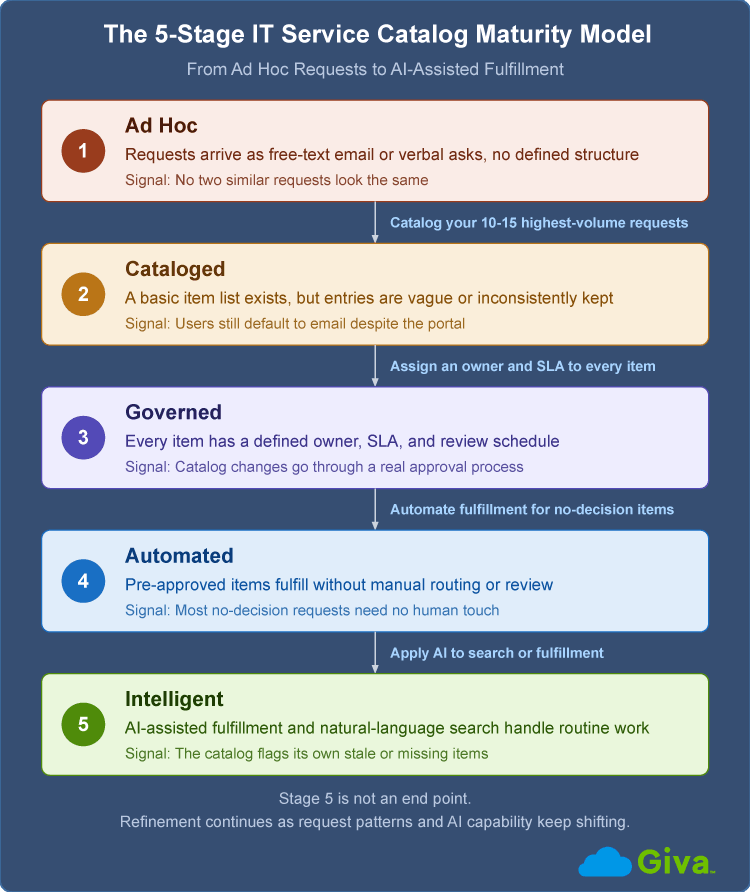
5-Stage IT Service Catalog Maturity Model Diagram
Service Catalog Governance: Who Owns It and How Often to Review It
A catalog with no governance behind it degrades the way any unmaintained system does. It happens slowly, then all at once, once enough stale items pile up that users stop trusting it.
Who Should Own What
Service Request Management will usually name the Catalog Manager as the role accountable for overall catalog design and maintenance. But below that role, each individual item needs its own named owner too, since one overworked Catalog Manager can't realistically track the accuracy of two hundred separate items:
- Catalog Manager or Owner: Overall accountability for structure, taxonomy, and cross-department consistency
- Item Owners: Per-item accountability for accuracy, SLA performance, and keeping the form current
- A Lightweight Review Group: Relevant once the catalog spans multiple departments through ESM, where IT, HR service management, and facilities each want a say in how their items get organized
- Requesters: Not a formal governance role, but the feedback loop that actually brings out what's missing whenever the catalog falls short
How Often to Review It
Who decides how often is often enough? There's no universal answer, and any source that hands you a single fixed number is guessing.
A quarterly full audit is a reasonable default. At each review, check:
- Usage rates per item
- Satisfaction scores by item
- How far actual fulfillment time has drifted from the stated SLA
- Any item with zero requests in the past 12 months
Between audits, keep a lighter, continuous eye on request volume, since a sudden spike in general or uncategorized tickets is usually the fastest signal that something changed and the catalog didn't keep up.
Still, even that quarterly default is really just a starting point. A fast-growing company adding new tools and roles every month probably needs to review its catalog monthly for at least its first year. A stable, mature catalog at a company that isn't changing much might hold up fine on a twice-yearly schedule. The right interval tracks how fast the request mix is actually shifting, not a fixed calendar rule.
AI and the Service Catalog
Agentic AI, which are AI systems capable of taking autonomous, multi-step actions without human direction, is starting to resolve service requests end to end. But what does AI need from the catalog itself to do that work? That's a structural question, not a fulfillment question.
Conversational Search Is Replacing Category Browsing
A growing share of users would rather type or say what they need in plain language than click through three levels of categories to find it. Natural-language search, where a user can type "I need Acrobat on my laptop" and land directly on the right catalog item, is quickly becoming a baseline expectation.
That doesn't eliminate the need for the category structure covered above. It just changes who, or what, is doing the browsing. The categories still matter for matching a free-text request to the right item behind the scenes, even when no human ever sees the category tree.
Why Machine-Readable Items Matter More as AI Takes On More Fulfillment
Gartner predicted in August 2025 that 40% of enterprise apps will carry task-specific AI agents, meaning software built to handle one narrow job automatically, such as classifying a request or triggering a fulfillment step, by 2026, up from less than 5% in 2025. An agent handling catalog fulfillment can only act on an item detailed enough for a machine to follow without guessing, which means clear inputs, explicit approval rules, and a defined workflow, not a description written only for a human to interpret.
Those are the same components noted above, a title, a form, an SLA, an owner, a workflow, just held to a stricter standard. A catalog item a new hire could follow without asking questions is usually specific enough for an AI agent to follow too. One that still needs a phone call to clarify isn't ready for either.
Giva's AI Agents guide goes deeper on what that approval layer looks like in practice, including a free calculator for estimating the labor hours a governed agent could free up for your team.
AI Can Also Help Maintain the Catalog Itself
Beyond fulfillment, AI is starting to show up in catalog maintenance directly, flagging items nobody has requested in months, drafting a first-pass description from a pattern of similar free-text tickets, and spotting a cluster of general requests that all describe the same missing catalog item. None of that replaces the governance process covered above. It just gives whoever is running that process a faster way to catch what needs attention.
IT Service Catalog FAQs
-
How many items should a service catalog have?
Start with your 10 to 15 highest-volume requests rather than trying to catalog everything a team could theoretically offer on day one. A catalog with 15 well-defined items that people actually use beats one with 60 items nobody can navigate. Add new items as real demand shows up in your ticket history, not because a department wants to feel represented in the portal.
-
Can a small business use an IT service catalog?
Yes, the same principles apply regardless of company size. A small business catalog might have 10 items instead of 100, and one person might hold every governance role at once. What matters is that each item still has a clear title, an owner, and a defined way to get fulfilled, not the total count.
-
What's the difference between a catalog item and a change request?
A catalog item describes something requestable within already-approved policy, while a change request is a proposal to modify the underlying IT environment itself, evaluated case by case. Installing a pre-approved piece of software is a catalog item. Reconfiguring a production server is a change request. See our article on submitting a Request for Change (RFC) for how that separate process works.
-
Does every catalog item need its own request form?
Only items where fulfillment genuinely cannot get the needed information anywhere else really need a detailed form. A routine password reset needs almost none, since the account itself supplies the context. Save the longer forms and conditional logic for items where the information actually changes how the request gets fulfilled.
-
What happens when a request doesn't fit any existing catalog item?
That's exactly the signal covered in the governance section above. A cluster of similar general or other requests is the clearest sign a catalog item is missing, and it should get added at the next review rather than treated as one-off overflow indefinitely.
Related Giva Resources
- ITIL Processes: Types and Examples
- Help Desk vs Service Desk vs ITSM: What Are the Differences?
- Knowledge Base Benefits
Building an IT Service Catalog That Actually Gets Used
A service catalog is not a one-time build. It's a maintained asset with an owner, a review cycle, and a place on the maturity curve laid out above. The teams that get it right treat catalog design as an ongoing program, not a project that ends at launch, and that discipline is what determines whether the catalog gets used or gets quietly routed around.
Start with the requests you already get the most of, specify each one completely, including a form, an SLA, an owner, and a workflow, and revisit the whole thing on a schedule that matches how fast your organization is actually changing. Everything else here, the taxonomy, the maturity model, the AI trend, builds on that same foundation.
Ready to Build a Service Catalog Your Team Will Actually Use?
Remember the new hire from the opening story, three days in and still waiting on Adobe Acrobat? That's exactly what a well-designed service catalog prevents. It turns a vague request into a five-minute, correctly routed transaction. Getting there takes more than picking software. It means defining every item clearly, attaching the right form and SLA to it, and reviewing it often enough that it never goes stale.
Giva's Help Desk Software and ITSM platform give you the building blocks to do exactly that. You can configure Nature of Request categories, complete with custom intake forms tailored to what each specific request actually needs, so a software install and a hardware request collect entirely different information and route to the right team automatically, without anyone sorting it by hand.
If your current setup is a handful of generic ticket types and an inbox full of "please help with" requests, the fix usually isn't more software. It's a catalog that actually reflects what your users ask for, and a process for keeping it that way.
Get a demo to see Giva's solutions in action, or start your own free, 30-day trial today!



Categories: IT, Help Desk