Incident vs. Service Request: How to Classify the Cases That Aren't Clear
A user submits a ticket that says their VPN (Virtual Private Network) won't connect. Another submits one asking for VPN access for a new contractor starting Monday. The subject lines look almost identical, but the two tickets need completely different handling. Route the first one like a routine request and an actual outage sits in the wrong queue. Route the second one like an emergency and you've added urgency to something that was never broken in the first place.
This article moves past the textbook definitions of "incident" and "service request" and into the part that actually trips up service desks, telling the two apart when a ticket doesn't announce itself clearly. You'll get the core definitions, a look at how each one is measured and owned, an overview of incident priority levels and service request categories, and a practical framework, with real edge cases, for classifying the tickets that don't fit neatly into either category.

Key Takeaways
- An incident is something that broke. A service request is something new a user needs: Most of the real difficulty lives in the gray area between those two, not in the definition itself.
- Misclassifying a ticket costs more than a wrong label: It skews SLA compliance, distorts reporting metrics like MTTR (Mean Time to Resolution) and MTTA (Mean Time to Acknowledge), and sends the ticket to a team that has to reroute it before anyone can act on it.
- A four-question check resolves most ambiguous tickets: Was this working before, does the user already have it, how many people are affected, and is there a security angle.
- AI is closing the gap, but not the judgment call: An ITSM.tools survey found 65% of IT service management professionals expect AI to improve the user experience, but only 20% have actually seen it, so classification judgment still falls on people for now.
What Is an Incident? What Is a Service Request?
Here's the two definitions that everything else in this article builds on.
What Is an Incident?
An incident is an unplanned interruption to an IT service, or a reduction in its quality, that needs to be fixed to restore normal operation. The user didn't ask for anything new. Something that was working has stopped working, or is working worse than it was, and someone needs to make it work again.
A handful of situations show up constantly in most service desk queues:
- The network drops for an entire office
- An application crashes for a user who could open it an hour ago
- An email server goes down
- A laptop suddenly won't boot
In every case, the starting point was working service, and the incident is the gap between that and what the user has now.
ITIL 4, the widely used IT service management framework (short for Information Technology Infrastructure Library), defines Incident Management as the practice of restoring service as quickly as possible while limiting the impact of the disruption. Speed matters more than root cause here, which is why a lot of incidents get closed with a temporary workaround rather than a permanent fix. Finding the permanent fix is Problem Management's job, the ITIL practice responsible for investigating why a disruption happened so it doesn't keep happening.
For the complete incident management lifecycle, from detection through major incident response, see our guide on IT incident management.
What Is a Service Request?
A service request is a formal, routine, and usually pre-approved request from a user for something new, something they don't already have. Nothing is broken. The user needs an item, an account, a configuration change, or access to a tool they didn't need yesterday and do need today.
Typical examples include:
- Requesting a new monitor or laptop
- Asking for software to be installed
- Getting a license assigned
- Onboarding a new employee with standard equipment and system access
Every one of these follows a known, repeatable process. There's no diagnosis step, because nothing needs diagnosing.
ITIL 4 treats Service Request Management as its own formal practice, distinct from Incident Management, precisely because the two demand different skills, different urgency, and different measures of success. Fulfilling a request well means following the defined steps efficiently. Resolving an incident well means figuring out what's actually wrong, often under real-time pressure.
Here's a shortcut that holds up in almost every case:
- If it was working yesterday and isn't today, it's an incident
- If you didn't have it yesterday and need it today, it's a service request
For more on how service requests are handled, see our article on Service Request Management: Process, Types & Best Practices.
Key Differences Between Incidents and Service Requests
Here's a breakdown of the main distinctions between incidents and service requests:
Characteristic |
Service Request |
Incident |
|---|---|---|
Nature |
Planned, routine, pre-approved |
Unplanned, unexpected disruption |
Trigger |
User needs something new |
Something that was working breaks |
SLA Type |
Fulfillment SLA (time to deliver) |
Resolution SLA (time to restore) |
Tools and Routing |
Service catalog item, often self-service |
Incident queue, flagged for triage |
Metrics Tracked |
Fulfillment time, approval cycle time |
MTTA and MTTR |
Who Typically Owns It |
Service desk analyst or approver chain |
On-call technician or incident manager |
Escalation Path |
Can become a change request if fulfillment requires infrastructure changes |
Can become a problem record if the same incident recurs |
Both are measured against a Service Level Agreement (SLA), just not the same kind. Incidents get a resolution SLA. Service requests get a fulfillment SLA.
A Priority 1 (P1) network outage owned by an incident manager and tracked against how quickly it gets resolved looks nothing like a new-hire laptop request owned by a service desk analyst and tracked against a fulfillment SLA, even though both start the same way, with a ticket being submitted.
For a closer look at how that fulfillment step actually runs from submission to closure, see our guide on Service Request Fulfillment.
One more term is worth defining clearly here, since it shows up in the escalation path above. A change request is neither an incident nor a service request. It's a formal proposal to modify a system, application, or piece of infrastructure in a planned, controlled way. Examples include rolling out a security patch, upgrading a server, or reconfiguring a network device. Incidents and service requests describe what a user experiences. A change request describes what IT does to the underlying environment, sometimes triggered by one of the other two.
Incident Priority Levels and Service Request Categories
Beyond the basic incident-versus-request split, both sides break down into their own named categories that shape how tickets get prioritized and routed.
4 Incident Priority Levels
Most service desks assign incidents a "priority level," sometimes called a "severity level," based on impact and urgency, typically using a four-tier scale:
- P1, Critical or Major Incident: A company-wide outage with no workaround, such as email or the core network going down for everyone.
- P2, High: Significant impact affecting a department or a large group of users, usually with a workaround available.
- P3, Medium: Moderate impact, often limited to one user or a small group, with a clear workaround in place.
- P4, Low: Minimal impact, such as a cosmetic issue or a one-off glitch with no real urgency attached.
Priority isn't assigned by gut feel. Most service desks calculate it from a priority matrix that cross-references impact, how many people or systems are affected, against urgency, how quickly the business needs it fixed, so two incidents with the same symptom can be set to different priority levels depending on who and what they touch.
5 Common Service Request Categories
Service requests typically sort into five recurring categories:
- Access requests: New accounts, permission changes, or VPN and system access.
- Hardware and equipment: New laptops, monitors, phones, or replacement peripherals.
- Software and licensing: New software installs, upgrades, or license assignments.
- Information requests: Policy questions, how-to guidance, and account status checks.
- Onboarding and offboarding bundles: Combined equipment, access, and account setup tied to a start or end date.
How to Classify Incidents vs. Service Requests: A Practical Framework for Ambiguous Cases
Most tickets classify themselves. A server goes down, that's an incident. A new hire needs a laptop, that's a service request. The cases that actually cost service desks time are the ones where the wording could go either way, and no amount of memorizing the textbook definition tells you what to do with those.
The 4-Question Incident vs. Service Request Triage Check
Run any ambiguous ticket through the Triage Check, in order:
- Was this working before? If the user had this working before and it stopped, that's the defining signature of an incident. If they never had it, move to the next question.
- Does the user already have this? If the user already has the access, item, or entitlement and it's failing, that points to an incident. If they're asking for something they don't currently have, that points to a service request.
- Is one person affected, or many? Multiple people reporting the same failure at once often signals a systemic incident, though a single person can still have a legitimate incident of their own, such as one failed laptop. This question narrows scope rather than deciding classification on its own.
- Is there a security dimension? A suspicious login, a compromised account, or an unusual access pattern overrides everything else. Treat it as a security incident regardless of how routine the surface request looks.
Run through the Triage Check for any ticket that doesn't obviously classify itself, and you'll resolve the vast majority of gray-area cases in under a minute. So what do you do when the answers still point in different directions? That's exactly what the scenarios that follow are for.
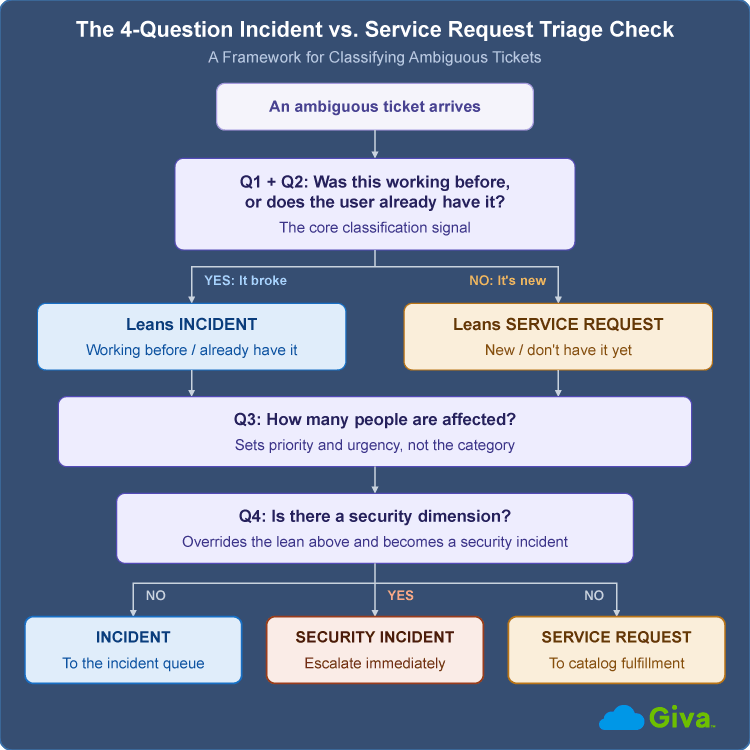
4-Question Incident vs. Service Request Triage Check Diagram
Edge Case Scenarios and How to Resolve Them
These are the tickets that show up in almost every service desk's queue, and where the surface wording is nearly identical no matter which way the correct answer goes:
What the User Reports |
Question to Ask |
Classification |
Why |
|---|---|---|---|
"My mouse stopped working" |
Was this working before? |
Incident (low priority) |
It was functioning and has now failed, meeting the definition of an unplanned interruption, even though the business impact is minor. |
"Can I get a different mouse?" (nothing is broken) |
Does the user already have a working one? |
Service request |
Nothing is broken. This is a standard equipment request. |
"I can't connect to VPN anymore" |
Was this working before? |
Incident |
The user had working access, and it has stopped functioning. |
"I need VPN access for my new role" |
Does the user already have this entitlement? |
Service request |
This is a net-new access grant, not a restoration of something that broke. |
"The printer isn't printing" (previously worked) |
Was this working before? |
Incident |
Same reasoning as the VPN scenario above. It was working and has now stopped. |
"I need the color printer added to my account" |
Does the user already have access to it? |
Service request |
The user is asking for something new, not reporting a failure. |
"I'm locked out, I forgot my password" (no security flags) |
Is there a security dimension? |
Service request (often self-service) |
This is routine, expected user behavior with no indication of compromise. |
"I'm locked out, and IT flagged unusual login attempts on my account" |
Is there a security dimension? |
Security incident |
Same surface complaint as the row above, but the security signal changes the classification entirely. That's exactly why the diagnostic questions matter more than the wording of the ticket. |
Hybrid and Transition Cases
Some tickets don't stay in one category for their entire lifecycle. A user submits what looks like a straightforward service request, IT installs the requested software, and the install crashes a shared server. What started as fulfillment now needs an incident record of its own, separate from the original request, so the outage gets tracked and resolved on its own timeline.
The reverse happens just as often. A laptop fails and gets logged as an incident. The fastest fix turns out to be a replacement rather than a repair, which means the incident's resolution is to open a new service request for hardware provisioning. Neither ticket is wrong. They're two different types of work connected by the same underlying problem, and closing the incident without opening the follow-up request just leaves the user without a working laptop.
This is exactly why linking the two records matters for reporting. If six of this month's incidents were actually closed by opening a follow-up service request, and nobody tags that connection, your incident count looks inflated by six cases that didn't really need incident-level investigation, and your service request count is missing six requests that came from a very real source of demand.
Who Should Own the Call When It's Genuinely Unclear
When the Triage Check above still leaves room for judgment, someone has to make the call, and it shouldn't default to whoever happens to pick up the ticket first. Most mature service desks handle this one of three ways:
- The frontline agent applies the framework and moves on
- An automated rule in the intake system makes a default call based on the catalog item or category selected
- A genuinely contested case, especially one with a security angle, gets escalated to a team lead
Does every ambiguous ticket need to be classified perfectly on the first try? Not really. The more useful standard is "good enough to route, refine later." A provisional classification that gets the ticket moving to roughly the right team beats a delay caused by trying to get it exactly right at intake. Triage is where the correction happens, not submission.
Why Getting the Incident vs. Service Request Classification Right Matters
Industry estimates put manual ticket misrouting somewhere between 15% and 25%, and every one of those tickets adds real delay. A reassignment means someone has to notice the error, hand the ticket to a different queue, and wait for a different technician to pick it back up.
Misclassification also quietly skews your own metrics. An incident that's really a service request inflates resolution-time numbers and makes response look worse than it is. A service request that's really an incident does the opposite, hiding inside fulfillment SLA reporting while an actual outage sits unresolved.
A real P1 outage that gets logged as a routine, low-priority request is where classification errors get expensive fast. Every minute that ticket sits in the wrong queue is a minute the business is losing money, not just patience. One 2024 industry survey put the average cost of a single hour of downtime at more than $300,000 for over 90% of mid-size and large enterprises, according to ITIC's Hourly Cost of Downtime research. A misclassified major incident doesn't just create an SLA problem. It extends an outage that's already expensive by the minute.
There's no clean industry number for how often tickets get misclassified in the first place, because most service desks don't track it as its own metric. What gets measured is downstream, things like SLA breaches, reopened tickets, and agent time spent re-routing. The actual misclassification rate is probably higher than any of those proxies suggest, since a ticket that gets silently reassigned without anyone flagging it as a routing error never shows up in the numbers at all.
There's also the plain cost of agent time spent re-triaging a wrongly filed ticket instead of working the next one in the real queue.
Tools, Automation, and AI for Classification and Routing
Self-service portals built around a well-designed IT service catalog fix a good share of this at the source. When a user picks "request new hardware" from a defined catalog instead of typing a free-text description, the system already knows it's a service request before a human ever looks at it. Dynamic intake forms take this further, changing which fields appear based on the category selected, so the system gathers exactly the context needed to classify and route the ticket correctly.
Here's a simple version of that pattern. If a user selects "something isn't working" as the ticket type, the form can ask when it last worked and how many people are affected, the same first two questions from the Triage Check above. If they select "I need something new" instead, the form switches to catalog fields for approval routing and delivery timeline. The classification happens at submission, not after an agent reads a free-text description and guesses.
AI ticketing tools are the next layer here, and expectations are running ahead of results so far. A 2025 ITSM.tools survey found that 65% of IT service management professionals expect AI automation to improve the end-user experience, but only 20% report actually seeing that improvement yet, according to their State of AI in ITSM research. That gap matters here specifically. Even a well-trained classifier can handle routine, clearly worded tickets well and still stumble on exactly the ambiguous cases this article is about, the ones where the surface wording doesn't match the underlying cause.
So where does that leave the Triage Check above? It leaves it as the fallback every automated system eventually needs, a clear, human-applied standard for the tickets AI can't confidently sort on its own.
AI tools are also starting to pull double duty here, suggesting relevant knowledge base articles and prior ticket history for a technician before they even open an incident, which speeds up resolution even when the classification itself still needs a human call to get it routed correctly in the first place.
Platforms built for this let teams encode the diagnostic questions directly into intake forms and routing rules, so the classification logic runs the same way every time instead of depending on whichever agent happens to be on shift.
Self-service password reset tools are one of the clearest examples of ticket deflection, removing one of the highest-volume ambiguous ticket types from the queue almost entirely, since a routine forgotten password never needs a human decision about incident versus request in the first place.
Incident vs. Service Request FAQs
-
Is a broken mouse an incident or a service request?
A broken mouse that stops working is technically an incident, since something that functioned has now failed. Many service desks log it as a low-priority service request instead, because the fix is simply providing a replacement rather than diagnosing anything. It's one of the most commonly debated edge cases among IT practitioners for exactly this reason.
-
Is a password reset an incident or a service request?
A routine, forgotten-password reset is a service request, since it's a standard, expected action with a known fix. If the reset is tied to a suspected account compromise or a broader authentication outage, log it as a security incident instead. The trigger, not the action itself, determines the classification.
-
What's the difference between an incident, a problem, and a service request?
An incident fixes something broken, a problem finds out why it keeps breaking, and a service request delivers something new. ITIL doesn't set a fixed number of repeats before an incident becomes a problem. Most teams open a problem record when the same issue resurfaces, when a major incident got resolved without a clear root cause, or when the fix was a workaround rather than a permanent solution.
-
Can a service request turn into an incident?
Yes. If fulfilling a service request causes something else to break, such as a software install crashing a shared server, the fulfillment step should spawn a separate incident record rather than being logged under the original request. Keeping the two tickets linked preserves an accurate history of what happened and why.
-
What's the SLA difference between incidents and service requests?
Incidents are measured against a resolution SLA, and service requests are measured against a fulfillment SLA. A resolution SLA measures how fast normal service gets restored. A fulfillment SLA measures how fast the request gets delivered. Applying the wrong SLA type to a ticket is one of the most common downstream effects of misclassification.
-
Is a service request the same as a ticket?
"Ticket" is the generic record type inside a help desk system, and incident and service request are two specific categories of ticket, alongside problem and change records. Every incident and every service request is a ticket, but not every ticket is an incident or a service request.
Related Giva Resources
- Help Desk vs Service Desk vs ITSM: What Are the Differences?
- Incident Classification
- Root Cause Analysis (RCA) and Asking the 5 Whys
- Ticket Management: Complete Guide to Workflows & Best Practices
Classifying Incident vs. Service Request Tickets Without the Guesswork
The label on a ticket, incident or service request, decides more than which folder it lands in. It sets the SLA clock, routes the work to the right team, and helps decide whether your metrics reflect what's actually happening on your service desk. Getting it right on the clear-cut cases is easy. Getting it right on the gray ones is what separates a service desk that runs on judgment calls from one that runs on a repeatable process.
Start with the four-question check the next time a ticket doesn't obviously sort itself, and build those same questions into your intake forms so the system asks them before a ticket ever reaches a queue. The clearer your classification is at the point of submission, the less time your team spends untangling it later.
Putting the Framework to Work With Giva
Knowing whether a ticket is an incident or a service request is only half the battle. The real test is whether your service desk can act on that distinction consistently, at scale, without slowing your team down. That's where the right help desk software makes the difference.
Giva's IT Help Desk Software platform lets you build intake forms through its self-service portal and routing rules around the same Triage Check logic covered in this article, so tickets end up in the right queue, with the right SLA clock running, from the moment they're submitted. That consistency is what actually reduces misrouted tickets, improves SLA compliance, speeds up MTTR, and gets more tickets routed correctly on the first try.
This matters most in the gray areas. When an incident's resolution requires a broader fix, a hardware swap, a configuration update, or a new access grant, Giva's IT change management capabilities, standalone or integrated, let you convert that work into a tracked, auditable change without losing the thread back to the original ticket. Because Giva unifies incident handling, service request fulfillment, and change management on one ITSM platform, your team never has to stitch together data from separate tools just to understand how a ticket moved through its lifecycle.
To learn more, get a demo to see Giva's solutions in action, or start your own free, 30-day trial today!



Categories: IT, Help Desk