Service Request Fulfillment: How to Get From Approved to Actually Done
A laptop request clears approval in under a minute. The employee gets a confirmation email and moves on with their day. Three days later, they follow up and find the ticket sitting in a shared queue that nobody actually owns. The catalog worked. The approval workflow worked. What broke was the part that comes right after, the part where a person or a system was actually supposed to fulfill the request.
This article is about exactly that stretch, the space between a request getting approved and a request actually getting done. You'll get a look at how the five fulfillment stages actually work, how requests get routed to the team responsible for executing them, a practical framework for deciding whether a given request should be handled manually, automatically, or through some mix of the two, and what to track so a request doesn't get lost and turns into a missed Service Level Agreement (SLA).

Key Takeaways
- Fulfillment is the execution stage, not the whole process: Service Request Management covers submission through closure. Fulfillment is specifically the execution step in between, and it's where most of the real delay and risk in a service request actually live.
- Most requests fit one of three fulfillment models: Manual, automated, and hybrid fulfillment call for different oversight. Treating every request the same way either overloads staff with work a system could handle or automates something that genuinely needed a human check first.
- Verification before closure catches what completion alone misses: A technician marking a request "complete" and a requester confirming it actually works are not the same event, and closing on the first without the second is one of the most common sources of reopened tickets.
- Escalation only works if ownership is explicit: A stalled request needs a defined tier, an automatic alert, and a way to hand off context, or it just bounces between teams until someone happens to notice.
What Is Service Request Fulfillment?
Service request fulfillment is the stage of the service request process where the requested item, access, or action actually gets delivered. It sits between approval and closure. Once a request clears approval, fulfillment is the actual work of making it happen, from granting a system access request to shipping a piece of hardware.
Service Request Management is the umbrella term for the entire path a request takes, from submission through closure. For the full breakdown, including request types and the service catalog that drives the whole process, see our article on Service Request Management.
This article picks up specifically at fulfillment. You'll see what happens once a request is cleared to move, who does the work, and how a team confirms the work was actually done before the ticket closes.
From ITIL's "Request Fulfilment" Process to the "Service Request Management" Practice
ITIL, short for Information Technology Infrastructure Library, treated request fulfillment as its own process in its third version, broken into five defined sub-processes covering everything from logging a request to monitoring and closing it. The newer ITIL 4 folded that process into a broader practice called Service Request Management, which covers the people, skills, and culture behind handling requests, not just the mechanical steps.
That's why this article treats "fulfillment" as the execution stage specifically, distinct from the practice name Service Request Management uses for the request lifecycle as a whole.
The Service Request Fulfillment Process: 5 Stages From Initiation to Closure
Request fulfillment runs through five stages, each with a different owner and a different way to go wrong:
-
Stage 1: Initiation
A user submits a request through a self-service portal, a service catalog item, or occasionally email, though catalog-driven submission produces cleaner data for everything that follows. For more on how the catalog shapes this step, see our article on the IT Service Catalog.
-
Stage 2: Approval
Standard, low-risk requests are often pre-approved at the policy level and skip this step entirely. Higher-cost or higher-risk requests route to a manager or budget owner, sometimes through more than one approval layer, before fulfillment can begin.
-
Stage 3: Execution, Where Fulfillment Actually Happens
Execution is the stage most people actually mean when they say "fulfillment." A fulfillment group, the specific team responsible for that category of request, does whatever the request actually requires, such as:
- Granting a system permission
- Provisioning a new account (creating and configuring it)
- Allocating a laptop or other hardware from inventory
- Running a script that installs software on a remote machine
The mechanics vary by request type, but the common thread is that nothing about execution is ambiguous going in. The request was already approved, and the fulfillment path was already defined. What varies is whether a person does that work by hand, whether a system does it automatically, or whether it takes some combination of both, which is exactly the decision the framework later in this article breaks down.
-
Stage 4: Quality Assurance and Verification Before Closure
Quality assurance is the step most fulfillment processes skip past, and it's the one most likely to produce a reopened ticket if it gets skipped. The question isn't whether a technician did something but whether what got delivered actually matches what the requester needed.
A hardware request is a straightforward example. The laptop shipping is not the same as the laptop working. A well-run fulfillment process confirms both before the ticket closes.
One anti-pattern shows up constantly. Fulfillment teams auto-close a ticket after a fixed number of days with no response from the requester. It looks efficient on a dashboard, where closure rates go up, average fulfillment time goes down, and nobody has to chase down a non-responsive user. But a ticket that closes because someone stopped replying isn't the same as a ticket that closes because the work was confirmed correct. The gap between those two usually shows up later as a reopened ticket or a request resubmitted from scratch. If a request does have to close for silence, our closing ticket due to no response templates article shows what to send first and how to label the closure.
-
Stage 5: Closure
Once verification confirms the work is done and the requester agrees, the ticket closes. That confirmation is what makes closure mean something instead of being a purely administrative step, and it's the same check that keeps the anti-pattern above from becoming the default.
Fulfillment Stages at a Glance
Stage |
What Happens |
Typical Owner |
|---|---|---|
Initiation |
Request submitted through the catalog, portal, or occasionally email |
Requester |
Approval |
Pre-approved automatically, or reviewed by a manager or budget owner |
Approver or policy |
Execution |
Fulfillment group grants, provisions, or delivers what was requested |
Fulfillment group |
Quality Assurance |
Delivered result verified against what was actually requested |
Fulfillment group and requester |
Closure |
Ticket closes once verification and requester confirmation are both in |
Requester confirmation |
Fulfillment Groups: Who Actually Does the Work
A fulfillment group is the specific team assigned to complete one category of request, and it's usually not the same team that triaged the ticket in the first place.
How Requests Get Routed to the Right Fulfillment Group
Routing usually happens automatically, based on the catalog item selected rather than anything an agent has to interpret. A request for Virtual Private Network (VPN) access routes to identity and access management. A hardware request routes to procurement or IT operations. The catalog metadata decides the destination before a human ever looks at the ticket.
Some platforms take this further with skills-based routing, matching a request to whichever available team member has the right specialization, or round-robin and load-balancing assignment, which spreads incoming requests evenly across a team instead of letting them stack up on whoever is fastest to claim tickets.
Not every fulfillment group sits inside IT though. A hardware request might route to an outside vendor or managed service provider for the actual shipment, and the fulfillment target still has to account for a delivery window IT doesn't fully control. Routing logic should treat an external provider the same way it treats an internal team, with a defined owner and timeline, and a way to escalate if that timeline falls behind.
When a Fulfillment Group Needs to Loop In a Specialist Team
A software install request is usually routine until it isn't. A fulfillment group installing a new application on a shared server discovers midway through that the install requires elevated permissions the security team has to approve first. The original request doesn't restart. It pauses, loops in the specialist team for that one step, and resumes once the additional approval clears.
Handoffs like that work best when they're backed by an Operational Level Agreement (OLA), an internal agreement between support teams that sets a response time for exactly this kind of mid-request handoff. An OLA is what gives the specialist team a defined obligation to treat someone else's request as a real priority rather than something that just waits behind their own queue.
This is also where a fulfillment step can cause a genuinely separate problem. If that same install crashes the shared server, the fix isn't to keep working the original request. It's to open an incident for the outage and finish the fulfillment request separately once the incident is resolved. For the fuller breakdown of when a ticket needs to split into two records like this, see our article on Incident vs. Service Request.
The 3-Model Service Request Fulfillment Decision: Manual, Automated, or Hybrid
Not every request should be fulfilled the same way, and treating them all the same is where a lot of fulfillment teams lose time they didn't need to lose. Fulfillment generally happens in one of three ways:
- Manual Fulfillment: Sometimes called "operator fulfillment," this is when a person does the work by hand, granting access directly, configuring hardware, or completing a step no system can do on its own.
- Automated Fulfillment: A system completes a single, well-defined task without a person touching it, such as auto-provisioning a license or resetting a password. Automated fulfillment handles one task at a time and works best for high-volume, low-complexity requests with no real decision to make.
- Hybrid, or Orchestrated, Fulfillment: Multiple automated and human steps run in a coordinated sequence, sometimes across more than one team or system. This is properly called "orchestration" rather than just automation, since it coordinates several steps into one workflow instead of executing a single task.
So how do you know which one applies to a given request type? It depends on how often that request type comes up, how much risk or cost is attached to getting it wrong, how many exceptions and edge cases it tends to produce, and whether the process needs to hold up under an audit.
Microsoft's own internal IT organization is a concrete example of what heavy automation looks like at scale. After rolling out an Employee Self-Service Agent to more than 300,000 employees and vendors, covering routine IT support requests such as password resets and VPN setup alongside HR and facilities requests, the team set an overall target of 40% ticket deflection (resolving a request without an agent ever touching it, usually through self-service) across the categories it covers, the exact high-volume, low-complexity situation the automated model is built for. User satisfaction on at least one of those covered issues jumped from 85% to 98% after the rollout.
Summary Table: Manual vs. Automated vs. Hybrid Fulfillment
Model |
Best Fit for Volume |
Risk and Cost Tolerance |
Exception Handling |
Audit Trail |
|---|---|---|---|---|
Manual |
Low volume |
Handles high-risk or high-cost requests well |
Strong, a person can adapt on the spot |
Depends on documentation habits |
Automated |
High volume |
Best suited to low-risk, low-cost requests |
Weak, breaks on anything unexpected |
Strong, the system logs every step |
Hybrid or Orchestrated |
Medium to high volume |
Handles moderate risk with built-in checkpoints |
Strong, routes exceptions to a person |
Strong, system logs plus a documented decision point |
There's no universal cutoff that tells you when a request type has enough volume to justify automating it. The honest answer is that it depends on how much staff time the manual version is actually costing you, and most teams don't track that closely enough to know for sure until they audit their own ticket history.
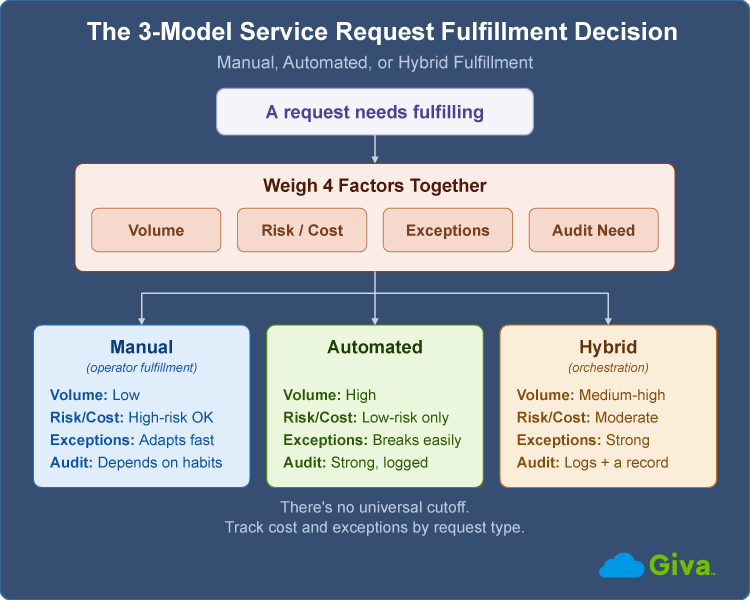
3-Model Service Request Fulfillment Decision Diagram
SLA Tracking and Escalation During Fulfillment
There's no single industry-standard term for the SLA that covers just the fulfillment stage. What most teams actually track is a resolution or completion SLA, the total time from submission to closure, without a separate clock for execution specifically. That's worth noting explicitly: if fulfillment itself is stalling, a lot of ticketing systems won't show you that until the whole request has already gone past its deadline.
Setting Realistic Fulfillment Time Targets by Request Type
A password reset and a hardware provisioning request obviously shouldn't share the same time target, and setting one blanket number for both hides the request types that are actually slipping. A workable approach uses a shorter window for anything a system can complete on its own, a wider window for anything requiring procurement or multiple approvers, and a documented exception path for anything unusual enough that neither window applies.
So how do you set the actual number for each category? Start with your own historical fulfillment time by request type, not an industry benchmark that averages a password reset with a laptop order into a number that means nothing for either one.
What Happens When a Request Stalls: Escalation Tiers and Breach Handling
A stalled request needs a defined escalation path, not an agent who happens to notice the due date passed. A workable structure runs through three tiers:
- Tier 1, Early Warning: The assigned agent gets an automatic alert when a request is approaching its target.
- Tier 2, Team Lead Review: A team lead is notified if the request crosses its target with no movement.
- Tier 3, Manager Escalation: A manager is pulled in if the request stays stalled past a second threshold.
Whatever the reassignment, the context needs to travel with the ticket. A request that gets reassigned without the notes, the history, and whatever the first team already tried forces the requester to explain the same thing twice, which is its own kind of failure even if the request eventually gets fulfilled. A request with no escalation tier actually included has no way to get flagged on its own, so the only escalation that happens is the requester giving up and complaining to someone directly. Not a good look.
Metrics That Measure Fulfillment Execution
Four metrics are specific to the fulfillment stage itself, distinct from the broader help desk metrics most service desk teams already track:
- Fulfillment Backlog: The gap between open requests and requests actually closed in the same period. A backlog that grows steadily, even with steady staffing, usually means some request type is still using the wrong model from the 3-Model Decision above, most often something that should be automated but is still handled by hand, not that the team needs more people.
- First-Pass Fulfillment Rate: The percentage of requests a fulfillment group completes without reassignment, rework, or a reopened ticket. A high rate means the group had what it needed to do the job right the first time.
- Cost per Fulfilled Request: The average staff time or system cost required to complete one request, tracked by request type rather than as a single blended number. This is one of the harder numbers to pin down cleanly, since it depends on how granularly a team already logs its own time.
- Fulfillment Time by Request Type: How actual fulfillment time compares to the target for that specific request type, reviewed often enough to catch drift before it turns into a pattern of missed SLAs.
There's no need to wait for a monthly report to catch a growing backlog though. A queue that's quietly climbing usually shows up first in the day-to-day view, and catching it there is what keeps a mismatch between request volume and fulfillment capacity from turning into a real SLA problem.
These four numbers need an owner at the fulfillment-group level, separate from whoever owns catalog accuracy or the request itself. A team with nobody watching its own backlog trend or first-pass rate usually doesn't notice a slide until it has already turned into a pattern of missed SLAs.
Automation, Orchestration, and AI in Fulfillment Execution
The mechanics behind automated and orchestrated fulfillment, covered above, are part of a broader shift toward service desk automation, and they show up differently across IT Service Management (ITSM) platforms depending on what each one is actually built to automate.
What Fulfillment Automation Looks Like in Practice
Most automation rules follow a similar shape regardless of platform. A trigger fires, a delay or condition gets checked, and a defined action runs, such as automatically closing a request a set number of days after it's marked resolved. Some platforms are pushing further with AI agents that can act on common requests with less human review at each step, and conversational assistants paired with workflow automation that make simple requests fast to set up.
The tradeoff shows up as request volume and workflow complexity grow. An automation setup that was fast to configure for a small fulfillment team can hit real limits once the number of request types, exceptions, and integrations expands past what it was originally built for.
Agentic AI vs. Traditional Automation for Fulfillment
AI ticketing tools started with triage and routing, but the more interesting shift for fulfillment specifically is what's now possible during execution itself.
Traditional automation and agentic AI solve different problems. Automation follows a fixed rule and breaks the moment a request doesn't match the pattern it was built for. Agentic AI, meaning AI systems that can take multiple autonomous actions toward a goal without a person directing each step, can handle a request that requires checking a condition, adjusting to what it finds, and completing a multi-step task without stopping to ask a human what to do next.
For fulfillment specifically, an ITSM.tools survey sponsored by HCL Software named end-to-end automated service request fulfillment as one of the top three agentic AI use cases already in production, cited by 13% of respondents, just behind autonomous incident triage and autonomous knowledge creation, each cited by 18%.
None of this replaces the 3-model decision covered earlier. It just shifts more requests toward the automated and hybrid end of it over time, provided the catalog item behind each request is specific enough for a system, not just a person, to act on without guessing.
If you're trying to size up what that shift means in practice, Giva's AI Agents guide and calculator walks through how agents earn the authority to act on a request end-to-end, and estimates the labor hours it could free up based on your own ticket volume.
Common Pitfalls That Stall Fulfillment
Most fulfillment breakdowns trace back to one of a handful of repeatable patterns, not a single dramatic failure:
- No Named Owner at Handoff: A request sits in a shared queue with no individual owner, and everyone assumes someone else already picked it up.
- Closing on Completion, Not Confirmation: A fulfillment group closes a ticket the moment their part is done, without confirming the requester actually has what they need.
- Manual Approval on Low-Risk Requests: A request that should have been auto-approved still waits for manual sign-off out of habit, adding days with no real oversight benefit.
- Routing Rules That Never Get Updated: A team reorganizes or a role changes hands, but the catalog's routing rule still points to the old team or the old owner, so new requests land with people who can no longer act on them.
- A Fulfillment Model That Never Gets Revisited: A request type that used to be rare becomes common, but the fulfillment model never gets revisited, so a process built for occasional manual handling now buckles under regular volume.
Service Request Fulfillment FAQs
-
What is service request fulfillment?
Service request fulfillment is the stage where an approved request actually gets delivered, whether that means granting access, shipping hardware, or completing a task a system can do automatically.
It sits between approval and closure in the broader service request process, and it's the step most directly responsible for how long a request actually takes from the requester's point of view.
-
What's the difference between a fulfillment SLA and a resolution SLA?
There isn't a single standardized "fulfillment SLA" the way there is a resolution SLA. Most ticketing systems track one completion clock covering the whole request, not a separate one for execution alone.
That's a real gap, not just a naming quirk. If fulfillment time matters to your team specifically, track it as its own number rather than trusting an SLA report that only measures the full request from submission to closure.
-
What is a fulfillment group?
A fulfillment group is the specific team assigned to complete one category of service request, such as identity and access management for VPN and system access requests or IT operations for hardware provisioning.
Fulfillment groups usually aren't the same team that triaged or approved the request. Routing a request to the correct group automatically, based on the catalog item selected, is what keeps fulfillment from depending on an agent's personal judgment call every time.
-
Should service request fulfillment be automated?
High-volume, low-risk, well-defined requests are usually good automation candidates. Anything with real risk, cost, or exceptions attached isn't automatically a good fit just because automation is available.
The right question is which specific request types meet the criteria in the 3-Model Fulfillment Decision covered above: volume, risk and cost, exception rate, and whether the process needs to hold up under an audit.
-
What happens if a service request breaches its fulfillment SLA?
A breached request should trigger an automatic escalation before it's noted in a report reviewed after the fact.
Good practice ties an automatic alert to the assigned agent as the deadline approaches with a notification to a team lead if it's missed, plus a documented reason logged for the record. That structure is what keeps a breach visible in real time instead of only in hindsight, after the chance to fix it has already passed.
Related Giva Resources
- SLA Breach Root Cause Analysis
- Measuring Success: SLA Compliance Reports
- Most Important Operational Metrics & KPIs
- HR Service Management Complete Guide: Types, Tiers and How-To's
Service Request Fulfillment: Where Process Design Pays Off or Falls Apart
A service catalog and an approval workflow can both be well-designed, and a request can still stall, because fulfillment is where the actual work happens. Getting fulfillment right means routing requests to a group that's actually equipped to handle them, picking the right model, manual, automated, or some blend of both, for each request type, and verifying the result before the ticket closes instead of after.
None of this is static. Request volume shifts, new request types show up, and a fulfillment model that worked at one scale can quietly stop working at a larger one without anyone noticing until the backlog says so.
Putting Fulfillment Into Practice With Giva
That gap between approved and actually done is where most of the real fulfillment work, and most of the real risk, lives.
Giva's Help Desk Software and ITSM Software give fulfillment teams a way to close that gap. Nature of Request categorization routes each request to the right fulfillment group automatically, and built-in SLA tracking flags a stalled request before it breaches instead of after.
Whether your team is still routing requests by email, watching fulfillment SLAs slip because nobody owns escalation, or closing tickets without ever confirming the work actually solved the problem, the fix is rarely more staff. It's usually a clearer model for who does the work, how it gets verified, and what happens when it stalls.
Get a demo to see Giva's solutions in action, or start your own free, 30-day trial today!



Categories: IT, Help Desk