Help Desk vs. Technical Support vs. Desktop Support: Roles and Skills Explained
Understanding the difference between help desk, technical support, and desktop support is a practical starting point for anyone building an IT support team or mapping a career in IT. These three roles serve distinct functions, operate at different support tiers, and require different skill sets, even though their titles are often used interchangeably in job postings and IT org charts.
With continued growth in computer and hand-held device use in the lives of many brings increasing technical questions and problems that arise. And so, the field of supporting these systems grows along with it, which brings business opportunities for entrepreneurs, and employment opportunities for support personnel.
But there are different types of support needs accompanied by varying required responsibilities and skills. The following are the differences between, and skills required for, three common areas of support: Help Desk, Technical Support, and Desktop/Deskside Support.
Help Desk vs. Technical Support vs. Desktop Support: Quick Comparison
|
Help Desk |
Technical Support |
Desktop Support |
|---|---|---|---|
Support Tier |
Tier 1 (front-line) |
Tier 2 / Tier 3 |
Tier 2 (on-site specialisation) |
Primary Contact |
Customers or internal users via phone, chat, or email |
Escalated tickets from Tier 1 |
In-office employees on-site |
Work Mode |
Remote (phone, chat, email) |
Remote or lab-based |
Primarily on-site |
Core Focus |
High-volume triage, routing, and common issue resolution |
Complex diagnostics, product or system expertise, root cause analysis |
Physical device setup, hardware repair, endpoint management |

IT Help Desk
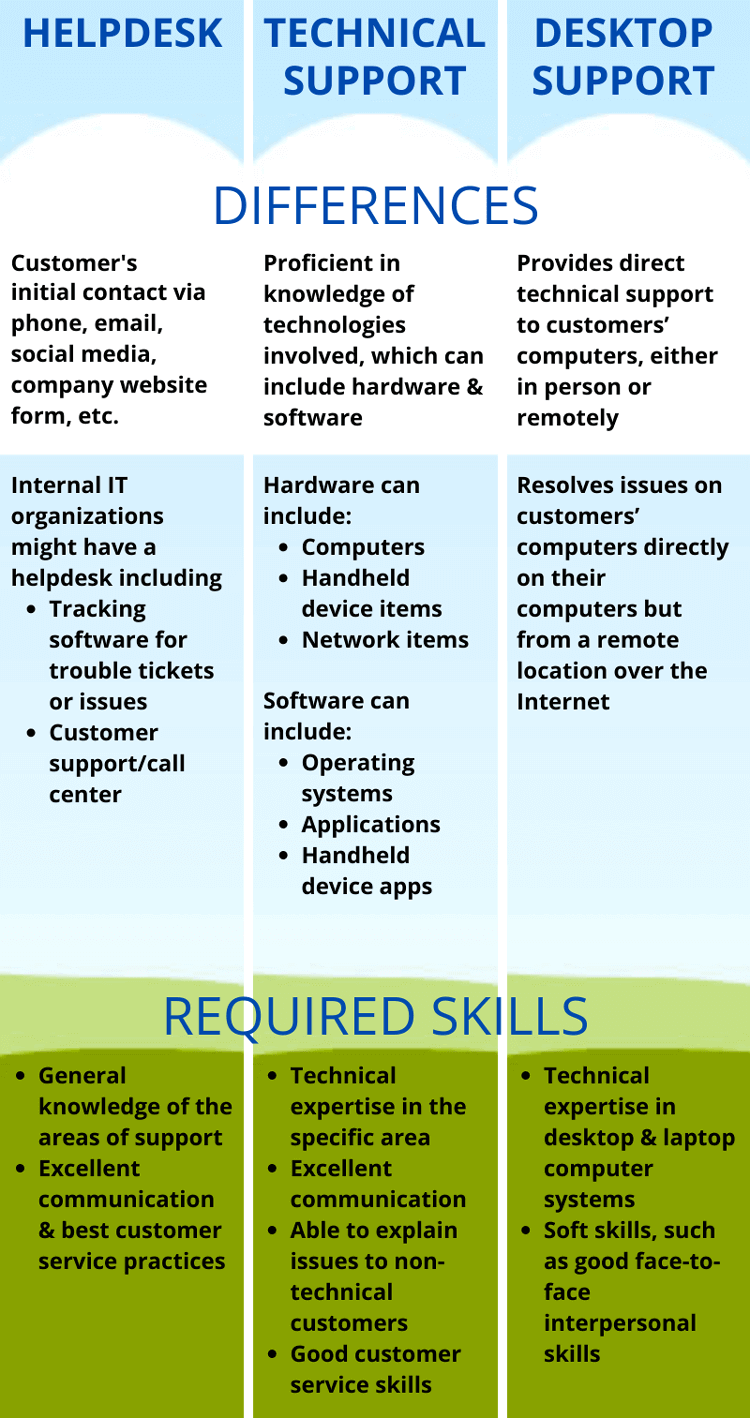
This is usually your front-line (sometimes called Level/Tier 1) level of support – the place where your customers will make initial contact; and this contact can be via many different channels: phone, email, social media, company website form, etc.
Internal IT departments might have a helpdesk; and computer, handheld device and software vendors will typically have a customer service/call center. Often these can be outsourced as well.
Usually, a helpdesk will have some form of tracking software for trouble tickets or issues.
Help Desk Support Skills List
- General hardware and software familiarity: Enough to triage the most common issues (password resets, application errors, connectivity problems) without escalating unnecessarily
- Active listening and question-based diagnosis: Using focused questions to understand what a non-technical user is actually experiencing before attempting a fix
- Ticket management: Accurately logging, categorizing, and prioritizing issues in systems such as Giva
- Remote troubleshooting: resolving common issues, like VPN connectivity, Office 365 access, browser errors, without hands-on access to the user's device
- Escalation judgement: Recognizing when an issue exceeds Tier 1 scope and handing it off with complete, accurate documentation so Tier 2 can act immediately
- Customer service fundamentals: Patience, empathy, and the ability to stay calm and professional with frustrated or non-technical users under time pressure
For a deeper dive, see our article on Help Desk Description of Duties.
IT Technical Support
These people will know most about the technologies involved that relate to the customers' issues (they are sometimes referred to as Level/Tier 2 or 3 support).
This can include hardware and software:
-
Hardware can include:
- Computer and handheld device items, such as displays, hard drives, memory, motherboards, etc.
- Network items, like routers, switches, networks servers, etc.
-
Software can include:
- Operating systems, such as Windows, Linux, Apple OS, etc.
- Applications, such as Microsoft Word, a web browser, conferencing software such as Microsoft Teams or Zoom, etc.
- Handheld device apps.
IT organizations and hardware/software vendors will need experts in all of the above as related to their business technologies.
Technical Support Skills List
- Deep technical expertise in a defined domain: Understanding functions such as Windows Server administration, network diagnostics, enterprise application support, or security operations
- Log analysis and diagnostic tooling: Reading system event logs and error codes, and working with tools such as Wireshark, SolarWinds, or OS-native diagnostics
- Root cause analysis: Moving beyond surface symptoms to identify the underlying system, configuration, or code-level failure
- Incident documentation: Producing detailed escalation notes and incident reports in tools such as Giva, with enough technical detail for engineering teams to act on
- Scripting and automation basics: Working knowledge of PowerShell, Bash, or Python for repetitive diagnostic or remediation tasks
- Technical communication: Translating complex findings into terms that non-technical stakeholders and end users can understand, both in writing and verbally
IT Desktop/Deskside Support
These people provide direct technical support to customers' computers, either in person or remotely.
Internal IT departments as well as computer hardware vendors will often have people that can come out and fix computer problems in person.
Remote computer management has helped in allowing this type of person to resolve issues on customers' computers directly on their computers but from a remote location over the Internet.
Desktop Support Skills List
- Hardware repair and imaging: Replacing components (RAM, SSDs, batteries, system boards) and deploying standardized OS images using tools such as Microsoft WDS, SCCM, or JAMF
- Endpoint management: Configuring and troubleshooting Windows 10/11 and macOS installations, plus common peripherals--printers, VoIP phones, monitors, and docking stations
- Active Directory and identity: Joining devices to a domain, managing user accounts, and resolving Group Policy conflicts
- Basic networking: Diagnosing physical connectivity issues (patch cables, switch ports, wireless access points) and configuring static IP addresses and DNS settings
- Asset tracking: Maintaining hardware inventory records, managing refresh cycles, and coordinating device procurement and retirement
- In-person interpersonal skills: resolving on-site issues with patience and professionalism, often working directly alongside frustrated employees under time pressure
Recommended Certifications by Role
Certifications validate technical skills and are consistently listed in job postings for all three support functions. The most relevant credentials by role:
-
Help Desk / Tier 1 Support
- CompTIA A+: The most widely recognized entry-level IT credential, covering hardware, operating systems, networking, mobile devices, and basic troubleshooting. Universally recommended for help desk roles.
- ITIL 4 Foundation: Introduces the service management framework used by most enterprise IT organizations, which is valuable for understanding how tickets, incidents, and change requests are handled.
- Microsoft 365 Fundamentals (MS-900): Relevant for help desk roles where Microsoft 365 is the primary platform.
-
Technical Support / Tier 2–3
- CompTIA Network+: Validates networking concepts, protocols, and troubleshooting skills across platforms.
- CompTIA Security+: Increasingly valuable as technical support roles intersect with security incident response and system hardening.
- Microsoft Certified: Azure Fundamentals (AZ-900): Relevant as organizations shift workloads to cloud platforms and technical support follows those systems.
-
Desktop Support
- CompTIA A+: Also the standard starting certification for desktop support, covering the hardware and OS fundamentals central to the role.
- Microsoft Certified: Modern Desktop Administrator Associate (MD-102): Covers enterprise deployment and management of Windows endpoints and Microsoft 365 Apps.
- CompTIA Linux+: Applicable in organizations running mixed Windows/Linux environments.
Career Path: How These Roles Connect
Help desk, technical support, and desktop support are not parallel tracks, where they form a natural progression that many IT professionals move through early in their careers.
A typical path starts at Tier 1 (help desk), where you build communication habits and develop familiarity with the tools and issues an organization encounters most often. From there, a specialization choice often emerges, where those drawn to complex diagnostics, systems analysis, and scripting tend to move toward technical support (Tier 2 or 3). Those who prefer working directly with hardware and end users on-site typically move toward desktop support.
Both routes lead to further specialization. Technical support experience is a common stepping stone to systems administration, cloud engineering, or cybersecurity. Desktop support experience prepares technicians for endpoint management, IT asset management, or field services leadership roles.
According to the U.S. Bureau of Labor Statistics, computer user support specialists earned a median annual wage of $60,340 in May 2024. Computer network support specialists, a common next step for technical support professionals, earned a median of $73,340 in the same period.
Important Conclusion
While the level of technical expertise can vary from role to role, interpersonal people skills is one important area that not only cannot be neglected, but should be highly emphasized in a support organization and a skill highly sought after in support personnel. All customer-facing people represent the company and can help or hurt the business' bottom line; and so, while technical skills are a must, great customer service skills and interpersonal relationship abilities are imperative as well.
Categories: Help Desk, Customer Service