Help Desk Management: The Complete Guide for IT and Support Teams
 By Ron Avignone
Help desk management has become a strategic priority for organizations of every size.
Whether your type of help desk is internal, employee-facing, or external, helping customers, it plays a mission-critical role in keeping your organization functioning.
In this guide, we cover what it takes to run a well-managed help desk in operationally challenging times. We've included core best practices, the software that makes help desks scalable, and the Key Performance Indicators (KPIs) you should work towards.
Every IT help desk should be aiming for less downtime, fewer delays, lower costs, and a consistently positive experience for everyone who reaches out for help.

Key Takeaways: Summary Table
For those in a hurry, we've compiled the following quick reference summary table:
# |
Takeaway |
Why it matters |
|---|---|---|
1 |
Structure your ticket routing from the start |
Clear categorization, priority levels, and automation rules prevent tickets from getting lost and keep resolution times down |
2 |
Build a centralized, maintained knowledge base |
Agents resolve issues faster and users can self-serve, reducing ticket volume for routine requests |
3 |
Document standard operating procedures |
Consistency across your team improves outcomes, speeds up onboarding, and makes process gaps easier to spot |
4 |
Automate repetitive tasks |
Workflow automation reduces manual effort, lowers error rates, and frees agents for complex, high-value work |
5 |
Train your team continuously |
Tools and expectations evolve, and ongoing training keeps technical skills and communication quality sharp |
6 |
Support users across all channels |
Omnichannel support and a self-service portal meet users where they are and reduce pressure on your support team |
7 |
Enforce SLAs with real processes |
SLA tracking only works when it's built into workflows, not reviewed after the fact |
8 |
Use a service catalog to manage expectations |
Clear service definitions reduce vague requests and help teams plan capacity more effectively |
9 |
Let data drive improvement |
Regular review of key metrics turns performance patterns into actionable process changes |
10 |
Treat security as an operational priority |
Sensitive data flows through every ticket; protocols, access controls, and audits are non-negotiable |
What Is Help Desk Management?
Help desk management is the ongoing practice of organizing, tracking, and resolving user support requests using a combination of ticketing software, defined workflows, and trained staff. In practice, that means automating routine tasks, coordinating escalations across support tiers, and continuously improving the processes that keep requests moving from submission to resolution.
A well-run help desk management program typically includes:
- Ticket intake and routing processes
- Defined support tiers and escalation paths
- Knowledge base management
- SLA monitoring and performance reporting
- Agent training and workforce planning
- Security and compliance controls
In many organizations, help desk management also overlaps with broader IT Service Management (ITSM) frameworks such as ITIL. These provide structured approaches for handling incidents, service requests, and problem management.
In the end, the goal of help desk management is to resolve issues quickly while maintaining a high-quality user experience.
Key Components of Help Desk Management
A well-run help desk management system is built on five main components:
- Ticketing system: The central mechanism for logging, tracking, and resolving every support request from submission to closure.
- Automation and rules: Automatic routing, escalation, and notification logic that assigns tickets to the right agents and keeps workflows moving without manual intervention.
- Reporting and analytics: Real-time monitoring of KPIs such as ticket volume, SLA compliance rates, and agent performance to support data-driven management decisions.
- Self-service knowledge base: A searchable resource that lets users resolve routine issues independently, reducing incoming ticket volume before requests ever reach an agent.
- Omnichannel support: A unified inbox that consolidates queries from email, phone, chat, and web portals so agents can manage all channels in one place, with full context on each user.
Why It Is Important to Improve and Maintain High Help Desk Management Standards
A poorly run help desk is more expensive than most organizations realize. High ticket volumes with no clear ownership, missed SLA deadlines, and support agents stuck on repetitive tasks aren't just inconveniences. They translate into lost productivity, damaged customer relationships, and costs that grow over time.
A well-managed help desk delivers real business results:
- Faster issue resolution reduces downtime for employees and friction for customers, directly protecting revenue.
- Lower operational costs come from automation and self-service tools that reduce incoming ticket volume.
- Higher user satisfaction builds loyalty. Customers who get fast, accurate help are more likely to stay.
- Better visibility lets leadership spot patterns, justify resources, and make smarter decisions about staffing and tools.
Organizations that invest in help desk performance don't just answer tickets faster. They build a support infrastructure that scales with growth and holds up under pressure.
Core Best Practices at a Glance
These operational practices form the foundation of a well-managed help desk. Each one supports the KPIs and workflows covered throughout this article:
- Structure ticket routing and priority levels: Route tickets automatically to the right support tier, from self-service through advanced escalation, so IT issues reach the right skill level without manual triage.
- Build and maintain a centralized knowledge base: A searchable, regularly updated library of knowledge base articles, reinforced by AI-Powered Knowledge Copilots, lets agents resolve issues faster and lets end users solve routine problems through a self-service portal before a ticket is ever created.
- Document standard operating procedures: Written SOPs for intake, escalation, and follow-up keep outcomes consistent across shifts and make onboarding faster.
- Automate repetitive workflows: Routing, escalation, notification rules, and AI copilots reduce manual effort and free agents for complex issues.
- Invest in ongoing agent training: Continuous training on both technical tools and soft skills keeps support quality high as tools and expectations evolve.
- Offer omnichannel and self-service support: Meeting users across email, chat, phone, and self-service portals with multi-language support where needed keeps the experience consistent regardless of channel.
- Align operations with Service Level Agreements (SLAs): Build response and resolution-time commitments directly into workflows, with automated alerts before an SLA breach, rather than reviewing compliance after the fact.
- Use an IT service catalog to set expectations: A clearly defined ITIL service catalog reduces vague requests and helps teams plan capacity.
- Let data and Customer Satisfaction (CSAT) drive continuous improvement: Regularly reviewing ticket volume, resolution time, and CSAT turns performance patterns into concrete process changes.
- Prioritize data security and compliance: Identity verification, role-based access, and audit trails protect the sensitive data that flows through every ticket.
- Use AI to streamline processes: AI now assists with ticket categorization, KB suggestions, self-service chatbots, and predicting SLA breaches before they occur.
- Reduce costs through self-service, automation, and knowledge reuse: Converting resolved tickets into KB articles and applying root-cause analysis to recurring issues lowers cost per ticket over time.
For the deeper operational detail behind these practices, including the specific process breakdowns where good intentions still quietly fail, see Giva's dedicated article Help Desk Best Practices: The 4 Silent Failure Points.
Typical User Roles in Help Desk Management
A well-structured help desk operation typically includes four distinct roles:
- The Help Desk Manager, who leads the team, sets strategy, and monitors overall performance
- Help Desk Agents, who handle day-to-day ticket resolution and direct user interactions
- The Help Desk Admin, who manages the platform configuration, user permissions, and underlying IT infrastructure
- The Knowledge Manager, who maintains and updates the knowledge base to ensure agents and end users have access to accurate, current information
In smaller organizations, one person may fill several of these roles simultaneously.
Key Responsibilities of the Help Desk Manager
While support agents handle day-to-day troubleshooting, help desk managers are responsible for ensuring the entire support operation runs smoothly.
Typical responsibilities include:
- Team leadership and staffing: Recruit, train, and schedule support agents to maintain coverage across all support channels.
- Process management: Design workflows for ticket routing, escalation, and resolution to keep operations efficient.
- Performance monitoring: Track metrics such as first-contact resolution, ticket backlog, SLA compliance, and customer satisfaction scores.
- Knowledge management: Make sure the knowledge base is kept accurate and useful.
- Continuous improvement: Analyze trends in support tickets to identify recurring problems and improve processes, documentation, or system configurations.
In mature organizations, help desk managers also collaborate closely with IT leadership, cybersecurity teams, and application owners to prevent issues before they occur.
Understanding the Help Desk Ticket Lifecycle
Every support request moves through a defined lifecycle from submission to resolution. Understanding this lifecycle helps managers identify bottlenecks and improve efficiency.
A typical ticket lifecycle includes:
- Ticket creation: A user submits a request through email, portal, chat, or phone.
- Classification and prioritization: The system categorizes the ticket and assigns priority based on urgency and impact.
- Assignment: Tickets are routed to the appropriate support tier or agent.
- Investigation and troubleshooting: The assigned agent analyzes the issue and works toward resolution.
- Escalation (if needed): Complex issues may move to higher-tier support teams.
- Resolution and documentation: Once solved, the ticket is closed and the solution may be added to the knowledge base.
Optimizing each stage of the ticket lifecycle helps reduce resolution times and improve customer satisfaction.
Common Help Desk Management Challenges
Even well-run help desks face recurring operational challenges. Recognizing these challenges early allows organizations to implement better workflows, automation tools, and training programs.
Some of the most common include:
- High ticket volumes: Growing organizations often see ticket demand rise faster than support capacity.
- Knowledge gaps: When documentation is incomplete or outdated, agents spend more time researching solutions.
- Inconsistent processes: Without standardized workflows, similar issues may be handled differently by different agents.
- Agent burnout: Support teams often deal with repetitive requests and high workloads, which can impact morale and performance.
- Security risks: Help desks frequently handle account access and sensitive data, making them a target for social engineering attacks.
How to Measure IT Help Desk Performance
Tracking the right metrics turns gut feelings into actionable intelligence. The most important performance indicators for help desk teams include:
- First-Contact Resolution (FCR) rate: Tickets resolved without escalation or follow-up
- Average Ticket Resolution (ATR) time: From open to closed
- Average Handling Time (AHT): Total time an agent spends on a ticket including active handling and wrap-up work
- SLA compliance rate: What share of tickets meet committed timelines
- Average response time: How quickly an agent makes first contact on a new ticket, distinct from full resolution time
- Ticket volume by category: Useful for spotting demand patterns and knowledge gaps
- Agent productivity / technician utilization rate: Tickets handled per agent relative to available capacity, balanced with quality indicators so efficiency gains don't come at the cost of resolution quality
- Customer Satisfaction Score (CSAT): Direct feedback on the support experience, typically collected via post-resolution surveys
- Cost per ticket: A measure of operational efficiency over time
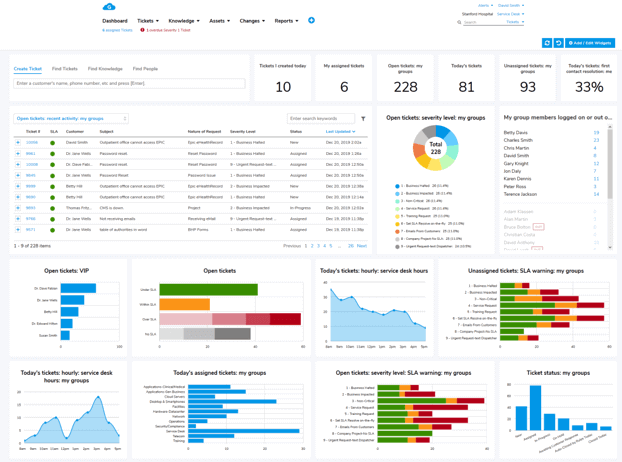
Giva's reporting and analytics tools surface these metrics in real time, giving managers the visibility to act quickly rather than react after the fact. For a deeper look at which metrics matter most and how to use them, explore Giva's resources on help desk metrics and performance reporting.
A real-time dashboard that puts all of these indicators in one view rather than requiring manual report pulls is one of the clearest signs of a mature, well-run help desk operation.
How the Right IT Help Desk Software Optimizes Productivity and Efficiency
Best practices only scale when they're supported by the right technology. Help desk management software is the operational backbone of a modern support team. See how Giva's help desk software brings these capabilities together in a single platform.
It's where tickets are created, routed, tracked, resolved, and analyzed. This software is crucial because its quality and features directly affect agent productivity, user satisfaction, and your team's ability to hit KPIs and SLAs.
What to Look for in Help Desk Management Software
- Automation capabilities: Robust workflow automation, smart ticket routing rules, and automated escalation and follow-up are essential. The more routine tasks you can automate, the more your team can focus on high-value work.
- Self-service and knowledge management: A built-in self-service portal, centralized knowledge base, and seamless knowledge base integration with your ticketing workflow are critical for reducing volume and empowering users to help themselves.
- Omnichannel support: Your platform should support all the communication channels your users rely on, email, web forms, chat, phone, and social media, with a unified view of each user's history across channels. No customer should have to explain their issue over and over again, especially if there's not been a satisfactory resolution yet.
- SLA tracking and reporting: Real-time SLA tracking, configurable alerts for approaching breaches, and clear performance dashboards are non-negotiable for teams with defined service commitments.
- Integration capabilities: Whether you need to connect to CRM systems, project management tools, collaboration tools, or asset tracking platforms, your help desk software should work with the systems your team already uses.
- Cloud-based and mobile-ready: A cloud-based or web-based help desk eliminates infrastructure overhead and lets support staff work from anywhere. Mobile device support ensures agents stay responsive even when away from their desks.
- Security and compliance: Role-based access, audit trails, and data security features are essential for teams handling sensitive employee or customer information.
Streamlined Help Desk Management for Streamlined Support
Running a well-managed help desk is an ongoing commitment to process, people, and technology, and the results compound over time.
IT teams that invest in clear ticket routing, solid knowledge management, workflow automation, regular training, and the right help desk management software consistently outperform those that don't. The results show up as faster resolution times, better SLA compliance, higher user satisfaction, and lower operational costs.
The best-performing help desk teams share one trait: they treat support as a strategic function, not just a cost center. They measure what matters, act on what they learn, and keep raising the bar.
Whether you're formalizing a help desk operation for the first time or looking to improve an existing one, the practices in this guide give you a concrete place to start.
Related Resources
- ITIL Resources: Get helpful ITIL resources with insights from our industry experts & best practices
- Help desk solutions for small, mid-sized, and enterprise organizations
- Self-service portal and AI-powered knowledge base solutions
- What SLA Metrics Are Worth Watching? 8 Key Metrics for Measuring Service Level Agreement Performance
Why Giva Stands Out as High-Performance Help Desk Management Software
Giva is a cloud-based help desk solution built for organizations that need enterprise-grade help desk capabilities without the enterprise-level complexity. It's designed for IT teams that need automation tools, self-service resources, SLA tracking, and real-time reporting. All of this is packaged in an interface that's clean enough that new support staff can get up to speed quickly.
Giva supports knowledge base integration, custom integrations, and live performance dashboards. With Giva, there's no infrastructure to manage and no lengthy implementation to navigate.
If your team is ready to move from reactive support to a proactive, data-driven operation, explore what Giva can do for your help desk.
Get a demo to see Giva's solutions in action, or start your own free, 30-day trial today!


Categories: Help Desk