Types of Help Desks: A Guide to Choosing the Right One for Your Business
A help desk is a centralized point of contact where users submit requests for technical support, IT assistance, or service. Every request is logged as a ticket, assigned to the right person, and tracked until it's resolved. Help desks range from a shared inbox at a small company to a multi-tier enterprise platform with automated routing, self-service portals, and AI-assisted triage. The right type depends on who you're supporting, how much control you need over the software, and whether you want to staff support in-house or hand it to a third party.
Help desks are categorized in four main ways: by who they support (internal employees vs. external customers), by how the software is delivered (cloud, on-premise, open-source), by how the support function is staffed (in-house vs. outsourced), and by the complexity tier of requests they handle. When choosing a help desk, you'll make decisions across all four dimensions. This article gives you a breakdown of each.
Internal vs. External Help Desks: The First Decision
Before choosing a deployment model or staffing approach, the most important question is: who are you supporting?
An internal help desk serves your own employees:
- IT departments use them to handle password resets, software installs, hardware issues, and network access requests
- HR teams use them to field payroll, benefits, and leave questions
- Facilities teams log maintenance requests and workspace issues through the same platform
Internally focused help desks typically handle lower ticket volume with a strong emphasis on personalized, fast resolution.
An external help desk serves the customers who buy your product or service. These platforms handle order inquiries, billing disputes, product support, and account management. Response speed and multi-channel access (email, live chat, phone) matter more here, because a frustrated customer can simply switch to a competitor.
Some organizations run both: an internal ticketing system for employees and a separate customer support platform for customers. Enterprise help desk software is often designed to handle both audiences in a single platform, which reduces tool sprawl but requires careful access and permission configuration to keep employee and customer data separate.
Comparison at a glance:
|
Internal Help Desk |
External Help Desk |
|---|---|---|
Primary Users |
Employees, IT/HR/Facilities teams |
Customers, end-users, partners |
Main Focus |
IT access, HR queries, facilities requests |
Product support, billing, account management |
Ticket Volume Pattern |
Predictable, typically business hours |
Variable; may require 24/7 coverage |
Key Metrics |
MTTR, SLA compliance, employee satisfaction |
Types of Help Desks by Deployment Model
-
Cloud-Based Help Desk
A cloud-based help desk (also called a SaaS help desk or web-based help desk) is hosted by the vendor on their servers and accessed through a browser or mobile app. You pay a monthly or annual subscription that typically includes technical support, maintenance, and data backups. Your IT team does not need to install or maintain anything on your own infrastructure.
Cloud-based help desks are the most common choice for small and medium-sized businesses because they're fast to set up, require minimal internal IT resources, and scale easily as you add users or support channels. Larger organizations use them too, especially when avoiding the capital cost of on-premise infrastructure is a priority. The trade-off is that your data lives on the vendor's servers, so data residency and privacy compliance requirements are worth checking before you commit.
-
On-Premise Help Desk
This is a help desk that is bought and set up on the customer's servers. After the software is purchased, it is up to the customer to ensure that the system is well maintained, protected and backed up. If the company hosting the help desk has a weak security system, important data and client information could be at risk. However, there are contracts in which the vendor is paid additional charges for maintenance. Because IT staff have firsthand experience with the company's technical functions, they can ensure that the software transitions smoothly into the business without interrupting existing infrastructure. An on-premise help desk is an expensive and highly customizable investment. For this reason, it may require an on-site technical support team, and is usually aimed at larger corporations.
-
Enterprise Help Desk
Rather than being aimed at helping customers only, this help desk is also used for in-house assistance. It is tasked with providing support to both the company's customers and employees so that the former remains satisfied and the latter's productivity is not hindered. The enterprise help desk can include many flexible features such as account management, service request fulfillment, and survey management. It is usually either custom-made to suit an organization's systems or is tailored for a specific business sector. The use of an internal help desk is advantageous to businesses desiring to strengthen ties and communication between departments, while simultaneously helping their customers.
-
Open-Source Help Desk
This help desk is quite common since it is sometimes provided free of charge. Open source software means that anyone has the freedom to access and alter a program's code without needing permission from its producers. A coder can easily improve, strengthen and upgrade any bug fixes in this help desk. One might think that because it is free, small businesses would prefer it over other help desks, but that is not the case. Organizations require highly skilled IT technicians that can successfully manage this fragile and malleable help desk, something that SMEs do not usually have.
Deployment model comparison:
Deployment Type |
Hosted by |
Setup Cost |
Maintenance Burden |
Customization |
Best for |
|---|---|---|---|---|---|
Cloud/SaaS |
Vendor |
Low (subscription) |
Minimal |
Limited |
SMBs and remote teams |
On-Premise |
You |
High (license + hardware) |
High |
Extensive |
Orgs with strict data control/compliance |
Enterprise |
Vendor or You (varies) |
High (license + implementation) |
Medium |
Extensive |
Large orgs supporting both employees and customers |
Open-Source |
You |
Low (free software) |
High |
Fully customizable |
Tech teams with in-house dev resources |
Operational Models: In-House, Outsourced, and Hybrid
Separate from how the software is delivered, you also need to decide who staffs your support operation. There are three models
- In-House Help Desk: Your own employees handle all support. You control quality, escalation paths, and institutional knowledge. The trade-off is higher staffing cost and limited coverage outside normal business hours.
- Outsourced Help Desk: A third-party provider (a managed service provider or BPO firm) handles support on your behalf. Organizations that outsource typically see cost savings of 20–35% compared to equivalent in-house staffing, and 24/7 coverage is easier to achieve. The trade-offs are reduced visibility into day-to-day operations and the risk that the vendor's agents don't know your products or internal processes as well as your own team would.
- Hybrid Model: Many organizations keep specialized or sensitive support in-house (Tier 2 and Tier 3 work, or support for regulated data) and outsource routine Tier 1 volume. This splits the difference between cost efficiency and quality control.
Help Desk Support Tiers: How Issues Are Routed
Most help desks organize support into tiers based on issue complexity. Routing tickets to the right tier prevents your most skilled engineers from handling password resets, and ensures serious incidents reach someone who can actually fix them
- Tier 0 - Self-Service: The user resolves the issue themselves using a knowledge base, FAQ page, or AI chatbot. No agent is involved. A well-designed self-service layer can deflect 20–40% of incoming tickets for common issues like password resets and basic how-to questions.
- Tier 1 - General Support: Front-line agents handle routine, high-volume requests by following documented procedures. This tier resolves the majority of tickets and acts as the triage point for escalation.
- Tier 2 - Specialized Support: Agents with deeper technical knowledge handle configuration problems, software bugs, and hardware failures that Tier 1 cannot resolve. Involves direct investigation rather than following scripts.
- Tier 3 - Internal Expert Escalation: Internal engineers/developers handling critical incidents, product defects, and deep infrastructure failures that Tier 2 can't resolve, whow are the people with the deepest knowledge of your own systems.
- Tier 4 - External Vendor Escalation: Issues escalated outside the organization to a software or hardware vendor (e.g., a CRM patch, a manufacturer's field engineer) -- high business impact, longest resolution time.
Not every organization uses all four tiers. Small teams often merge Tier 1 and Tier 2 into a single generalist group. Larger enterprises may add a Tier 4 for issues that require escalation to an external software or hardware vendor beyond Tier 3 scope.
How to Choose the Right Type of Help Desk
Once you understand the four dimensions, choosing comes down to a series of sequential questions:
- Who are you supporting? If employees, you need an internal IT or HR help desk. If customers, you need an external customer service platform. If both, look for enterprise software built to handle both audiences in one system.
- How sensitive is your data? If you have strict data residency requirements, HIPAA or GDPR obligations, or operational data you cannot share with a third-party vendor, on-premise or private cloud deployment is worth the added cost and maintenance burden. For most organizations, a reputable cloud/SaaS provider is sufficient.
- What is your team's technical capacity? Open-source and on-premise deployments require internal IT expertise to configure, secure, and maintain. Cloud/SaaS requires almost none. If your IT team is small or already stretched, the ongoing maintenance of self-hosted software is a real hidden cost to factor in.
- Do you want to run support in-house or outsource it? Outsourcing lowers headcount cost and improves coverage flexibility, but you give up direct oversight and institutional product knowledge. A hybrid model is a common middle ground: outsource Tier 1 volume and keep Tier 2+ in-house.
- What volume and complexity of tickets do you expect? A 50-person company with mostly routine IT requests needs a very different setup than a 5,000-person enterprise with multi-tier SLA requirements and regulated data. Tier 1-heavy operations favor cloud/SaaS and outsourcing; complex multi-tier environments typically need an enterprise platform with built-in escalation routing and reporting.
Consider Giva for Your Help Desk Needs
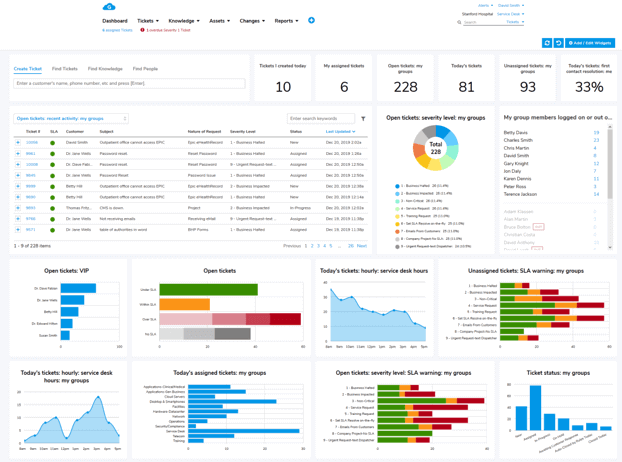
Giva's help desk and ITSM software bring you real-time, highly-customizable dashboards with a large widget library. You'll be up and running in days, and your IT help desk and service desk teams can be trained in hours on our intuitive and friendly interface.
Other Giva features include:
- Harness the power of Giva's AI Copilot to effortlessly refine responses and quickly access and format solution information
- Automatically convert emails into tickets to streamline the ticketing process
- Customize Giva for any department or subsidiary organization and deliver real-time agent and team analytics to help improve performance
- Automatically open tickets on a scheduled and recurring basis
- Automate escalation and closure of tickets
To learn more, book a free Giva demo to see our solutions in action, or start your own free, 30-day trial today!
Categories: Help Desk