What Is Tier 0 IT Support? Level 0 Self-Service Explained
Tier 0, also known as Level 0, is the self-serve IT support level.
Also referred to as Level 0 IT support, Tier 0 is the ITSM designation for what most organizations call their self-service layer. These are the tools and resources users turn to before they ever contact a human agent. It usually includes FAQs, knowledge bases, online forums, and automated (AI-based, such as Chatbots) solutions. And, it is the fastest and least expensive type of IT support to deliver, and when done well, it resolves the majority of routine requests automatically.
Tier 0 should catch and resolve as many routine inquiries as possible, making it easy for people to find these resources and navigate around it.
TL;DR
- These days, almost everyone who uses software, email, or devices in a workplace wants to find quick answers to common problems.
- Self-serve IT portals, also known as Tier 0 support, help people find answers to questions themselves.
- Only if an IT self-serve portal can't provide an answer will most users turn to an IT team to access ITIL user support. This is usually by submitting a support ticket via help desk software.
Read on for details. . .
What is Tier 0 IT Support? (Level 0 or Self Serve)
Tier 0 IT Support, often referred to as Level 0, is the foundational layer of IT service management (ITSM). Whether delivered by an organization's IT department or a third-party IT customer service team/vendor, having self-serve (Tier 0) solutions solves a lot of problems for users and IT teams.
Pro Tip: Use AI-based chatbots even when people are submitting support tickets to Tier 1/Level 1 ITSM support. If they have not found an answer, they can then be directed to a suitable self-help resource that should reduce demand on IT teams.
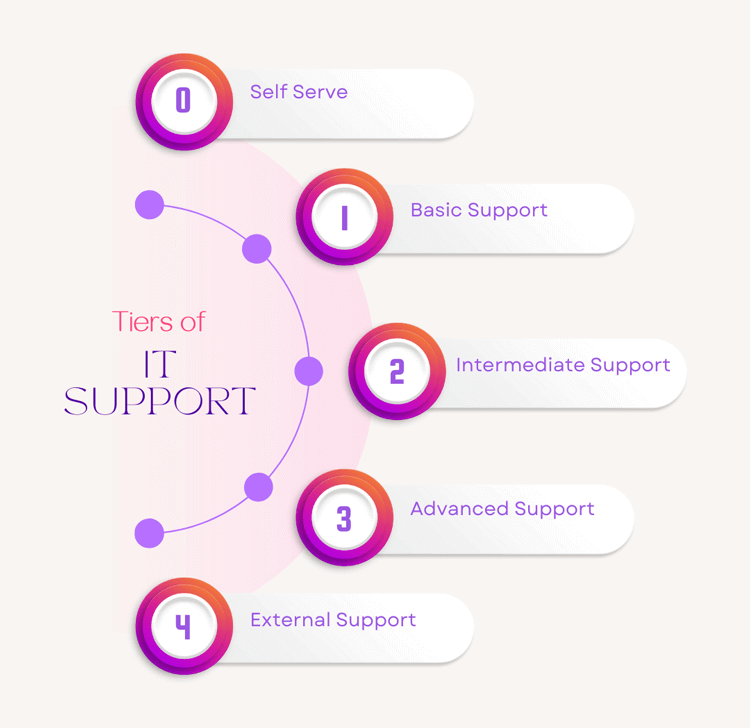
Unlike the other 4 IT support tiers where users interact with IT team members with ever-increasing levels of expertise, Tier 0 specifically delivers self-service solutions.
Self-serve IT solutions should include a range of resources, such as:
- Knowledge bases
- FAQs for common IT issues
- AI-powered chatbots and search tools
- Community forums
- Helpful videos
The idea behind self-serve is to empower end-users to resolve their issues without needing to rely on Tier 1/Level 1 IT support.
However, if an issue is too complex for self-serve, then end-users will need Tier 1 support. This can be even potentially higher if the problem is too complex for simple troubleshooting.
Tier 0 service is designed to provide users with the tools and information they need to solve common problems themselves. This strategy and series of solutions accelerate problem resolution and reduce the demand for Tier 1 and other levels of IT support. It further allows IT teams to focus on troubleshooting and more complex issues.
Common Examples of Tier 0 IT Support
The best way to understand Tier 0 is to see some examples. The following are among the most common use cases that organizations resolve through self-service rather than routing to a live IT agent:
- Password resets and account unlocks: This is the single most frequent IT support request in most organizations. Automated password reset tools let users verify their identity and reset credentials in under two minutes, with no ticket, no wait, no agent involvement.
- Software access requests: A self-service catalog allows employees to request standard software (Office 365, VPN clients, printers) and receive automated provisioning, cutting what was once a multi-day process to minutes.
- Hardware troubleshooting guides: Step-by-step knowledge base articles walk users through common issues, such as connecting to a shared drive, setting up a new monitor, resolving a slow machine, before they resort to submitting a ticket.
- New employee onboarding resources: These are searchable how-to libraries covering common day-one questions (network access, email setup, device configuration) that reduce the flood of onboarding tickets to Tier 1 teams.
- AI chatbots for routine inquiries: Virtual agents handle questions about IT policies, software availability, and basic troubleshooting through conversational prompts, escalating to a human agent only when the issue exceeds their resolution capability.
These examples share a common characteristic: they are high-volume, repeatable, and low-complexity, which is the ideal profile for Tier 0 resolution.
Why Does Tier 0 IT Support (Level 0) Play a Critical Role in ITSM and Help Desks?
Tier 0 plays a pivotal role in modern ITSM and help desk operations with a streamlined and self-serve approach to issues that are easy to solve and occur more often.
ITSM organizations continue to support digital transformation strategies. This has increased the amount of IT support for every company. Tier 0 solves this challenge with scalable, 24/7 support that anyone can access to find answers to their problems.
Including Tier 0 in an ITSM framework improves user satisfaction through the delivery of immediate solutions and keeps downtime to a minimum.
Tier 0 also allows IT teams to allocate resources more efficiently, focusing their attention on critical incidents and strategic initiatives. When ITSM teams and ITIL operators move the resolution of simple, repetitive troubleshooting tasks to Tier 0, help desk teams can reduce operational costs. It can also help improve overall service levels and customer service scores (e.g., CSAT, NPS, etc).
The demand for self-service resolution is substantial. According to a Gartner survey of nearly 6,000 customers, 73% use self-service at some point in their support journey, meaning that nearly three-quarters of incoming demand is already looking to resolve issues without a human agent. When Tier 0 resources are well-built, they intercept and process that demand before it becomes a ticket.
Pros and Cons of ITSM Tier 0 IT Support
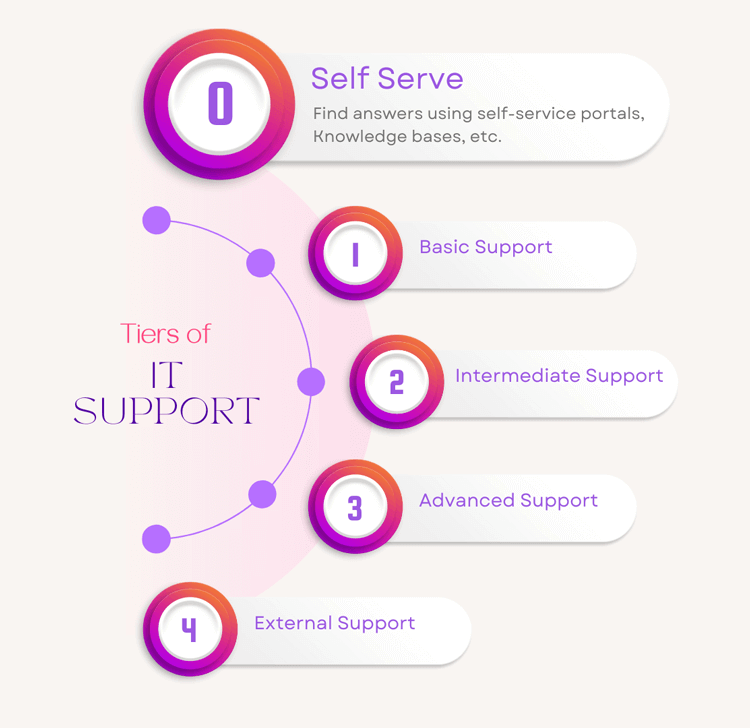
With five tiers of IT support we discussed in a previous blog post, from self-serve to the most advanced technical support, your organization will benefit from having each to support your staff. Here are the pros and cons of Tier 0, or self-serve IT tools.
Pros of Tier 0 IT Support, ITSM Self-Serve
- Cost-Effectiveness: Tier 0 reduces the need for as many Tier 1 IT staff by enabling users to solve their problems independently, leading to significant cost savings. Self-service resolutions cost a fraction of agent-handled tickets, and at scale, that gap makes Tier 0 one of the highest-ROI investments in the IT support stack.
- Scalability: Self-service resources can be easily scaled to accommodate a growing user base without an equivalent increase in IT staff.
- Issue Resolution That Won't Impact KPIs/SLAs: Users can resolve issues instantly without waiting for support, improving productivity and user satisfaction. This also means that every time someone solves a problem this way, it won't impact KPIs and SLAs, so it's better for productivity monitoring.
- Resource Optimization: IT teams can focus on more complex and high-priority issues, improving the efficiency of every other support tier.
- User Empowerment: When people have the tools and knowledge to solve their issues, IT organizations can help to cultivate a culture of self-reliance and continuous learning.
Cons of Tier 0 IT Support, ITSM Self-Serve
- Limited Scope: Tier 0 is much more effective for common, straightforward issues, not more complex problems that require IT team members to take action.
- Initial Setup Costs: Developing and maintaining a comprehensive self-service platform does require a significant upfront investment of time and resources.
- User Adoption Challenges: Encouraging users to adopt self-service solutions can be difficult, particularly in organizations with an older, less tech-savvy workforce. The same Gartner survey from above also found that 43% of self-service failures occur simply because users cannot find content relevant to their issue.
- Can Cause More Problems: Like anyone "Googling" medical symptoms, users may misinterpret the information available. This may lead to incorrect solutions or further complications.
- Constant Updates Required: Keeping the self-service resources current and relevant requires ongoing effort. This can include regular updates and content management.
Now let's look at how to set up self-serve tools, which is the largest upfront investment of time and resources required for this level of support.
How to Set Up Tier 0 IT Support: 5 Stages for an IT Help Desk
In most cases, setting up Tier 0 IT Support involves 5 stages, and it's equally important to maintain these resources once they're established.
- Identify Common Issues: Analyze your IT support tickets to identify recurring issues that can be addressed with self-service resources. If this is your first time setting up self-serve, then you might have 100s of issues that can be turned into self-serve resources.
- Develop a Knowledge Base: Create a comprehensive and easily accessible knowledge base that includes guides, FAQs, troubleshooting steps, and video tutorials.
- Integrate AI and Automation: Implement AI-driven chatbots and automation tools to guide users to the right resources or assist them with basic tasks like password resets. Make sure AI is embedded as part of the search function and the first stage of submitting a support ticket. This is so people can find answers they might otherwise have missed.
- Promote User Adoption: Educate everyone across the organization about the self-service options available. Encourage them to use these resources before contacting support.
- Monitor and Improve: Continuously monitor the effectiveness of Tier 0 resources through user feedback and analytics. Make necessary adjustments to improve the system. Keep adding to the resources when new software gets introduced to the organization, or anything changes.
How Does Tier 0 Compare to Other ITSM Support Tiers?
For more information on every tier of IT support, here is our 5 Tiers of IT Support Explained: Tier 0 to Tier 4, ultimate guide.
Tier 0 vs. Tier 1
Tier 0 is a self-service solution, while Tier 1 involves a front-line IT team for basic troubleshooting and issue resolution.
Tier 1 help desk staff handle issues that cannot be resolved through Tier 0 resources. This can provide issue resolution when a user is unable to solve the problem themselves.
When a user moves from self-service to an agent, by chat, phone or a visit to the desk, that request should still become a ticket, or the handoff leaves no record. Our article on why every IT request should become a ticket explains why.
For more information on Tier 1 support, here's our article on Tier 1 (Level 1) IT Support.
Tier 0 vs. Tier 2
Tier 2 support is for more complex issues that require deeper technical knowledge and expertise.
While Tier 0 handles simple, routine troubleshooting, Tier 2 IT staff handle and solve problems that require more advanced and specialized knowledge.
For more information on Tier 2 support, here's our article on Tier 2 (Level 2) IT Support.
Tier 0 vs. Tier 3
Tier 3 is typically reserved for issues that require high-level technical skills, such as bug fixes, advanced platform knowledge (e.g., AWS, Google, Microsoft, Intel, etc.), and system integration tasks.
While Tier 0 focuses on empowering users to solve basic problems, Tier 3 involves solving complex technical challenges.
At this level, IT staff are usually involved in strategic decisions and implementations, such as digital transformation, platform migrations, and in-house software development.
For more information on Tier 3 support, here's our article on Tier 3 (Level 3) IT Support.
Tier 0 vs. Tier 4
Tier 4 often involves coordinating with external vendors and consultants who attempt to solve issues beyond the internal IT team's capabilities. In contrast, Tier 0 is entirely user-driven and focused on common, internal support needs.
For more information on Tier 4 support, here's our article on Tier 4 (Level 4) IT Support.
How Do Different Tiers of IT Support that Include Level 0 Work Together to Make a Functional ITSM Team?
The different tiers of IT support work together to create a seamless, efficient support ecosystem.
Tier 0 serves as the first line of IT operations, handling the bulk of simple queries. This is a massive time and cost-saver for Tier 1 and Tier 2 teams to focus on more challenging issues.
Tier 3 and Tier 4 provide deeper technical expertise and vendor support for the most complex problems. With this layered approach, it ensures that each issue is resolved according to the appropriate level of expertise. This serves to optimize resource allocation and KPI-based response times.
Key Takeaways: Why Your Organization Needs Tier 0 IT Support
Implementing Tier 0 IT support can significantly enhance your organization's efficiency and user satisfaction. If you don't have self-serve, you're causing your IT team a lot of headaches and increasing costs while reducing potential efficiencies.
Self-serve reduces workloads on higher-tier support, reduces operational IT costs, and provides users with instant solutions. This leads to faster issue resolution and a workforce that's empowered to find answers to their own problems.
Giva Can Help Your Tier 0 IT Support
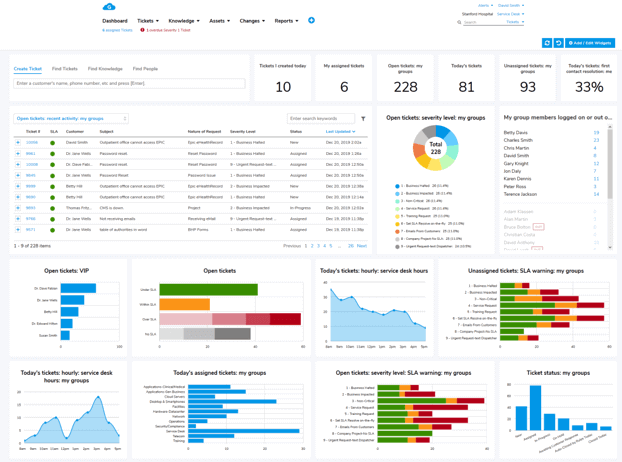
Giva's help desk and ITSM software include knowledge management and a self-service portal, which can help you bring self service to the organizations you support.
Other Giva features include:
- Harness the power of Giva's AI Copilot to effortlessly refine responses and quickly access and format solution information
- Automatically convert emails into tickets to streamline the ticketing process
- Customize Giva for any department or subsidiary organization and deliver real-time agent and team analytics to help improve performance
To learn more, book a free Giva demo to see our solutions in action, or start your own free, 30-day trial today!

Categories: IT, Help Desk