Higher Education Service Management: What It Is and Who Owns What on Campus
A student needs financial aid, but the aid is on hold and blocks registration, at least temporarily. Clearing the hold requires both the registrar and the bursar's office. The email confirming that the hold has been lifted is sent to a student login that IT locked last week over the unpaid balance. Three offices are now working three separate queues, and no one owns the full problem. The offices do not report to the same boss, yet the student's problem crosses them all. Higher education service management is the practice meant to coordinate that kind of cross-office problem.
This post covers what higher education service management actually is and how campuses decide who owns which service. It also looks at how requests should move between offices so students do not have to restart the process. All of this while still following privacy and financial-aid rules. A shared front door for students can exist without removing local ownership.

Key Takeaways
- Ownership comes before the platform: Campuses can share one front door and one set of workflows without merging staff or budgets. The harder question is who owns each service and who has the authority to change it.
- A single front door still needs clear hand-offs: Students and faculty need to sign in, see status, and move between offices without restarting the request. The portal is only as useful as the routing and ownership rules behind it.
- A help desk ticket can be an education record: The Family Educational Rights and Privacy Act (FERPA) covers records directly related to a student and maintained by the institution. Queue design, agent scripts, and access controls need input from the registrar or privacy office.
- Public campuses face new accessibility dates: The Department of Justice moved the ADA Title II web accessibility deadlines (WCAG 2.1 AA) to April 26, 2027 for larger governments and April 26, 2028 for smaller ones. This includes vendor-hosted portals as well.
- The academic calendar sets the staffing and change windows: Peak volume at the start of term and during registration is real, but published data is mostly limited to IT desks. Non-IT offices face the same busy periods even if exact numbers are not published.
What Is Higher Education Service Management?
Higher education service management applies IT service management and enterprise service management practices across a campus, giving students and staff one front door, shared processes, and clear ownership. That way IT, HR, facilities, and student offices such as the registrar and financial aid can handle requests together.
ITIL 4 defines service management as "a set of specialized organizational capabilities for enabling value for customers in the form of services." Campuses usually apply those capabilities first to IT, then extend them to other offices. For the broader ITIL background, see Giva's guide to IT service management.
Other sources use different names for related ideas. Some say enterprise service management (UCISA and the University of Reading). Others say shared services (CLA). In Australia, some use a service reference model inside the Higher Education Reference Model. This article uses higher education service management as the working term.
One way to keep the terms clear is to separate practice, scope, and organization:
- The practice is IT service management.
- The scope is enterprise service management, which means applying those practices beyond IT.
- The organization is shared services. CLA defines shared services as the intentional consolidation of administrative and transactional functions.
That is an organizational choice, not the same thing as service management. A campus can share processes and a front door without merging staff.
Four Key Components of Higher Education Service Management
-
IT Service Management (ITSM)
This is the ITIL-based practice for campus technology support. It replaces scattered departmental inboxes with one ticketing system, so every request is tracked against a Service Level Agreement (SLA). It also covers the help desk, account access, classroom technology, and asset management for software licenses, devices, and equipment loan programs.
-
Enterprise Service Management (ESM)
ESM applies IT's request, workflow, and knowledge practices to other offices on campus. EDUCAUSE's 2019 IT service catalog model covers IT services only and places housing, registration, facilities, and police outside its scope, so campuses design non-IT catalogs themselves.
Read more: Enterprise Service Management (ESM): What It Is and How Far to Take It
-
One Front Door: Service Portal and Catalog
Students, faculty, staff, and sometimes alumni and applicants all submit requests through the same front door. For the mechanics of portals and catalogs, see Giva's self-service portal guide and IT service catalog guide.
-
Governance and Compliance
This covers who owns each service and the privacy, financial, and accessibility rules that shape what a campus desk can do. The ownership section and the FERPA section below explain how campuses handle both.
What Campuses Report Gaining, and How Far to Trust It
Campuses often say they gain three things: lower costs, better work across offices, and a better experience for students and staff. Most published results come from the campuses themselves. No independent study has measured the overall effect. Cost savings are hard to pin down. The only dollar figures that appear come from conference talks or vendor case studies, which are hard to verify.
One experience, Case Western Reserve's 2025 service desk results show first call resolution of 85.01% against a 65% target, satisfaction of 4.87 out of 5, and 4.99% call abandonment. The desk's contractor is required to meet these numbers.
On effect size, a 2011 knowledge base at the University of Maryland, Baltimore County cut the need for phone support by 30%, but ticket volume by only 3% (Fritz & Mocko, 2015). The modest result shows what one real campus change produced.
Three Challenges That Set Higher Education Service Management Apart
Three conditions shape how a campus can run service management, and each one limits what a single office can mandate:
- Shared governance and faculty autonomy: No single office can require a campus-wide process. CLA's guidance on higher education shared services says models have to balance efficiency with faculty autonomy and shared governance, and recommends bringing faculty leadership in early.
- A diverse, changing user base: EDUCAUSE's service catalog paper describes users that include students, faculty, staff, parents, alumni, and donors, plus governance committees and legislatures, and notes that the population turns over as new students arrive and others graduate.
- Phased, stakeholder-driven change: Campuses replace ticketing platforms and consolidate desks in stages. Penn State began an 18-month discovery period in July 2025 with a January 2027 target, and UNC-Chapel Hill ran a listening tour in 2022 before a roughly six-month platform replacement in 2024.
Higher Education Service Management vs. Student Information Systems, CRM Platforms, and One-Stop Centers
System |
Primary job |
Typical owner |
Holds the record of |
Handles a request by |
Limit |
|---|---|---|---|---|---|
Student Information System (SIS) |
Manage enrollment, registration, grades, and financial aid |
Registrar / student affairs |
Student academic and financial records |
Updating student data or generating reports |
Does not route or track cross-office requests |
Customer Relationship Management (CRM) |
Track prospective students and alumni relationships |
Admissions / advancement |
Leads, contacts, and outreach history |
Logging interactions and campaigns |
Does not manage internal service workflows or ownership |
Learning Management System (LMS) |
Deliver courses and track student progress |
Academic affairs / IT |
Course content, grades, and activity |
Assigning work or posting materials |
Does not handle non-academic requests or multi-office hand-offs |
Enterprise Resource Planning (ERP) |
Run finance, HR, and procurement transactions |
Finance / HR / central admin |
Budgets, payroll, and purchasing records |
Processing transactions and approvals |
Does not provide a shared front door or service catalog for campus users |
One-stop center |
Give students a single physical or virtual place for common questions |
Student services |
Appointments and walk-in notes |
Answering questions in person or by chat |
Relies on staff knowledge; does not scale ownership or workflows across offices |
Service management platform |
Provide one front door, shared workflows, and ownership rules |
IT / service management office (or federated) |
Requests, status, and knowledge articles |
Routing, tracking, and handing off between offices |
Does not replace the systems of record above; it sits on top of them |
Ten Campus Service Areas and the Requests They Generate
These are common campus office service areas and the types of requests they generate. Not every campus has all ten, and ownership could vary:
- IT / Technology Support: Password resets, software access, classroom tech issues, device setup
- Registrar: Registration holds, transcript requests, enrollment verification, course add/drop
- Financial Aid: Aid status, verification documents, disbursement questions, scholarship holds
- Bursar / Student Accounts: Payment plans, refunds, account holds, billing questions
- Housing / Residence Life: Room assignment issues, maintenance requests, roommate concerns
- Facilities / Work Orders: Building repairs, keys, space requests, custodial issues
- Human Resources: Payroll questions, benefits enrollment, employee onboarding tasks
- Academic Advising: Appointment requests, degree progress questions, major changes
- Library: Research help, access issues, interlibrary loan, room reservations
- Campus Safety / Police: Incident reports, escort requests, lost and found, parking concerns
What Offices Are Usually First In Rolling Out Service Management on a Campus?
There is no single order. When campuses are unsure where to begin, most start with IT. The request, workflow, and knowledge practices already exist there, so the first expansion is usually low-risk and quickly shows what the platform can and cannot do. If IT alone is not enough, campuses usually add one or two high-volume non-IT offices that already have clear, repeatable workflows. Common early additions are the registrar, financial aid, or facilities. The harder question is not which office joins next, but who owns each service once it is on the shared platform.
Student and Faculty Requests
Students generate higher volume, especially around the academic calendar. Common peaks are registration, financial aid verification, housing assignments, and billing holds. These requests often cross several offices, such as the registrar, financial aid, the bursar, and IT. Requests coming from faculty are usually lower volume but can be more urgent or specialized. These often stay with IT but still need clear status and hand-offs. Both students and faculty need the same basic front-door experience. They should be able to sign in, see the status of their request, and move between offices without the need to restart the process.
The start of term and registration periods create predictable pressure for student-facing offices. Faculty pressure is more constant or tied to specific research and teaching deadlines.
Who Owns Which Service on a Federated Campus
A federated campus keeps local ownership and staffing in place while still sharing a front door, common rules, and a single platform.
Five Ways Campuses Organize IT and Service Delivery
- A central IT department and one single service desk: Penn State moved 350 IT staff into a new university-wide IT organization on July 1, 2025.
- Federated IT: Central standards and a shared platform are made accessible to other departments. Local teams manage delivery and ownership of content going into this system. UW-Madison uses the label federated for its IT Federation Program and describes it as a hybrid, not centralization.
- Shared services for higher-volume transactional work: Specialized work remains local to the department. CLA describes the same split, with student-facing processing increasingly centralized while advising stays with departments.
- A central location: For students that need to receive services from multiple offices. UT Knoxville's One Stop is one example, with a contact form that creates a ticket.
- Completely distributed: Each department runs its own support with little coordination from other units.
Most campuses will use a mix of the above. That said, federated IT is the pattern the rest of this section will focus on because it allows local ownership to remain while still coordinating with other departments seamlessly.
Who Owns the Service?
A service owner is the person accountable for the end-to-end experience of one service, even when several offices touch it. The owner does not have to do all the work. They quarterback priorities, rules for hand-offs, and act as the point of contact when requests stall. A couple of field examples include:
- UW-Madison's federation program gives each service a named owner. The provost and the senior finance officer act as executive sponsors, but local teams still decide how the service works for their own units.
- Western Sydney University's Enterprise Service Management (ESM) steering committee oversees the overall ESM program, the WesternNow platform, and new projects. Chaired by the Vice-President of Finance and Resources, the committee consists of senior staff from across the university and oversees the shared platform. A separate Service Owners Forum brings together leaders from the business units that have services on that platform.
One Platform Does Not Require One Organization
A campus can put many offices on the same platform and still leave staffing and decision-making local. The platform handles the shared front door, status, and hand-off rules. The offices keep their own people and priorities. As we have seen, this is how several campuses are proceeding.
Getting Units to Join Without a Mandate
Most campuses do not force every unit onto the single platform. They start with units that already have clear pain points. Things such as large volumes of hand-offs, missing requests, or generally high volume. A willing owner also helps. Evidence from smaller campuses is limited, but the University of Utah's Campus Computer Support program shows one workable approach: it provides embedded IT support to units that do not have their own dedicated technical staff.
Student and Faculty Service Requests: Building One Front Door
Students and faculty both need one place to submit requests. This could be an access problem with a program or a tuition payment question. From that submission point, it should be easy to see status and easy to move between offices without restarting the process. Ownership remains with the local office to which the ticket is ultimately assigned.
What a Student-Facing Portal Needs That an Employee Portal Doesn't
- Audience size and identity: A student portal must handle current students, and often applicants or alumni. These accounts are usually set up differently from faculty or staff accounts. They also hold different types of information.
- High-volume calendar peaks: Registration, financial-aid verification, housing, and billing holds create sharp but often predictable spikes. The portal needs clear status and self-service options so students don't find the need to call or email during those busier weeks.
- Cross-office hand-offs that students can see: A student request often touches the registrar, financial aid, the bursar, and IT. All in one go around. The portal must show which office currently has the request and what the next step is. This creates clarity and reduces the need for follow-up.
- Privacy and rules: Because a ticket can contain education-record information, the portal needs tighter access controls and clearer language about who can see the request. The FERPA section below covers how campuses handle this.
FERPA, Financial Rules, and Accessibility on a Campus Service Desk
-
Can a Help Desk Ticket Be an Education Record?
Yes. The Family Educational Rights and Privacy Act (FERPA) covers records that are directly related to a student and maintained by the institution. A ticket that includes a student's name, ID, grades, financial-aid status, or other education information can qualify. Queue design, agent scripts, and access controls need input from the registrar or privacy office to ensure compliance.
-
Who Can See Which Tickets?
Access should follow the "need to know" principle. An agent in financial aid can see aid-related tickets. An IT agent should not automatically see the full education record just because the request arrived at the shared desk. Role-based permissions and clear hand-off rules keep the shared front door from becoming an open record for everyone.
-
What Can an Agent Say?
Agents can confirm that a request is in progress and name the next office, but they should not discuss the content of an education record with anyone who does not have a legitimate educational interest. Scripts and training need to reflect this. When in doubt, the agent can escalate or refer the student back to the owning office.
-
Financial Aid and Health Clinics Add Rules
Financial-aid offices follow Title IV rules in addition to FERPA. Health clinics follow HIPAA (or state privacy laws) and are usually kept off the general service desk. Clinic tickets should not be routed through the same queue as the registrar or IT requests unless the privacy office has explicitly approved the controls.
-
Vendors and AI
A vendor-hosted portal or an AI tool that processes student tickets is still the institution's responsibility. Contracts need clear language on data use, retention, and subprocessors. AI that drafts replies or summarizes tickets should not be trained on education records without a reviewed agreement and access controls.
-
When Is the Portal's Accessibility Deadline?
As mentioned earlier in the post, public campuses face new ADA Title II web accessibility deadlines (WCAG 2.1 AA). Larger governments must comply by April 26, 2027; smaller ones by April 26, 2028. This includes vendor-hosted portals as well. Private campuses are not under the same Title II dates but still face other accessibility expectations.
Service Request Academic Calendar Peaks and Change Windows
Most campuses see predictable pressure at the start of term or the month before. Course registration usually happens around this time and the adding or dropping of courses can add strain to an already busy operation. Financial-aid disbursement periods and the weeks before housing move-in are also hectic times. Most of what we talked about here occurs before a new academic period begins. During these times, campus offices see more hand-offs across the registrar, financial aid, the bursar, and IT. The service management practice does not remove the peak; it makes the volume visible and the hand-offs clearer.
What Peak Weeks Look Like
- Start of term and registration bring high volume around holds, enrollment checks, and access issues. These requests often cross the registrar, financial aid, and IT.
Virginia Tech's 2023 annual report says its 4Help desk receives 29% of a semester's total incident volume during Fall Rush, which it defines as the week before classes begin through the first two weeks.
- Financial-aid disbursement brings questions about aid status, refunds, and account holds. These usually touch financial aid and the bursar.
- Housing move-in and the first weeks of the semester bring room assignment issues, key requests, and facilities problems. These often start with housing or facilities but can still create tickets for IT and the registrar.
- Mid-semester and end-of-term volume is usually lower, but the requests become more specialized. Grade changes, incomplete requests, and research system access are common.
Faculty pressure looks different. It is more constant or tied to research and teaching deadlines rather than one big calendar spike.
Metrics That Change on Campus
During peak weeks the numbers that matter shift. First-call or first-contact resolution usually drops because more requests need a hand-off. Ticket age and time-to-resolution rise even when the team is working at full capacity. Call or chat abandonment often increases if the front door does not show clear status. Knowledge-base use can rise if self-service articles cover the common peak questions.
The same metrics used in a normal week can look different during registration or the start of term. Campuses need to put these into perspective against the calendar instead of treating every week the same.
Seven Steps to Extend Higher Education Service Management Beyond IT
Most campuses start with IT because the request, workflow, and knowledge practices already exist there. Extending the same front door and rules to other offices does not need a full reorganization. These seven steps keep the work practical and local:
- Name the owners of the first three services you want to share: The owner does not have to do all the work. They are accountable for the end-to-end experience and the hand-off rules.
- Pick one non-IT office that already has a clear workflow problem and a willing owner: Registrar, financial aid, and facilities are common starting points because the volume usually results in some type of issue in their day-to-day operations.
- Map how requests currently move for that office: Write down who touches the request today and where it stalls. Do not redesign the process yet.
- Put that office on the same platform IT already uses: Give the office its own queue and its own service catalog entries. Keep staffing and priorities local.
- Write the hand-off rules in plain language: Decide what the first office can close, what it must pass, and who owns the next step.
- Add simple status visibility for the person who submitted the request: Students and faculty should be able to see which office has the ticket without calling or emailing.
- Review the first office after one full academic cycle: Look at the hand-offs that still stall and decide whether a second office is ready to join. Do not expand until the first office is stable.
How Do You Gauge Where You Are?
You do not need a formal maturity model. Start with three questions:
- Can a student or faculty member submit one request and see its status without restarting?
- Does each shared service have a named owner who can answer for the hand-offs?
- Can the offices that touch the request see only what they need to see?
If the answer to any of these is no, start there. Focus on the services that already cross offices instead of trying to put every office on the platform. For peer toolkits and working-group papers written by campus practitioners, the EDUCAUSE IT service management library is a good place to start.
AI at the Campus Service Desk: What to Automate First
AI can help with volume and status updates at the campus service desk, but it shouldn't make final decisions on education records or anything that needs a person to review and approve. It works best for repetitive, low-risk work that already has clear rules. Here are some examples:
- Suggest knowledge-base articles when a request comes in.
- Draft a status update that an agent reviews before it's sent.
- Route a request to the right queue based on keywords or form fields.
- Summarize a long ticket thread for the next agent.
There are many scenarios AI shouldn't touch as well. Like finance and healthcare, the sensitive nature of the data means the human step is still required. AI shouldn't decide financial-aid eligibility, interpret a hold, or reply to a student about grades or account details without an agent reviewing it. Because a ticket can contain education-record information, any AI tool needs the same access controls and contract language already covered in the FERPA section.
AI also shows up in the student-facing self-service portal. Northeastern says its AI Tech Assistant handles more than 95% of IT support chats, although that figure counts chats that weren't passed to a person and doesn't measure how accurate the answers were. UC Irvine's ZotDesk takes a more cautious route, where it answers from the campus knowledge base, needs no login, and is monitored by help desk staff.
To start, pick one high-volume, low-risk task, like article suggestions or status updates, on the IT queue. Measure whether it reduces handle time, then decide whether other offices are ready.
Nine Service Management Platform Requirements Campus Buyers Ask For
Campus buyers usually look for the same core features when they evaluate a service management platform. The list below covers the nine that come up most often. None of them require every office to merge; they support the shared front door concept while ownership stays local:
- One front door for students, faculty, and staff: Users sign in once and submit a request without choosing the right office first.
- Visible status and hand-off tracking: The person who submitted the request can see which office has it and what the next step is.
- Role-based access controls: Agents see only the tickets and fields they need. This keeps education-record information limited to the right people.
- Service catalog with clear ownership: Each service lists a named owner and the rules for when a request moves to another office.
- Knowledge base that sits in front of the queue: Common questions are answered before a ticket is created, especially during peak weeks.
- Workflow rules that offices can adjust: Local teams set their own hand-off steps and priorities without waiting for a central change.
- Accessibility that meets WCAG 2.1 AA: The portal and its forms work for users who rely on screen readers, keyboard navigation, or other assistive tools.
- Audit trail and contract language for vendors: Every action is logged, and the vendor agreement covers data use, retention, and any AI features that touch tickets.
- Integration with campus systems: The platform connects to the student information system, the learning management system, and the campus sign-in, and Delaware State University's 2025 request for proposals lists Ellucian Banner (as its ERP) and Blackboard or Canvas among the systems to integrate.
These requirements keep the platform useful without forcing a single organization. Start with the first four if the campus is early in the process. The rest can be added as more offices join.
Higher Education Service Management FAQs
-
Who should own service management at a college or university?
There is no single answer. At Western Sydney University, the Enterprise Service Management steering committee is chaired by the Vice-President of Finance and Resources. At the University of Wisconsin-Madison, the IT Federation Program has the provost and the senior finance officer as executive sponsors, and a service owner is named for each service. Ownership can sit with a central team, a steering group, or individual service owners, as long as someone is accountable for the end-to-end experience.
-
How long does a campus rollout take?
It depends on scope, and no benchmark exists. UNC-Chapel Hill's platform replacement took about six months (February to July 2024). Consolidating IT support teams across three campuses at the University of Miami took about a year and a half, according to a 2015 director interview. Penn State began an 18-month discovery period in July 2025 with a January 2027 target.
-
Can a small college do this without a dedicated service management team?
Verified small-campus evidence is thin. What exists is that the University of Utah's Campus Computer Support program provides embedded IT support to units that don't have their own dedicated technical staff. Do not assume a staffing ratio. Start with one high-volume office that has a clear workflow problem and a willing owner.
Related Resources
- HR Service Management Complete Guide: Types, Tiers & How-To's
- Help Desk AI: How It Works, How It Helps & How to Get Started
Higher Education Service Management: Sharing the Front Door While Keeping Ownership Local
A campus can share one front door and one set of rules without merging staff from different offices or removing local ownership. Several campuses already work this way, including the University of Wisconsin-Madison, the University of Iowa, Indiana University, and Penn State. To get started, name the owners of three services, then pick one non-IT office that has a clear workflow problem. Map the current hand-offs for that office and agree on who owns the next step when a request leaves IT.
Ready to Build a Shared Front Door for Campus Services?
On most campuses, each office keeps its own priorities and its own data, and often its own inbox. Students and employees get sent from office to office, and the people working those queues spend their days absorbing the interruptions. You can fix that without merging the teams, as long as every request reaches the right owner and everyone can see where it stands.
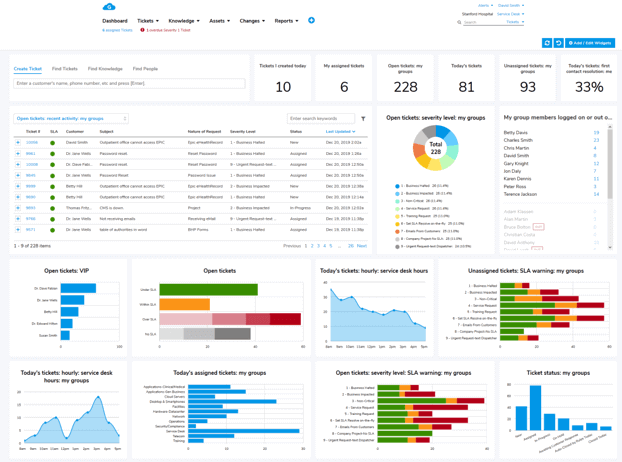
Giva's ITSM Software allows for running separate service desks for different departments on one platform, with each desk keeping its own workflows and its own data. Staff can work in more than one desk, and reports can include data from all of them. A campus can start with IT and add other offices as it's ready. Students, faculty and staff submit requests through a self-service portal, where request categories (Giva calls them Natures of Request) and custom forms collect the right details up front.
Giva supports single sign-on through SAML, a common sign-in standard, and you can require multi-factor authentication for every user. Its Active Directory sync doesn't require coding. If a campus clinic needs its own desk, HIPAA compliance is included in every edition and Giva will sign a Business Associate Agreement. Your registrar or privacy office decides how FERPA applies to each queue. Separate desks, each with their own access roles, give them a way to scope who sees what.
Learn how Giva's solutions benefit colleges and universities.
Then, get a demo to see Giva's application in action, or start your own free, 30-day trial today!



Categories: IT, Help Desk