IT Support for Non-Technical Users: How to Make the Help Stick
Picture a ticket many desks have seen. A user can't sign in at a PC that someone else used last, and she tells the technician the sign-in box usually shows her name. By the afternoon the story is regrettably a joke in the IT team's chat. But the sign-in box did show a name, the last user's, so her surprise was reasonable. What looked like a user problem was partly a screen problem.
The stakes are higher than the joke suggests. Technicians in public IT forums describe colleagues who left jobs they could not do on a computer, and one describes a coworker in tears over a password she could not reset from two written steps. Neither story is about a weak person. Both are what a capability gap costs when nobody treats it as something with a cause.
IT support for non-technical users gets easier once you stop treating the shortfall as a fact about the person and start treating it as something with a cause. A request that keeps coming back is the evidence that makes the cause findable. This article sorts those causes and offers diagnostics for telling them apart. It shows when to stop teaching one person, usually by absorbing the task, which means doing it for them. It also covers who should conduct training.

Key Takeaways
- Five causes, five fixes: Repeat tickets come from a missing skill, a person who won't try, an answer that arrived too late, a default that misleads, or something IT wrote. Teaching the employee directly is the main fix for only one of them, and three of the five start with IT.
- Handing ticket history to a manager fits one cause: It fits the person who has the skill, has been shown, and still won't try, and it works only where a manager will act.
- Many different ticket senders point to IT's side: A sign-in setting or a self-service reset can stop the repeats for everyone at once, though it brings a transition period and leaves some apps uncovered. When the senders are all new, an orientation is the fix instead.
- Three signals say teaching one person is no longer worth the time: The person succeeds only while supervised, the explanation and the written steps have both been tried, or the task returns on a predictable cycle. Each signal has its own next move, from a saved macro to a system fix, and a starting number of two documented walkthroughs in a quarter turns them into a team rule.
- Put a dollar figure on the repeats: Multiply tickets, minutes, and an hourly rate that includes benefits and overhead, because practitioners report that management acts on dollars more readily than on annoyance.
How Does IT Support Employees Who Aren't Tech-Savvy?
IT supports employees who aren't tech-savvy best by diagnosing why a request keeps coming back and then applying the fix that matches the cause.
Non-technical user support is help built around end users who depend on technology to do their jobs but don't build, configure, or troubleshoot it. A basic how-to question is usually logged as a service request because nothing has failed, and recurrence is what makes it worth diagnosing.
Being "not tech-savvy" depends on the task as much as on the person. An architect who designs buildings using complex software can still ask whether the Virtual Private Network (VPN) works without an internet connection. A developer who codes all day can still need a colleague's help to find the share-screen button before a meeting. So who counts as non-technical? We found no agreed way to measure it inside a company, and a ticket's cause is easier to establish than a person's skill.
By default, IT owns the systems it provides and how people sign in, connect, and ask for help, and departments own how to do the job inside those systems. Where nobody in the department can answer, the question still reaches the help desk.
5 Causes Behind Tickets for Things Employees Were Already Shown
Repeat tickets for things employees were already shown come from five causes. The person can't do it, won't do it, couldn't find the answer in time, was misled by a default, or was confused by something IT wrote. Two start with the person, and three start with IT.
Mager and Pipe's Analyzing Performance Problems, published in 1970, already laid out a flowchart procedure that separates a skill deficiency from other causes, such as a lack of motivation or negative feedback. It matches each cause to a different remedy.
Nielsen Norman Group, which studies usability, makes a related argument that the answer to "user error" is usually better design. It focuses on consumer sites, and it notes that people forced to use a system regularly may eventually learn its quirks, though it calls those cases rare. That describes employees, so teaching still has a place.
The five causes and examples below are derived from researching publicly-available information from IT practitioners and haven't been tested against ticket data. Note also that thresholds given later are starting points rather than published standards, so adjust them to your own volume:
-
Can't: A Real Skills Gap
A real skills gap is the one cause of repeat tickets where teaching the employee is the main fix. Limited basic computer literacy can show up as a basic how-to ticket, and behind it there can be a missing picture of how the system works. For example, a programmer helping classmates who had only ever used Google's cloud apps explained the file browser as working like Google Drive, which they already understood.
To confirm that a skill is missing, let the person do the clicking while you explain. If they try, go wrong in a specific place, and get it right after a short walkthrough, check their next ticket. If they can do it alone, the skill really was missing. If they can't, see "3 Decisions That Tell You to Stop Teaching One Person" below.
Targeted training means a short orientation on the basics every employee needs, short lessons at the point the task comes up, and a habit of letting the person do the clicking during the call. Follow-up lessons spaced over weeks hold better than one long session. Giva's Guide to IT Technical Training of Non-Technical Employees covers formal training programs.
-
Won't: Capable but Declining
When an employee has the skill, has been shown, and still chooses not to use it, at some point, IT should hand the ticket history to the employee's manager.
Before handing anything off though, confirm that the job really requires the skill, that the person doesn't try when shown, and that the step was verified, since a reported restart doesn't always mean the machine restarted. Skill can't be observed directly, so the evidence is behavior, such as a past success on the same or a similar task followed by a refusal to try it after a walkthrough. Rule out fear as well (see "Test for Fear Before You Call It Won't" below).
A person who handles consumer apps without trouble but hands off the work tool may have the skill, but that's only a hint, since work tools aren't always as polished. Some people decline because passing a task to IT is quicker than learning it, and that can eventually become a workload conversation for their manager.
Accountability belongs to the person's manager, so IT sends ticket history that shows the same requests from the same requester after a documented walkthrough, in a short hand-off note. The IT ticket prioritization framework recommends the same escalation to the manager for repeat misuse of the urgent priority. A note is easiest to act on when it carries:
- The requester and the request type
- The ticket dates
- The walkthrough given and the written steps sent
- The decision you're asking the manager to make, such as having the person complete the orientation
Discipline isn't IT's call, since consequences are a management and HR decision. Check the employee's past tickets and suggest courses to their manager. Where a manager won't act, the same ticket keeps returning, and so absorbing it becomes the fallback.
-
Couldn't Find the Answer in Time
Tickets still arrive when the answer exists in a notice, a handbook, and a link but isn't in front of the person at the moment they need it.
Put the answer where the problem happens:
- Notice at login: Telling people in the moment works better than a mass email alone. Notify them at login a few times before a password expires, then move them into the reset flow.
- Banner on the request page: A short note on the page where people submit requests reaches the person who is about to open a ticket.
- Reminders only for people who haven't acted: Take people off the reminder list as they finish the step, so each later reminder goes only to those who haven't.
If a link already sat on the very screen where people got stuck and the tickets still came, the answer was in front of them, so timing isn't the cause. Check whether the person is declining, whether the screen itself misleads, or whether IT's own wording is at fault. In one case, a manager ignored a form that suggested the right documentation page while the ticket was being typed, filed anyway, and then asked a question that the first line of that page answered.
Our IT self-service portal and ticket deflection articles cover the mechanics, including user adoption.
Moving work toward self-service and toward the user is what shift-left describes, but it assumes the person receiving that work can act on what arrives. The missing-skill and IT-wording causes are where the assumption breaks. A deflection rate that stalls is worth checking as a capability problem before it is treated as an adoption problem.
-
The System Invites the Mistake
A default, a screen, or a setting can make the wrong action the natural one, as the sign-in screen in the opening scenario did. It filled in the last person's name, and a user who expected to see her own name had good reason to be confused. The clue is how many different people of different skills and tenure send the same ticket. When it's many, a configuration change can do more than a lesson.
A configuration change works in one of two ways:
-
Remove the need for the call: Two common changes do this:
- Self-service password reset: Employees reset a password or unblock a locked account without calling anyone, which Microsoft says reduces help desk calls. It helps only the people who registered a reset method, and passwords managed in an on-premises directory also need password writeback, the feature that writes a cloud reset back to it. See Microsoft's documentation.
- Single Sign-On: Microsoft lists fewer credentials for users and fewer password resets reaching the help desk among its benefits. Apps that aren't set up for it keep their own sign-ins and the tickets that come with them.
-
Make people learn what the system used to show them: This is the fix for a missing skill, teaching, delivered through configuration. One example is to stop displaying the last signed-in user at the Windows sign-in screen.
Microsoft's setting is named "Interactive logon: Don't display last signed-in," and you enable it to hide the last user. Microsoft documents it only as a security measure. The claim that people learn their usernames comes from practitioners.
Practitioners who have made this change describe about a week of pain before everyone knew their username, and a surge of next-day calls asking what the username was.
Hiding the last user is a trade-off. Tell managers and brief the desk before the change, and consider a pilot with one department. Price the week of calls against the repeats it removes, using the method in "How to Cost the Tickets That Shouldn't Exist" below. Put one line of on-screen explanation wherever you add friction. Teams that have made users type a word to confirm an action get tickets saying the system is broken.
Hardware can be the cause too. A repeat ticket from a medical imaging application traced back to screens below the application's minimum resolution, and in another organization the response to the same kind of problem was to stop issuing one laptop model to a department.
If you don't hold admin rights to identity or Windows policy settings, hand the problem up. Take the ticket pattern and the cost figure from "How to Cost the Tickets That Shouldn't Exist" to whoever does, and check whether your identity platform offers an equivalent setting.
-
Remove the need for the call: Two common changes do this:
-
IT Made It Worse
The quickest way to find out whether IT's own writing is the cause is to give the written steps to someone who has never done the task. If they can't follow them, the writing is at least part of the cause.
Common sources include:
- IT's own labels: Username, email address, PIN, and password can all appear on the same sign-in path, and people lose track of which is which.
- Error text IT passes along: A management console message once led a user to believe Microsoft Office had failed to install when it hadn't.
- Closure notes that point to another ticket: A note saying another ticket was opened leaves the requester to reopen the original as not fixed.
- Intake emails that ask too much: A list of questions in one email usually gets an answer to the first question only, and a quick diagnosis stretches over days of replies. Asking one question at a time is a change IT controls, and our closing ticket due to no response templates article applies the same rule to follow-up messages.
The choice is between users who are as bad as IT says and an IT team that communicates poorly, and an anonymous venting post can't tell you which. A test on someone new can. If you've sent the same screenshot-heavy troubleshooting guide to the same person for months, the test is also the quickest way to decide whether to keep sending it.
Rewrite the failing steps in the words the requester uses for the screen, test the rewrite on someone new, and train the people who write them. Help desk scripts offer templates for written replies, and our IT help desk analyst onboarding article covers training the analysts who write them.
The Five Causes at a Glance
Cause |
What It Looks Like in the Queue |
How to Confirm It |
The Fix |
|---|---|---|---|
Can't |
Basic how-to tickets, a missing picture of how the system works, a skilled person who is new to one tool |
The person tries, goes wrong in a specific place, gets it right after a short walkthrough, and repeats it alone on the next ticket |
Targeted training, starting with a short orientation |
Won't |
The same request after a documented walkthrough, from someone who has the skill |
The person doesn't try when shown, the job requires the skill, the step was verified, and fear is ruled out |
Hand the ticket history to the person's manager |
Couldn't Find the Answer in Time |
A notice or document exists and tickets still arrive, often from many people |
The answer wasn't in front of people when they got stuck (if it was, test the declining user and IT's own wording) |
Put the answer where the problem happens, and remind only the people who haven't acted |
The System Invites the Mistake |
Many different people send the same ticket, from a misleading screen, default, or sign-in setting |
The same ticket comes from people who differ widely in skill and tenure |
Change a default or sign-in behavior, and explain the change on screen |
IT Made It Worse |
Tickets from IT's own labels, forms, error text, or steps that skip actions |
The written steps fail for someone who has never done the task |
Rewrite for the reader, and train the people who write |
How to Tell Which Cause You're Looking At
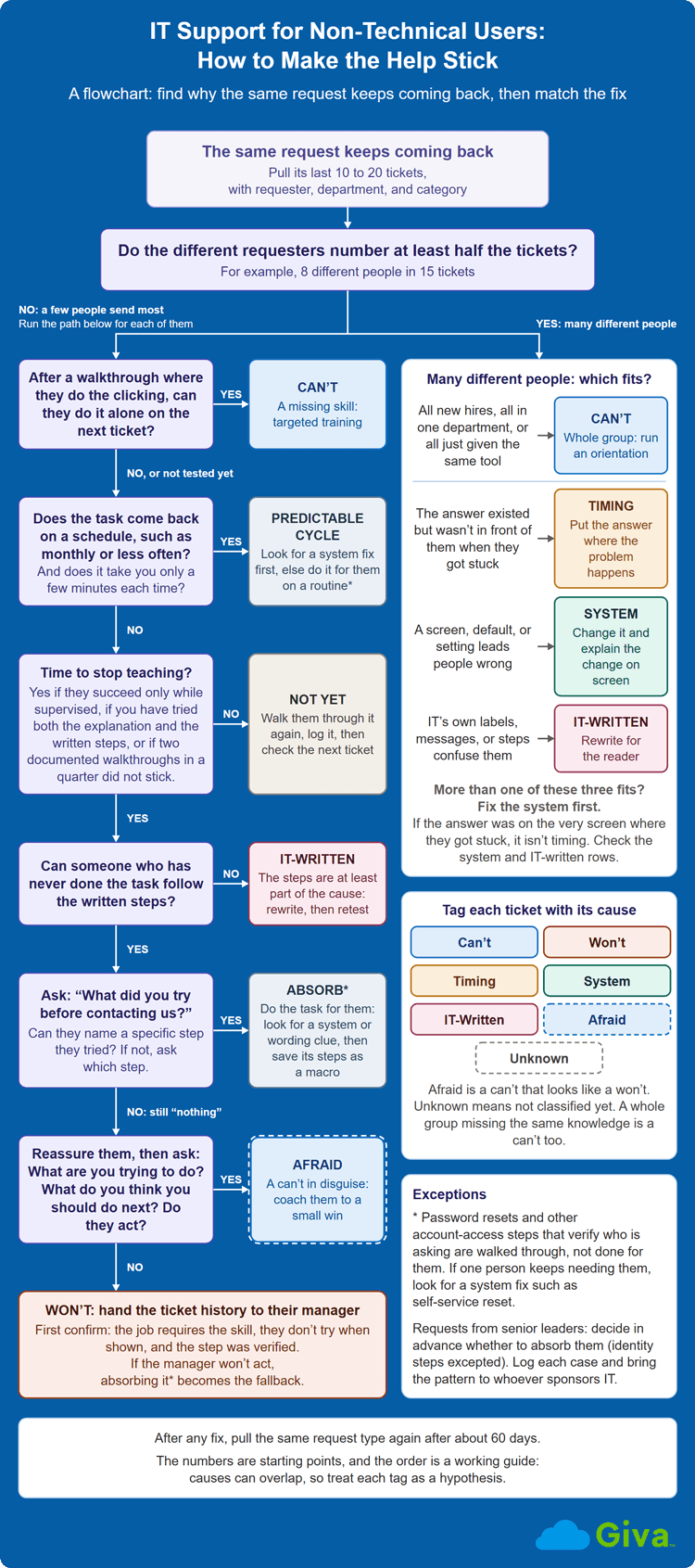
Four steps are enough to name the cause of a recurring request type, and the cause decides which fix to use:
- Pull the repeats: Pick the request type you most want to shrink, usually the highest-volume one, and export its last 10 to 20 tickets with requester, department, and category.
-
Count the different people: Call it many when the different requesters number at least half the tickets in your sample, such as 8 different people in 15 tickets.
Many people of different skill and tenure point to timing, the system, or IT's own writing. The three cause sections above describe how each one looks. If more than one fits, fix the system first.
If the many are all new hires, all in one department, or all just received the same tool, the whole group is missing the same knowledge, and an orientation fixes it. If a few people send most of the tickets, run the next two tests on each of those people.
- Test one repeat requester: Let them do the task while you explain, then check their next ticket to see whether they can do it alone.
- Test the written steps on someone new: If a person with no history can't follow them, the writing is at least part of the cause.
Recurring incidents are what problem management exists for, and the same root-cause diagnosing habit applies to repeat service requests, where these five causes are a good starting list. Our articles on the causes of a high ticket reopen rate and on IT help desk weekly reports mention a pivot table by requester and category and show how to read the top ticket categories report. After any fix, pull the same request type again after about 60 days, using the same categories and a comparable period of data, to see whether the repeats dropped, and expect a default change to raise the count first, as the username calls above show.
Test for Fear Before You Call It "Won't"
A person who could do the task but is sure they can't, or who is afraid of breaking something or of making extra work for IT, can look like someone who "won't." Users writing from the other side of the ticket describe handing over problems instead of risking twice the work for IT.
For instance, in a technician's account, the user read the screen aloud and the instruction included the next step. Asked what they were trying to do, then what they thought they should do next, the user paused and gave the right answer, phrased as a question. Those two questions, in that order, make a simple fear test. Scenes like this get called learned helplessness, tied to people who've been blamed for assuming one tool works like another.
When a person acts after reassurance and coaching, the fix is a small success they produce themselves, with their hand on the mouse. Treat it as a can't wearing the face of a won't, and tag it Afraid so it isn't counted as one.
3 Decisions That Tell You to Stop Teaching One Person
Teaching one person is no longer worth the time when they succeed only while supervised, when the explanation and the written steps have both been tried, or when the task comes back on a predictable cycle.
We found no source that states a rule for when to stop teaching one repeat requester. These signals are this article's own reading of what practitioners report. The practitioner who describes making the switch says only that they realized teaching this user wasn't going to work, with no earlier sign given:
-
First Check: One Person or Everyone?
The signals apply to one person, so count the people sending the ticket first. If many different people send it, use the "Count the different people" step in "How to Tell Which Cause You're Looking At" above instead.
Carolyn Kopprasch of Buffer made a similar point about customer support in a 2014 essay. She lists three cases where her team skips the lesson. The first is a task that only needs doing once. The second is a task much faster to do than to explain when many people are waiting, and the third is a customer who has already struggled for a long time. For the faster-to-do case, she adds that a team that keeps handling the same task for many customers has found a signal about the product.
-
The Three Signals to Check
Once it's one person, three signals say teaching is no longer worth the time:
-
Success while supervised, failure alone: The person gets it right while you watch and wrong the next time on their own.
One practitioner wrote step-by-step documentation with screenshots, watched the user follow it correctly, left, and learned of the same mistake again. Soderstrom and Bjork's 2015 review of learning research found that how well someone performs during practice is often a poor guide to whether they have learned the task for the long term.
Ask one question on the repeat ticket, "What did you try before contacting us?" A specific attempt means they tried and failed. Look in it for a system or wording clue, then absorb the task and save its steps as a macro or pre-filled form any agent can run. "Nothing" points to fear, or to a person who is declining.
-
The explanation and the written steps have both been tried: The walkthrough happened, the written steps exist, and the ticket returns.
Test the written steps on someone new, and rewrite them if they fail. If they pass, the document isn't the problem, so ask what the person tried. A specific attempt points to a system or wording clue, and "nothing" points to fear or to a person who is declining.
- The task comes back on a predictable cycle: A monthly call from an executive about the VPN, or a quarterly task that's easy to forget between uses.
When a task comes back on a schedule and takes you a few minutes, teaching usually costs more than it saves. Look for a system fix first, and if none exists, absorb it on a fixed routine (password and account-access steps excepted).
-
Success while supervised, failure alone: The person gets it right while you watch and wrong the next time on their own.
-
Set Three Team Rules
Three rules turn the signals into a stop rule your team can share:
- Agree on a starting number: We found no published threshold for how many repeats are too many. A reasonable starting point is two documented walkthroughs of the same task for the same person within a quarter, which allows one retry before you stop. A signal from the list above can end the teaching sooner. Once the number is reached, stop teaching and route by the answer to "What did you try?" A task that returns monthly or less often falls under signal 3, the predictable cycle.
- Keep an exception for identity and access: Even when you're absorbing everything else, walk people through password resets and other account-access steps that verify who is asking. If the same person keeps needing the same identity walkthrough, the answer is a system fix such as self-service reset, not doing it for them. Buffer's essay makes the same exception for security.
- Decide the executive exception in advance: Executives often get more help than junior staff would, and pushing back can carry a cost for the person who does it. Make it a deliberate policy so the help desk isn't quietly absorbing everything senior. Log each case and bring the pattern to whoever sponsors IT. Identity steps stay as walkthroughs for executives too, with a system fix as the endpoint.
IT Support for Technical Users: How to Tell Which Cause Diagram
How to Cost the Tickets That Shouldn't Exist
To cost a recurring ticket, price the agent minutes and the employee minutes each at its own loaded hourly rate, add the two, multiply by the tickets a month, and multiply by twelve. Practitioners report that management acts on a dollar figure more readily than on complaints about annoyance or lost time.
Fill in the formula with:
- Tickets per Month: Use your ticket data for one request type.
- Minutes per Ticket: Record the agent's handling time and the employee's active time separately, the latter covering the call, creating the ticket, and working the problem with IT. The employee's share of this is the productivity loss. Count waiting only when it blocks the person's work, and say so when you present the number.
- Hourly Rate: Ask HR or Finance for the fully loaded hourly cost of an agent and of an employee, which includes benefits and overhead as well as wages.
Here's an illustration with made-up round numbers: Take 30 tickets a month, 15 minutes of agent time at $45 an hour, and 25 minutes of employee time at $60 an hour. That comes to $1,087.50 a month, or $13,050 a year, for one request type.
That's the cost of the problem, but the case for a fix needs a second number, the share of those tickets the fix would remove. If a default change would remove about 60% of them, the yearly saving is about $7,830 before the fix's own cost. Those are hours, not cash, unless the time frees capacity you would otherwise buy. Do this for your top three to five repeat request types and bring the figure for each, next to the option you would use on it and that option's cost.
The real number is harder to estimate than the formula suggests though, because contacts that never became tickets leave no record. A help desk tool can usually produce the raw counts, and Giva's Ticket Fields report, for example, builds a custom report from fields such as department and Nature of Request that you can download for analysis elsewhere.
What to Do on the Ticket: Teach on the Call or Absorb It and Log It
When the diagnosis points at one person, an agent can teach on the call by having the person do the task, or absorb the task and log the cause.
Both work, and practitioners report success with each. One technician made users do the clicking after a few extra minutes of explanation. By their own account, it came across as kind, but the real motive was to keep the person from calling back. Another started remoting into the machine the moment the caller's number appeared and did the task themselves.
Teach on the Call: Make the User Do the Clicking
Let the person do the clicking while you explain what each step does and why, in a sentence or two. Use the name that appears on their screen, and tie the why to their own work, such as the time the step saves them. For remote workers, who can't ask a technician to stop by their desk, a shared screen lets them keep the mouse while you watch.
Follow the call with the written steps and an annotated screenshot so the person can review them later.
Absorb It and Log It
Absorbing a ticket should be a deliberate choice made under the team's stop rule, and the ticket should still be logged with the cause you diagnosed. Add two fields or tags in whatever your tool supports:
- Cause Tag: Can't, Won't, Timing, System, or IT-Written, plus Afraid (a can't that looks like a won't) and Unknown (not classified yet)
- Walkthrough Given: A yes or no marker, plus whether written steps were sent
Those two fields, with the requester and date your tool already records, are what let you count the signals. Treat the tags as internal shorthand, and write the hand-off note as dates and steps with no verdict on the person. If you remote in, log the session on the same ticket.
Absorbing in silence hides the pattern from the people who could fix it, and it may teach the requester that IT does the task. Assume the requester can see the closure note and may forward it, so avoid a "no digital competency" closure note. Giva's article on ticket resolution notes covers what a good note contains.
Who Should Run the Training? Splitting the Universal From the Role-Specific
IT should run the training that every employee needs and leave job-specific application training to the department. The universal part is short and covers:
- Signing in and the password policy
- Multifactor authentication, the extra check that confirms who is signing in
- How to connect to the VPN, ideally with a technician watching the first connection
- How to reach IT, including a live demo of filing a request
- Security basics, such as how to report a suspicious email
Practitioners describe running the first four items in about 30 minutes, either for each new employee or in batches coordinated through HR. Some desks also send a short "IT tips" email for quick items like the screen-lock shortcut and save one-on-one or classroom sessions for bigger topics.
Departments own the rest, because they know the workflows the job requires and IT doesn't. Consider naming a go-to person in each department, someone who knows the team's tools, to answer the quick role-specific questions before they reach the desk.
Do AI Assistants Change IT Support for Non-Technical Users?
AI assistants might help where the answer arrives too late or where IT's own wording is the problem, would leave the declining user and the misleading system unchanged, and could make the evidence harder to see. We found no study of employee-facing IT assistants, so what follows is what we believe is a logical assessment.
An assistant that answers in plain language at the moment someone has a question would help where the answer arrives too late. It could also restate steps written for technicians in simpler words, which helps where IT's own wording is the problem. It wouldn't change the person who won't try, because someone who won't try is unlikely to ask either. Nor would it change the misleading system, which still needs a configuration change.
In Gallup's AI indicator, 52% of US employees used AI at work at least a few times a year as of May 2026, and 30% used it a few times a week or more. An employee who is embarrassed or stuck may ask a public chatbot instead of filing a ticket. That would remove the repeat-contact evidence this diagnosis relies on.
Ask your team whether people already use public chatbots for IT questions. Those questions never reach the queue.
IT Support for Non-Technical Users FAQs
-
Does IT have to train employees on basic computer skills?
IT doesn't have to, but it's the natural owner of the training every employee needs, such as signing in and filing a request, and departments should train on their own applications. Where practitioners describe a basics orientation, IT usually runs it, in about 30 minutes.
-
Why do employees keep asking IT the same question?
Employees keep sending the same ticket for one of five identifiable reasons, and the quickest check is how many different people send it. If many different people, of different skill and tenure, send the same ticket, the cause is often timing, the system, or IT's own writing, so a lesson for each person is the slow route. If it's one requester, a short walkthrough where they do the clicking often shows whether the cause is a skills gap, a refusal, or fear.
-
How do you explain a technical problem to a non-technical user?
Tell the user what is affected, what to do now, and when they'll hear back, in plain words.
Use the name that appears on their screen for what is affected. For example, instead of "your VPN session timed out," say "your connection to the office network dropped. Close the VPN app and open it again, and I'll call you back in ten minutes if it still won't connect." Showing beats describing, so share a screen and have them do the clicking. For tone and exact wording, see our articles on customer service soft skills and help desk scripts.
-
What do you do when the repeat requester is a senior leader?
Decide in writing to do a senior leader's task for them, log the cause, and bring the ticket pattern and cost figure to whoever sponsors IT. The goal is to show what the pattern costs, whatever the cause, and the written rule keeps the desk from absorbing senior requests out of habit.
-
How do you keep technicians from burning out on the same questions?
Give them a stop rule the team agreed on, plus a system fix to go with it. A stop rule says when a technician stops teaching one person and what to do instead, whether that is absorbing the task, coaching, or handing the ticket history to the manager. Nobody then decides alone or feels guilty about it. The pattern data then goes to whoever can change the default.
-
At what point does a repeat request become a management issue instead of an IT issue?
A repeat request becomes a management issue when the person has the skill, has been shown, has no fear getting in the way, and still doesn't try. IT supplies the ticket history and the record of the walkthrough, and the manager decides what happens next. If no manager will act, the desk ends up absorbing the ticket. Log the cause and put a dollar figure on the repeats for whoever can set the policy.
Related Giva Resources
- Help Desk Best Practices: The 4 Silent Failure Points
- Help Desk Customer Satisfaction: What Actually Drives It
- What Is Tier 0 IT Support? Level 0 Self-Service Explained
Supporting Non-Technical Users Starts With a Diagnosis
The user who couldn't sign in had good reason to be confused, and the screen had misled her. The colleagues who left jobs they could not do on a computer, and the coworker in tears over a password reset, raise the same question. What kept the help from sticking?
Asking that question changes the work. A skill that was never taught calls for teaching on the call, but a default, a notice, or a document that IT controls will keep producing the same ticket, however patient the technician is. Knowing which one you are looking at also tells you when to stop teaching and start absorbing the task.
You can start with one request type. Count how many different people send it, and agree on the number at which your team changes approach. Then price the repeats in dollars before you take the pattern to whoever can change the default.
See How Giva Helps IT Teams Spot and Handle Repeat Tickets
A help desk tool can make the evidence easier to see and the intake easier to follow, though the diagnosis is still yours to make.
Giva's Help Desk Software supports this work in several ways:
- Structured intake: Employees pick a Nature of Request in the self-service portal, with sub-categories if you set them up, and answer any request-specific questions that appear. They can also search the knowledge base you give them access to before they open a ticket.
- Broadcast messages at login: You can set a broadcast message to appear when employees log in to the portal, for a known issue or a change that's about to generate calls.
- Reports for pattern work: Reports can be built from fields such as department and Nature of Request, then saved, shared, and scheduled by email.
- Ticket macros: When an agent absorbs a recurring request, ticket macros apply predefined content to items such as how-to questions.
For more on how we can help you support your employees, get a demo to see Giva's solutions in action, or start your own free, 30-day trial today!



Categories: IT, Help Desk