Prioritizing IT Tickets When Everything Is Urgent: The 3-Layer Framework
When every incoming ticket is marked urgent, the label quickly loses meaning. Whether it's a simple password reset or a potential malware incident, everything feels like an emergency the moment it hits the help desk queue. With no reliable system in place, agents often default to helping whoever complains the loudest. The result is chaos. Growing backlogs, high stress, and important work falling through the cracks.
The 3-Layer Framework gives you a support ticket prioritization process that brings order to the chaos. In this article, we explain the 3-Layer Framework step by step. You will learn about the baseline scoring method, override rules, and aging safety net. We also cover how to communicate priority changes, roll out the system, and more. This goes beyond generic advice. It gives you practical solutions you can start using right away.

Key Takeaways
- "Urgent" has lost its meaning: Most tickets get marked urgent, which makes the label meaningless and forces agents to help whoever complains the loudest.
- The 3-Layer Framework replaces guesswork with scoring: It gives you a clear way to score tickets based on real impact and urgency instead of guesswork.
- You can lower pushback with simple scripts: You'll learn practical scripts to explain priority changes to requesters without creating conflict.
- Fix inflation at the source: You can cut down urgent ticket inflation by improving your ticket intake form.
- Stay in control even when volume spikes: This framework helps you stay in control of your queue even when ticket volume is high.
What Is IT Ticket Prioritization?
IT ticket prioritization is the process of scoring and ordering tickets so the most important issues get handled first.
The real fix is not stricter rules or telling people to stop marking tickets urgent. Instead, create a shared definition of "urgent" that both IT agents and requesters understand and use. When everyone uses the same clear criteria, "urgent" actually means something.
Impact vs. Urgency vs. Severity vs. Priority: Clarifying the Terms
These four terms are often used interchangeably, but they mean different things when it comes to a ticket's priority.
- Impact: How many people or business functions are affected. A password reset for one user has a low impact, while a ransomware attack has company-wide implications.
- Urgency: How soon the issue needs to be fixed before real damage occurs. Complete system downtime raises urgency significantly.
- Severity: How technically serious the problem is. This term is more common in software bug tracking than in IT service desk prioritization.
- Priority: The final ranking that determines what gets worked on first. It combines impact and urgency, plus any override rules.
Note: Software bug tracking often uses severity and priority differently than IT service desks do when determining a ticket's priority.
Why the "Everything Is Urgent" Ticket Problem Happens
In most cases, the "everything is urgent" problem stems from a lack of a shared, documented definition of "urgent" between the IT team and requesters. Without clear criteria, staff mark almost every ticket as urgent or high priority because they don't know what qualifies for each level. Of course they want their situation, big or small, resolved as soon as possible.
As we've touched on, this leads to priority inflation. When criteria is loose, teams default to helping whoever complains the loudest. The result is a chaotic queue and important work getting buried.
IT Ticket Priority Levels: P1 Through P4 (or P5) Explained
Most IT teams use a tiered system to classify tickets, built by cross-referencing impact against urgency on a simple 1-to-5 scale. The most common model uses four priority levels, though some organizations add a fifth. Each is listed in the table following, including an example and Service Level Agreement (SLA) target:
Level |
Name |
Definition |
Example |
Typical SLA Target |
|---|---|---|---|---|
P1 |
Critical |
Major business impact with no workaround |
Company-wide system outage or security breach |
Immediate (15-30 minutes) |
P2 |
High |
Significant impact with limited workaround |
Key department or application is down |
1-4 hours |
P3 |
Medium |
Moderate impact, workaround exists |
Single user issue affecting productivity |
8-24 hours |
P4 |
Low |
Minor impact, cosmetic or general inquiry |
Formatting issue or password reset |
48 hours or more |
P5 |
Planning |
No immediate impact, scheduled future work |
Feature request or planned maintenance |
Scheduled (no immediate SLA) |
Many teams stop at P4. However, adding a P5 "Planning" tier can be useful. It separates truly low-priority items from deliberate, scheduled work that has no urgency. This helps protect capacity for important future tasks without mixing them into the regular low-priority backlog.
Read More: Complete Guide to ITSM Ticket Management Plus Workflows and Best Practices
The 3-Layer IT Ticket Prioritization Framework
Most guides only cover the basic Impact x Urgency matrix and stop there. That's exactly why so many teams still struggle with "everything is urgent" problems. The 3-Layer IT Ticket Prioritization Framework builds on the classic approach and adds critical layers that make it actually work in the real world. Layer 1 is the baseline score, Layer 2 adds override rules, and Layer 3 provides an aging safety net.
-
Layer 1: The Impact x Urgency Baseline Score
This is the foundation. Instead of letting requesters pick their own priority, you score each ticket using two simple questions:
- How many people or business functions are affected?
- How soon will real damage happen if it's not fixed?
For example, consider two tickets both marked "Urgent." One is a single executive's laptop that won't turn on. The other is a company-wide email outage. No emails are able to be sent out or received, meaning a server could be down. The executive's laptop has low impact (only one person) and moderate urgency. The email outage has high impact (the entire company) and high urgency. The outage clearly wins, even though both tickets came in marked urgent.
-
Layer 2: Override Rules for Safety, Security, and VIP Exceptions
Some tickets need to jump the queue regardless of their baseline score. Layer 2 covers these documented override rules.
The main triggers are safety risks, security or compliance issues, and a clearly defined VIP policy. These overrides must be written down and backed by leadership so agents are not negotiating exceptions ticket by ticket.
For example, a ticket from the CEO asking for help with their laptop right before a major board presentation can override the normal score if you have a documented VIP policy in place. It can also go as far as any ticket from the CEO, regardless of the situation, jumping the queue.
-
Layer 3: The Aging Safety Net
Even tickets scored as low priority at intake can't be ignored forever.
If a ticket sits too long without being addressed, it automatically escalates. This ensures legitimately low-priority work doesn't fall through the cracks and eventually turn into a bigger problem. It serves as an important backstop for the entire system.
It also prevents a common issue. For example, if employees see low-priority tickets sitting for weeks, they start marking everything as urgent going forward. This quickly breaks the whole prioritization system.
Summary Table: The 3 Layers of the Framework
Layer |
Purpose |
What Triggers It? |
Example |
|---|---|---|---|
Layer 1 |
The Impact x Urgency Baseline Score |
Number of people/business functions affected + time until real damage occurs |
Company-wide email outage scores higher than a single executive's laptop issue |
Layer 2 |
Override Rules for Safety, Security, and VIP Exceptions |
Safety risks, security/compliance issues, or documented VIP status |
CEO laptop issue right before a board meeting takes precedent over other urgent tickets |
Layer 3 |
The Aging Safety Net |
Ticket sits too long without resolution |
A low-priority ticket that has been open for 30 days automatically escalates |
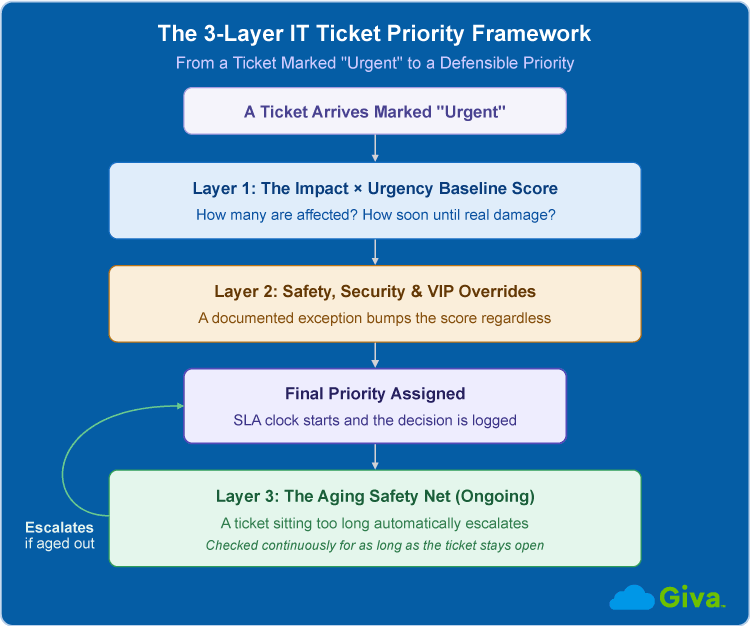
IT Ticket Prioritization 3-Layer Framework
How to Apply the Priority Framework to a Real Ticket
Follow these six steps in order to apply the 3-Layer Framework:
- Assess impact: Ask how many people or business functions are affected.
- Assess urgency: Check how soon real damage will occur if the issue is not fixed. Determine whether a temporary workaround exists.
- Check for overrides: Look for safety risks, security issues and compliance requirements. Also account for potential revenue impact.
- Check VIP status: Review who made the request and compare against your documented VIP policy.
- Assign the final priority: Calculate the baseline score from impact and urgency, then apply any override. This gives you the ticket's official priority level.
- Set the SLA and communicate: Record the target response time based on the assigned priority. Clearly explain the decision to the requester.
How to Communicate a Ticket Priority Change Back to the Requester
When you need to lower the priority of a ticket, clear communication helps set expectations and reduces pushback:
- Acknowledge receipt of the ticket as quickly as possible.
- State the newly assigned priority and target response time clearly.
- Explain the specific criteria used rather than simply saying the priority was lowered.
For example: "Thanks for submitting this ticket. We've reviewed the details and assigned it Medium priority because it affects one user and a workaround is available. The workaround involves using the browser version of the application for now. We expect to respond within 24 hours with an update."
Publishing your SLA targets upfront also helps. When requesters understand the standard response times, they are less likely to mark everything as urgent from the start.
Preventing Escalation at the Source: Redesigning the IT Ticket Intake Form
Rather than downgrading tickets after they arrive, the smartest fix is to improve accuracy at the source. Redesigning your IT ticket intake form can reduce priority inflation. Here's one effective way to update your intake form:
Replace any free-choice "Urgent" dropdown with short, guided questions. Ask about the number of people affected, whether a known workaround exists, and which business function is involved. The system can then suggest a starting priority for incoming requests instead of letting the requester choose "Urgent" right off the bat. This is not meant to slow the submission process down. Instead, it is meant to verify that if a ticket is submitted as urgent, it actually is. It allows requesters to better think through their input.
Rolling Out the Ticket Prioritization Process: Leadership Buy-In and Repeat Offenders
Now that you have a clear framework, the real challenge is implementing it. Getting leadership buy-in for a stricter process is often harder than designing the policy itself. When presenting to upper management, be ready with three things: documented priority level criteria, clear benefits to support IT operations, and a plan for handling repeat offenders.
Repeat offenders are the employees who mark almost everything as urgent. A structured system gives you guardrails. Instead of arguing ticket by ticket, shift to pattern recognition.
The first couple of times, you can let it slide with an explanation. "We've addressed your ticket as requested, though please be aware that in the future, issues to do with password resets should be marked as Medium priority." Any future requests that don't meet the appropriate priority level should be downgraded right away with a brief explanation. If the pattern continues, escalate the conversation to the individual's manager.
What to Do When the Ticket Queue Is Already Flooded
Even with a solid framework, ticket queues can still become overwhelmed. This is especially true during company-wide issues. In these moments, the first priority is clear communication. Send a standardized acknowledgment to both existing and new requesters. A simple message such as "We are currently experiencing high ticket volume. We are working through them as quickly as possible and appreciate your patience." If comfortable, adding an updated timeline for ticket resolution can help. This manages expectations and reduces follow-up tickets.
Next, regain control of the queue. Create a temporary triage lane to batch similar tickets and collapse duplicate tickets into single threads. Continue working on the highest priority tickets first, then move through the rest in chronological order. This approach helps you stabilize the situation until the flood subsides.
Metrics That Confirm the IT Ticket Prioritization System Is Working
Once your framework is live, track these metrics to measure success and identify areas for improvement:
- First response time by priority tier: Are P1 and P2 tickets receiving fast enough attention?
- Resolution time by priority tier: How long does it take to close tickets at each level?
- SLA compliance rate: Per any established internal or external agreements, this is the percentage of tickets meeting their target response and resolution times.
- Priority override / reclassification rate: How often are tickets changing after the initial assessment? Is the IT team having to downgrade high-priority tickets to lower tiers on a regular basis?
- VIP ticket aging: How long do high-profile tickets sit before action is taken? If the CEO has an issue with their laptop, is it resolved faster than a low or medium priority ticket from other employees?
- Percentage of total ticket volume marked high-priority: This acts as a key health indicator for your ticket triage process. A consistently high number usually signals ongoing priority inflation.
Read More: 7 IT Help Desk Reports Every Manager Should Review Weekly
Where AI and Automation Fit Into the Ticket Prioritization Framework
AI and automation should enhance the 3-Layer Framework, not replace it.
The most effective approach is using AI to support the ticket triage process. It can auto-score tickets using real signals like number of users affected, VIP status, and system criticality. It can also detect linguistic urgency inflation. These are things like all caps, "ASAP," and lots of exclamation points. These markers often devalue the request and can have an opposite effect on scoring. Automation tools can suggest priority levels and escalation rules. That said, you should always keep human oversight so agents can review and make the final call as needed.
Start small. Use automation where it reduces manual triage effort, and keep the 3-Layer Framework as your foundation.
Read More: IT Service Desk Software: Complete Guide to Features, AI's Effect, Best Practices and How to Choose
Common Mistakes When Prioritizing IT Tickets
Even with a solid framework, teams still make these common mistakes. This is especially true during high-pressure situations.
- Trusting self-reported urgency as final: Without a clear system, requesters mark everything as urgent and agents get pressured into treating every ticket as P1.
- Skipping the aging safety net: Low-priority tickets get ignored for too long and eventually become urgent. This also trains requesters to mark everything high priority next time around.
- Allowing informal VIP exceptions: C-Suite requests often deserve faster attention. However, handling them case by case creates inconsistency and resentment among other employees. A documented VIP policy is the better approach.
- Treating the framework as a one-time policy: Setting up the system and then forgetting about it is a common trap. It requires ongoing consistency and adherence to the guidelines to actually work.
Avoiding these mistakes is what turns the 3-Layer Framework from a document on a shelf into a system that actually works.
IT Ticket Prioritization FAQs
-
How do you prioritize multiple tickets that are all marked urgent?
Use the IT TIcket Prioritization 3-Layer Framework. Score each ticket based on impact and urgency, apply any overrides, and then work them in order. The aging safety net ensures nothing gets left behind for too long.
-
Should end users be allowed to set their own ticket priority?
Treat their selection as one input signal, never the final decision. Self-reported urgency often leads to priority inflation. The guided intake form and clear criteria help get more accurate results.
-
How many priority levels does an IT help desk actually need, 4 or 5?
Most teams do well with 4 levels (P1-P4). Adding a P5 planning tier can be useful to separate scheduled work from regular low-priority items.
-
What is the difference between ticket severity and ticket priority?
Severity is more common in software bug tracking and focuses on how technically serious the problem is.
Priority in IT service desks is the final ranking based on impact, urgency, and overrides.
-
What are the 5 D's of prioritization as applied to tickets?
The 5 D's (Do, Defer, Delegate, Diminish, Delete) is a general productivity framework. When applied to tickets, it looks like this:
- Do: Handle high-priority tickets immediately.
- Defer: Schedule low-priority tickets for later.
- Delegate: Assign tickets to the right team member or tier.
- Diminish: Reduce impact through workarounds or self-service.
- Delete: Close duplicate or no-longer-relevant tickets.
For most IT help desks, the 3-Layer Framework is still the better day-to-day system because it is built specifically for service desk prioritization.
Related Giva Resources
- Implementing Service Level Agreements: IT Service Desk
- IT Incident Management: Process, Best Practices & Key Metrics Explained
- ITIL Incident Management Practice
- Incident Severity Levels Fully Explained
- Incident Escalation: How to Plan Triggers & Policies
- Understanding Operational Level Agreements (OLA) vs SLA in ITIL
- AI Ticketing
Turning Ticket Priority Into a System, Not a Guessing Game
The "everything is urgent" problem is not mainly a people problem. It's a system problem. Fixing it requires more than asking requesters to be more reasonable. It requires a clear baseline score, documented override rules, and an aging safety net. That combination is what the 3-Layer Framework delivers.
Implementing this takes work. You'll need leadership buy-in and consistency across the team. But once it's in place, your queue becomes manageable even as ticket volume grows. The result is less chaos, better SLA performance, and a more effective IT team.
Stop guessing. Build the system.
Put This IT Ticket Prioritization Framework Into Practice With Giva
A priority system only works if it is actually enforced on every ticket, every time, without an agent having to remember the rules or relitigate an exception under pressure. That is where a policy written on a wiki page tends to fall apart the moment a queue floods.
Giva's Help Desk Software gives you the tools to put this framework into practice, not just define it. Configurable Severity Levels make sure high-priority issues get prompt attention automatically, and configurable SLAs keep your response and resolution targets visible and consistently enforced, instead of leaving them to individual judgment calls.
Whether your team is drowning in a queue where every ticket is marked urgent, or you are building a priority policy for the first time, the right software takes the guesswork out of enforcing it consistently.
Get a demo to see Giva's solutions in action, or start your own free, 30-day trial today!


Categories: IT, Help Desk