How to Set Up IT Help Desk Escalation Rules That Actually Work
 By Ron Avignone
A ticket has been open for 45 minutes. One agent decides that is long enough and hands it to Tier 2. Another agent, working a nearly identical issue the same afternoon, keeps troubleshooting for another hour before finally giving up and escalating it. Neither agent did anything wrong. They just made two different judgment calls about the same vague rule: "escalate when you get stuck." Multiply that across a team of ten or twenty agents, and the help desk ends up with an escalation process that looks consistent on paper but feels random in practice.
This article covers what actually belongs in an IT help desk escalation rule set. That starts with the tier structure those rules route into, moves through the time-based and condition-based triggers most teams already know about, and ends with the one format-based rule that replaces manager judgment with something a ticketing system can enforce on its own.

Key Takeaways
- A working escalation rule has three parts: A trigger, a receiving tier, and a required handoff format. Most teams only define the first one, which is why the other two end up decided case by case.
- A rigid time threshold alone produces inconsistent decisions: Two agents facing the same 45-minute stall can reasonably disagree about whether it counts as "stuck," because the timer never had to account for what was actually tried.
- The Escalation Defense Log turns documentation into the actual trigger: A ticket cannot move to the next tier until the agent records the symptom, the steps already tried, why the current tier cannot resolve it, the user's availability, and the business impact. Completing the log is what allows the escalation to happen, not paperwork filled in after the agent has already decided to escalate.
- Escalating too early costs nearly as much as escalating too late: Sending a user to Tier 2 before Tier 1 has genuinely exhausted its options slows resolution and erodes trust in the process almost as much as sitting on a stalled ticket too long.
- Automation should enforce the rule, not replace the judgment behind it: Service Level Agreement (SLA) timers and required fields work best when they enforce a rule the team already agreed on, not when they try to make the judgment call themselves.
What Is an Escalation Rule?
An escalation rule is a documented condition, paired with a required handoff format, that moves a ticket from one support tier to another. Most teams get the first half right and skip the second.
Every working escalation rule needs three components:
- The trigger defines the condition that starts an escalation, whether that is elapsed time, a severity level, or a specific request type
- The destination defines which tier or team receives the ticket next
- The handoff format defines what information has to travel with the ticket so the next tier is not starting from zero
Often, published guidance on this topic stops at the first two, and the same is often true of a team's own internal policy. Even when it names a trigger and a destination, it usually gets circulated once and then quietly gets set off to the side the moment agents are busy.
Types of Escalation IT Help Desks Use
Before configuring any rule, it helps to know which kind of escalation you are actually building. IT Service Management (ITSM) practice recognizes a small set of standard escalation types, and mixing them up is a common source of confusion:
- Functional escalation: A ticket moves to a different tier or team because it needs more technical skill or system access than the current tier has, not more authority. A password reset issue that turns out to be an Active Directory permissions problem is a functional escalation from the help desk to a systems administrator.
- Hierarchical escalation: A ticket gets flagged for a manager or senior staff member because of its sensitivity or political volatility. A frustrated executive asking for a status update on a routine request is a hierarchical escalation even if the underlying issue is simple.
- SLA-based (time-based) escalation: A ticket escalates because an SLA clock is approaching or has already passed its deadline. Many teams set an early warning around 80 percent of the SLA window elapsed, then a hard escalation the moment the deadline is actually missed.
- Condition-based escalation: A ticket escalates because it matches a defined condition unrelated to elapsed time, such as a severity level, a VIP account, a recurring issue, or a ticket that was routed to the wrong queue in the first place.
Most real escalation policies combine at least two of these. A ticket might sit on an SLA-based timer by default, but jump straight to a functional escalation the moment an agent recognizes it needs access they do not have.
Escalation Types at a Glance
Type |
What Triggers It |
Example |
|---|---|---|
Functional |
Skill or access gap at the current tier |
Help desk routes an Active Directory permissions issue to a systems administrator |
Hierarchical |
Sensitivity, authority, or visibility of the request |
A manager is looped in on a complaint from a department head |
SLA-Based |
Elapsed time against a response or resolution deadline |
A ticket auto-escalates at 80 percent of its SLA window |
Condition-Based |
A defined non-time condition is met |
A ticket tagged "critical outage" bypasses Tier 1 entirely |
Many teams call this combined view of tiers, triggers, and destinations an "escalation matrix." Sketching one out on paper, even a simple version of the table above, before configuring anything in the ticketing system is worth the hour it takes.
3 Steps for How to Set Up Your Ticket Escalation Tiers and Triggers
-
Step 1: Build Your Tier Structure First
Escalation rules only make sense once there is somewhere for a ticket to go. Most IT help desks organize support into tiers, and getting this structure right before writing any trigger logic saves a lot of rework later:
- Tier 1 handles the front line, the common, well-documented issues that a knowledge base article or a scripted troubleshooting flow can usually resolve
- Tier 2 handles issues that need deeper system access or specialized product knowledge, things Tier 1 is not authorized or trained to touch
- Tier 3 handles the smallest, hardest slice of tickets, the confirmed bugs, systemic failures, and anything that needs engineering or vendor involvement
For a deeper breakdown of what belongs at each level, see Giva's article on the tiers of IT support.
Set Concrete Criteria for Each Tier Transition
The tier structure only works if the criteria for moving between tiers are specific enough to apply consistently:
- "Escalate when you cannot solve it" is not one
- "Escalate when the issue requires administrator-level access Tier 1 does not have, or when the same troubleshooting steps have already failed twice" is
Some tickets should skip Tier 1 and Tier 2 entirely and route straight to Tier 3, since running them through the normal tier sequence just adds delay without adding value. For example:
- A confirmed vendor-side software defect
- An active infrastructure failure affecting multiple users
- An issue already tied to a declared major incident
-
Step 2: Configure Time-Based and SLA Escalation Triggers
Time-based triggers are the most common starting point, and for good reason. An SLA clock gives every ticket a deadline, and an escalation rule can watch that clock without anyone having to remember to check it.
Most SLAs actually set two separate clocks worth escalating on:
- The first response clock covers how quickly someone acknowledges the ticket at all
- The resolution clock covers how long the fix itself is allowed to take
A rule that only watches one of the two will miss tickets that got a fast acknowledgment but then stalled, or the reverse.
Both clocks are usually set per priority level rather than as a single number for every ticket. A Critical ticket might carry a 15-minute response target and a 1-hour resolution target, while a Low priority request might get a 24-hour response window and a much longer resolution target. The escalation rule watches whichever clock applies to that ticket's priority, not a single company-wide threshold.
So what does a stronger version of that clock actually look like? Two thresholds instead of one:
- An at-risk warning fires at a set percentage of the SLA window, commonly somewhere around 80 percent elapsed, giving the current tier a chance to act before the deadline is missed
- A hard escalation fires if the deadline passes anyway
Combining a proactive warning with a reactive fallback catches tickets earlier than waiting for an outright breach.
Here is where a purely time-based rule runs into a real limit, and it is worth admitting this one plainly: There is no clean, universal number for how long is too long. Ten minutes on a simple password reset is a long time. Forty-five minutes on a ticket that required three separate diagnostic steps and a callback to the user is not. A rule built only around elapsed time cannot tell the difference between those two situations, which is exactly why two agents facing similar stalled tickets end up making different calls. The fix is not a better number but a different kind of rule, covered next.
-
Step 3: Add Condition-Based Triggers
Alongside time, most escalation policies also define specific conditions that trigger an immediate escalation regardless of how long the ticket has been open. Giva's article on incident escalation covers the fuller list of triggers in depth. The most common ones worth building into your rule set include:
- High severity or business impact: An outage, a confirmed security breach, or a defect affecting a critical system or a large group of users, all of which should route straight to the tier best equipped to handle it.
- VIP or critical account: A ticket flagged as belonging to a critical account or a senior stakeholder, since these often carry visibility that changes how quickly a response is expected.
- Recurring issue: The same issue showing up again from the same user or across multiple users, which usually means the underlying problem needs a root cause analysis, not another round of Tier 1 troubleshooting.
- Misrouted ticket: A ticket that landed in the wrong queue from the start and needs to move to the correct team rather than sitting in front of an agent who was never going to be able to help.
These conditions work well layered on top of the tier structure and the time-based triggers above. A misrouted ticket, for example, should not have to wait out an SLA clock before moving to the right queue.
The IT Help Desk Escalation Defense Log: Make the Documentation the Rule
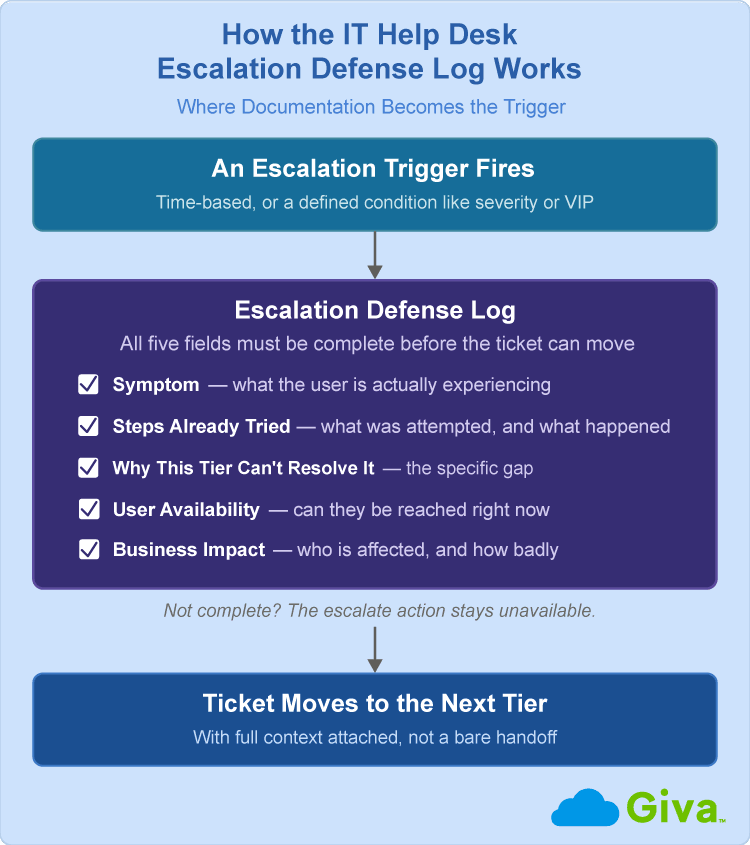
So what actually fixes the inconsistency a time threshold cannot? Instead of asking "has enough time passed," the rule asks a different question: "Can this escalation be justified in five specific ways." A ticket cannot move to the next tier until the agent answers all five. That requirement is the rule. It is not something maybe helpful added on top of a separate time-based trigger.
Call this the Escalation Defense Log. It requires five fields, and none of them are optional:
- Symptom: What is the user actually experiencing, described specifically enough that Tier 2 does not have to guess. "Can't log in" is not a symptom. "Login attempt returns an invalid credentials error after a password reset completed ten minutes ago" is.
- Steps Already Tried: The specific troubleshooting steps already attempted, and what happened when each one was tried. This is the single most valuable field for the receiving tier, since it prevents duplicated work.
- Why This Tier Can't Resolve It: A short statement of why the current tier cannot take this further, whether that is missing access, missing expertise, or a step that requires authority the current tier does not have.
- User Availability: Whether the user is available right now for a callback or a remote session, and the best way to reach them if not. Tier 2 loses just as much time to a user who already left for the day as it does to a missing symptom.
- Business Impact: Who or what is affected, and how badly. One user with a minor inconvenience is a different ticket than a department that cannot process orders.
Compare that to a ticket that just says "escalating, tried everything." Tier 2 has no idea what "everything" means, has to start troubleshooting from scratch, and often repeats steps Tier 1 already ruled out. A completed Defense Log for a VPN issue might read like this:
- Symptom: A client that connects but drops within two minutes
- Steps Already Tried: A reinstall of the client and a check of the user's local firewall settings, both with no change
- Why This Tier Can't Resolve It: The drop pattern points to a server-side certificate issue outside Tier 1's access
- User Availability: Available by phone the rest of the day
- Business Impact: One remote employee unable to reach internal systems since this morning
Tier 2 can start working the actual problem within seconds of opening that ticket.
This is also where the format genuinely earns the name "defense." An agent who filled out all five fields has a documented, defensible reason for the decision, not a guess a manager has to take on faith after the fact. If an escalation later turns out to have been premature, the log shows exactly what was known at the time, which protects the agent as much as it protects the process.
IT Help Desk Escalation Defense Log
Let the System Enforce the Escalation Rules, Not Managers
A rule that lives only in a policy document depends on someone remembering to follow it under pressure, which is exactly when it tends to get skipped. The stronger approach is to build the rule into the ticketing system itself, so the required fields, SLA timers, and tier-based routing are configured as part of the workflow rather than left to memory.
A modern help desk platform can be configured to help enforce all of this directly in the ticket workflow:
- Require the five Defense Log fields as mandatory ticket fields before the escalate action becomes available at all
- Run the SLA at-risk and breach timers automatically
- Route an escalated ticket to the correct tier or team based on category, without a manager approving each step
None of this replaces judgment. It removes the need for a manager to personally approve or second-guess a decision that the rule already covers. That is the same reason a documented Defense Log works better than a supervisor spot-checking tickets after the fact. The rule already decided what counts as justified, so nobody has to relitigate it case by case.
Common Mistakes to Avoid When Setting Up IT Help Desk Escalation Rules
A handful of mistakes show up repeatedly once escalation rules move from a policy document into daily use:
- Escalating too early: Sending a ticket up a tier before Tier 1 has genuinely exhausted its options trains users to expect an immediate handoff and buries Tier 2 in issues it should never have seen.
- Escalating too late: Sitting on a stalled ticket well past the point where continuing to troubleshoot at the current tier makes sense, usually out of reluctance to admit the issue is beyond the current tier's scope.
- Applying one rule set to both incidents and service requests: Incidents (unplanned disruptions to a service that need to be fixed) and service requests (planned asks like new equipment or access) fail for different reasons and need different escalation logic. A single rule set applied to both usually under-serves one of them.
- No clear acceptance step at handoff: A ticket that moves to Tier 2 without an explicit acceptance step can sit unowned while both tiers assume someone else is handling it. Mapping out a RACI matrix, who is Responsible, Accountable, Consulted, and Informed, at each tier removes that ambiguity.
- Treating the policy as a document instead of a system-enforced rule: An escalation policy that exists as a document nobody has opened since onboarding is not a rule. It is a suggestion.
- Allowing exceptions to the documentation requirement: Skipping the Defense Log fields "to save time" defeats the entire purpose, since the time saved at escalation gets spent twice over by the next tier reconstructing context.
How to Know Your Escalation Rules Are Working
Before trusting any of these metrics, confirm the rules actually fire the way they were configured. Create a test ticket, walk it through each trigger, and check that the SLA timers, the routing, and the Defense Log requirement all behave as expected. This matters most right after a change to the ticketing system, since a broken routing rule or a mistyped threshold can sit unnoticed for weeks if nobody escalates a ticket in the meantime.
Once the rules are confirmed to work, a handful of metrics show whether they are actually doing their job:
- Escalation rate: The share of tickets that escalate at all, roughly the inverse of your First Contact Resolution (FCR). A rate that creeps up over time usually points to a Tier 1 knowledge gap rather than a wave of genuinely hard tickets.
- Time to escalate: How long a ticket sits at its original tier before moving up. A rising number suggests agents are waiting too long to escalate, not that tickets are getting harder.
- Resolution time after escalation: How long the ticket takes to close after it reaches the next tier, sometimes tracked as Mean Time to Resolve (MTTR). If this stays high even with a complete Defense Log attached, the bottleneck is downstream of escalation itself.
- Repeat escalation rate: How often the same issue escalates more than once. A high rate here usually means the first escalation did not actually fix the underlying problem.
Because every escalation now carries a completed Defense Log, pulling these metrics does not require a manual audit of ticket notes. The reason for each escalation is already sitting in a structured field, which makes the data trustworthy enough to act on.
FAQs About IT Help Desk Escalation Rules
-
When should a help desk ticket be escalated?
A ticket should be escalated when the current tier lacks the access, expertise, or authority to resolve it, or when a defined condition, such as an SLA deadline or a declared critical issue, requires it. In practice this means Tier 1 escalates functional issues once troubleshooting hits a wall it is not equipped to solve, and escalates on a time or severity trigger regardless of how confident the agent feels about eventually resolving it. Waiting past either of those points usually costs more time than it saves.
-
What is the difference between functional and hierarchical escalation?
Functional escalation moves a ticket to a different tier or team because it needs more technical skill or system access, while hierarchical escalation involves a manager or senior staff member because of the request's sensitivity or visibility, not its technical difficulty. A complex networking issue is a functional escalation to a specialist. A routine request from a frustrated executive is a hierarchical escalation, even though the underlying fix might be simple.
-
What should an IT escalation policy include?
An IT escalation policy should define the tier structure tickets route through, the specific triggers that start an escalation, and the information that must travel with the ticket at handoff. The most common gap is that last part. A policy that names a trigger and a destination but never requires a structured handoff format still leaves the receiving tier to reconstruct context from scratch, which is where most of the delay in a "successful" escalation actually happens.
-
Can escalation rules be fully automated?
The triggers and routing can be fully automated, but the underlying judgment behind those triggers still comes from people, and the documentation requirement works best when it stays a mandatory human step rather than something automation tries to guess. A ticketing system can watch SLA clocks, apply condition-based rules, and route a ticket to the correct tier without a person clicking anything. What it should not do is auto-generate the Defense Log fields on the agent's behalf, since the value of those fields comes from the agent actually stating what was tried and why.
-
How do you stop agents from escalating too early or too often?
Requiring a completed Defense Log before an escalation can go through is itself the most effective control, since it forces an agent to state specifically what was tried and why the current tier cannot resolve it before the option to escalate even appears. An agent who has not actually attempted meaningful troubleshooting will find the "steps already tried" field hard to fill out honestly, which naturally discourages reflexive escalation without adding a separate approval step that slows everyone down.
-
What if my IT team is too small for three formal tiers?
The same logic works with two tiers, or even one, as long as the trigger and the handoff format stay explicit. A one- or two-person IT department can designate a single point of contact who decides next steps, keep an emergency contact list for vendors or contractors who effectively act as Tier 3, and still require a Defense Log before waking someone up after hours. The part worth keeping regardless of team size is a clear rule for when an issue goes straight to leadership, typically a security breach, a revenue-stopping outage, or anything with real reputational risk, since ad hoc environments tend to either escalate everything to the top or bury real emergencies until it is too late.
-
What if the issue needs to leave IT entirely?
Some issues need to leave IT entirely rather than move up a tier, and the same Defense Log discipline should travel with them to the new destination. A confirmed security breach usually needs Infosec, and a compliance or legal question needs Legal, not another round of IT troubleshooting. The receiving team still needs the same Defense Log fields Tier 2 or Tier 3 would, since starting from scratch costs just as much time whether the handoff crosses a tier or a department.
Related Giva Resources
- Incident Severity Levels Fully Explained Plus How-To's and Best Practices
- SLA Breach Root Cause Analysis: How to Find Causes & Fix Them
- Help Desk Best Practices: The 4 Silent Failure Points
Escalation Rules for Your IT Help Desk: Where to Start
A tier structure and a time-based trigger get an escalation policy most of the way there, but they are not what makes escalation feel consistent to the people using it every day. The part that actually closes the gap is requiring a structured reason for every escalation, enforced by the system rather than left to a manager's judgment call.
Start with the tiers, add SLA and condition-based triggers on top, and then make the Escalation Defense Log a required field before a ticket can move at all. Once that is in place, the rule is no longer "escalate when you feel stuck." It is "escalate when you can answer five specific questions," and that is a rule two different agents can actually apply the same way.
Ready to Build Escalation Rules Your Team Actually Follows?
None of this has to stay theoretical. The right ticketing system can help hold the rule in place instead of letting it live only in a policy document nobody checks.
Giva's cloud-based Help Desk Software and ITSM Software let you configure custom required fields for each Nature of Request, so your team can build its own version of the Defense Log fields directly into the ticket form. Giva also requires a reason whenever a ticket is reassigned to a different person, reinforcing the same "no handoff without context" habit this article recommends.
SLA breach notifications and color-coded dashboard indicators flag a ticket as it approaches its deadline, giving your team visibility into time-based risk before it turns into a full breach. The decision to actually escalate still rests with the agent, guided by the rule your team has configured, rather than an automatic system action, which keeps a person accountable for the call while giving the team the tools to catch problems early.
If your team is still relying on group knowledge to decide when a ticket needs to move up a tier, that is exactly the gap a configurable ticketing platform is built to help close.
Get a demo to see Giva's solutions in action, or start your own free, 30-day trial today!



Categories: Help Desk