ITSM Implementation: What to Decide, in What Order, and How Long It Takes
The kickoff call for your new IT Service Management (ITSM) tool is going well until the implementation partner asks for your ticket categories, your templates and required fields, what counts as high priority, and your service level targets. Nobody on your team has decided any of it yet. Whatever stays undecided gets filled in by the tool's defaults or the old tool's settings, and leadership has already asked how long this will take.
Implementations like this are common. In a Q3 2025 ITSM.tools poll of 229 respondents, 40 percent said they were replacing their ITSM tool (19 percent), planning to replace it when they can (11 percent) or reimplementing it (10 percent). This article covers what an ITSM implementation includes, how long it takes and what it costs, and which decisions to make before you configure anything. It also covers what to do first and how that fits a digital transformation, plus how to cut over and keep people using the tool.

Key Takeaways
- Installing the tool is only one part of the work: Practices, owners, data and adoption need planning too, not only the software.
- No typical timeline exists: Among publicly-documented projects that went live, going live took from about five months to nearly two years, and their scope, authority to decide and deadlines differed widely.
- Organizational factors came up more than the tool: In the 2022 AXELOS and ITSM.tools benchmark, a self-reported survey, organizations named lack of senior-management buy-in most often as their key challenge, and few named the tool.
- Start small and phase the rest: Info-Tech and a small ITSM.tools poll both put incident and service request management first, and Info-Tech adds a knowledge base. Leave most old ticket history behind unless retention is required.
- Someone has to own the tool after launch: Name the owner and schedule the reviews before go-live.
What Is ITSM Implementation?
ITSM implementation is the work of deciding how IT handles requests and incidents, assigning owners, and setting up the tool and data that support those decisions. It also includes getting people to use the result, which takes its own plan.
ITSM itself is how an organization designs, delivers, supports and improves its IT services. Our ITSM benefits article describes its benefits, and our Complete Guide to IT Service Management (ITSM) covers the discipline in full.
Where you start changes the work, and most teams fall into one of three starting points:
- First-Time Implementation: With a shared inbox or spreadsheets behind you, there's little structured data to carry over, and you define categories from scratch.
- Replacement: The main question is what not to copy from the old tool.
- Re-Implementation: Find out why the first rollout stalled before you plan the second.
6 Phases of an ITSM Implementation
An ITSM implementation generally should move through six phases, from scoping and a baseline to improvement after go-live, whether the tool is new, replaced or reworked. Settle process design and a baseline before you choose a tool, and a team that already owns a tool still completes phases 1 and 2 before configuring it.
The six phases in order are:
- Scope the Work and Baseline Where You Are: Name a sponsor and write down your goals and scope in a short project charter, then record today's volumes, pain points and measures and note the gap to where you want to be.
- Make the Design Decisions: Settle the categories, templates, priorities, owners and first-release scope, then choose or confirm the tool against them.
- Build and Configure: Configure the tool to those decisions and set up integrations, and trim the knowledge base.
- Pilot, Test and Train: Test with real tickets in a pilot group, and train people by audience.
- Cut Over and Stabilize: Pick a cutover date and write a rule for open tickets. Staff the weeks right after go-live and close the old request channels (a shared inbox, email or spreadsheets).
- Improve and Expand: Hold reviews on a schedule and keep a backlog for the next wave.
ITSM Implementation Roadmap
Use this roadmap to give each phase an owner and an exit test, which is the check that tells you the phase is done:
Phase |
What gets decided or built |
Who owns it |
Exit test |
|---|---|---|---|
1. Scope and baseline |
A named sponsor, a short project charter (goals and what's in and out of scope), today's volumes, pain points and measures, and a first-release boundary (what's live at go-live and what waits) |
Sponsor and project lead |
The sponsor signs off scope and baseline |
2. Design decisions |
The decision register (a list of each decision, its owner and its default) filled in, and the tool chosen or confirmed against it |
Process owners and project lead |
Every first-release decision is made and written down |
3. Build and configure |
Configuration to the decisions, integrations and a trimmed knowledge base |
Tool administrator, with the vendor or partner |
A test instance the pilot group can use |
4. Pilot, test and train |
A pilot group, testing on real tickets and training by audience |
Project lead |
Pilot results are reviewed and the go-live readiness checks pass |
5. Cut over and stabilize |
A cutover date, an open-ticket rule, hypercare (the weeks right after go-live, when extra people watch for problems and fix them quickly) and the old intake closed |
Project lead, then the named tool owner |
Hypercare exit criteria are met |
6. Improve and expand |
Reviews at 30, 60 and 90 days and 12 months, a backlog and the next wave |
The named tool owner |
Not applicable, because this phase continues |
Our maturity model article and free ITIL self-assessment and readiness worksheet (organized by the five ITIL v3 lifecycle stages) can help you gauge your maturity and your readiness for ITIL (the Information Technology Infrastructure Library, a body of IT service management guidance) in phase 1. Your own records supply the volumes, pain points and measures.
This map shows where each how-to in this article fits across the six phases and the two gates between them.
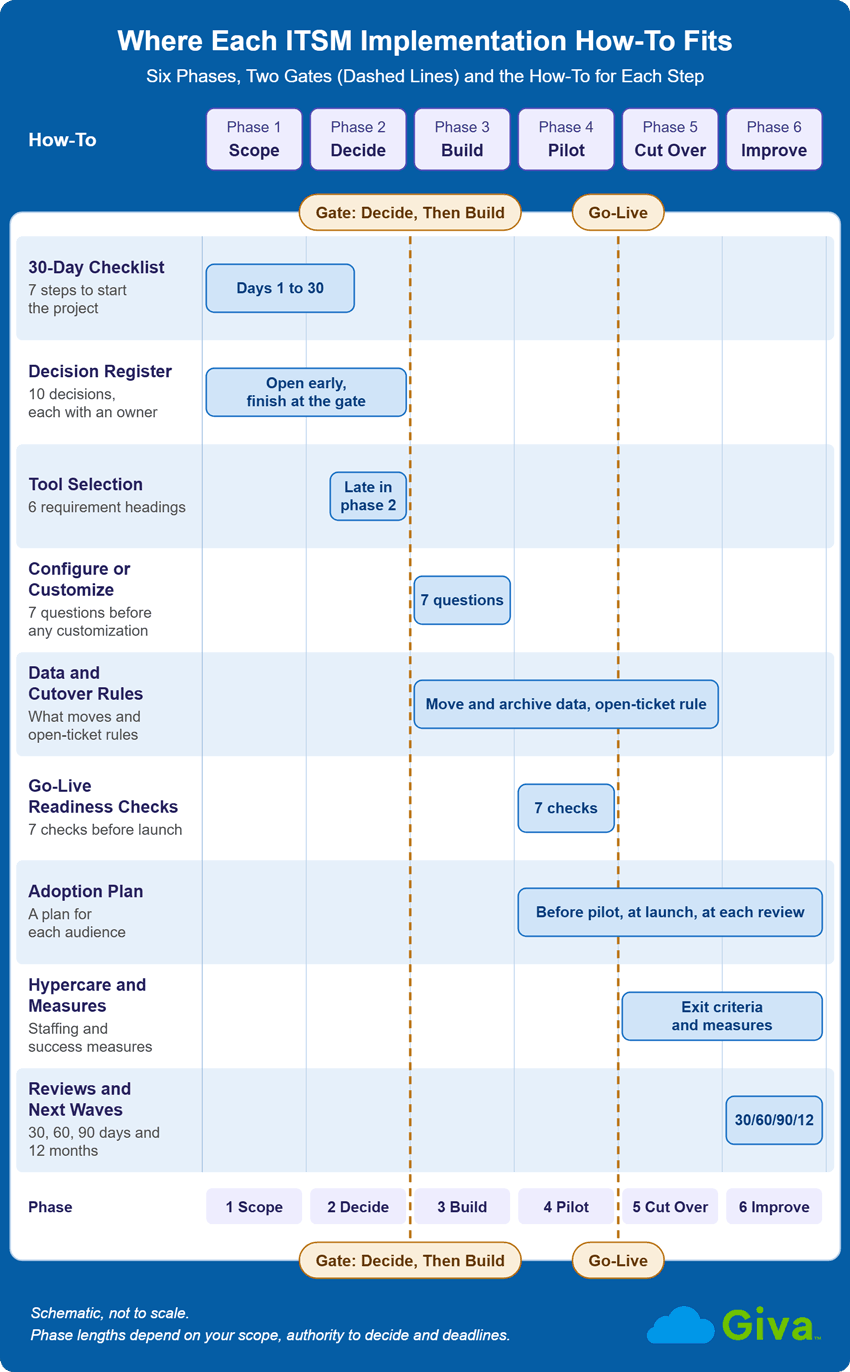
ITSM Implementation Roadmap Diagram
ITSM Implementation Checklist: The First 30 Days
The first month is phase 1 and the start of phase 2, and you don't need a tool decision to begin. Work through these seven steps:
- Name the executive sponsor and the project lead.
- Write a one-page charter with your goals and what's in and out of scope.
- Record your baseline, which is today's ticket volumes, pain points and measures.
- Open the decision register (see "Decide Before You Configure") and give each of its ten decisions an owner.
- Draft the first-release boundary, meaning what's live at go-live and what waits.
- Test your draft categories against a sample of recent real tickets.
- Check for a fixed deadline, such as an old tool's end of life, and give leadership a range with scope labels.
Which Framework Should You Follow?
No framework is meant to be implemented as written. PeopleCert's ITIL site makes this point about ITIL itself, so treat any framework as a source of practices to adapt. For more on frameworks, see our ITSM frameworks article. The main options are:
- ITIL: Guidance to draw practices from, so adopt the ones that match your pain points.
- ISO/IEC 20000-1: The standard an organization can be certified against, so choose it if certification across the organization is a goal. Its 2018 edition, with a 2024 amendment, is current as of October 2026 (ISO's catalog record), and ISO publishes implementation guidance for it (ISO/IEC TS 20000-5).
- COBIT: Control Objectives for Information and Related Technologies, a framework from ISACA, is designed to work alongside other standards, so use it for governance language.
- FitSM: A free, lightweight standard that a small team can consider.
How Long Does an ITSM Implementation Take, and What Does It Cost?
Public records of real projects show scoped ITSM implementations going live in about five to six months at the fast end and about 20 to 23 months at the slow end among the projects that actually went live (as noted by the dates in the table below). One city was still preparing a later module more than nine years after its request for proposals. We found no neutral source that publishes a typical duration or cost.
In these cases, scope, who could decide, a partner's help and fixed deadlines appear to have shaped the timeline, and none of the sources compares how quickly different tools go live. Each duration starts from a different point, such as the start of implementation for one project and the tool decision for another.
Documented ITSM Implementation Timelines
Use the table to see what drove each timeline, then compare those drivers with your own scope, authority to decide and deadline:
Organization |
Scope |
Documented timeline |
What moved it |
|---|---|---|---|
University of North Carolina at Chapel Hill (UNC-Chapel Hill) (public university, EDUCAUSE Review case study, May 19, 2026, self-reported) |
Replacing the platform it had implemented about five years earlier, now used by more than 1,200 agents |
About six months, February to July 2024 (self-reported) |
The case study says the timeline mirrored the earlier implementation's but felt less rushed, thanks to clear expectations and a small, well-defined team led by a director "who had the authority to make decisions without extensive stakeholder consultation." Features were cut back, the goal was out-of-the-box configuration as far as possible, and the university didn't migrate its old data. |
University of Canterbury, New Zealand (public university, trade media, December 8, 2023, self-reported) |
A platform go-live, with HR service delivery added later |
"Went live in five months," and about 11 months in all once HR service delivery was added about six months later (self-reported) |
A partner's pre-configured templates |
Illinois State University (public university, board resolution of May 10, 2024 and a status page) |
ITSM software and services |
Cutover scheduled for June 24, 2025 and marked completed on June 26, 2025, about 13.5 months after the resolution (plan, then status page) |
The old tool's announced end of life (December 31, 2026) prompted the project. |
University of Wisconsin-Madison (UW-Madison) (large public university, project pages updated October 2026) |
ITSM tool replacement |
Decision in fall 2024, an aim of "July 2026" and an August 12, 2026 update saying the new tool was live, so about 20 to 23 months from the decision to that announcement (our calculation, since the pages give no go-live date) |
The old tool reaches end of life on December 17, 2026. A two-lane team (business analysis and requirements, and technical) worked in sprints. |
City of Berkeley, California (city government, council staff reports from 2019, 2024 and 2025) |
Incident, change, service request and problem management first, then project management, with inventory tools still being prepared in December 2025 |
Request for proposals in September 2016, vendor selected in May 2017 (the reports' wording), the first four modules live in January 2018 (about 16 months after the request for proposals, our calculation) and project management in August 2018 |
The 2024 staff report says city staff "do not have the capacity or the knowledge to execute a successful implementation" without the partner's professional services, but the reports don't say how that affected the dates. |
Tioga County, New York (county government, IT committee papers, 2024, plan and status statements) |
A ticketing service center, then change advisory board meetings, a status board and a function for documenting standard operating procedures |
A new ticket system announced for 2024 (February 2024 minutes), the service center "being implemented in quarter four of 2024," change advisory board meetings from January 2025, and the status board and procedures function still planned (December 2024 packet) |
The papers say the county reviewed multiple platforms first and don't say what drove the dates. |
Cardiff and Vale University Health Board, Wales (health board, audit committee minutes, April 5, 2022) |
Service desk tool |
Targeted for October 30, 2021 and went live internally in March 2022 (management-reported) |
The minutes attribute the delay to the pandemic and team workload, after an internal audit gave only "limited" assurance on IT service management. |
Six variables show up across these projects:
- Process Scope: Canterbury went live in five months, but the full program with HR service delivery took about 11.
- Who Has Authority to Decide: The UNC-Chapel Hill row shows one director with that authority.
- A Partner's Help: Canterbury's timeline reflects a partner's pre-configured templates, and Berkeley's 2024 staff report says city staff lacked the capacity or the knowledge to implement without its partner.
- Fixed Deadlines: Illinois State and UW-Madison both had an old tool with a known end-of-life date.
- Outside Events No Plan Covers: The pandemic and team workload slowed Cardiff and Vale.
- The Amount of Data to Move: UNC-Chapel Hill says migrating its old data, including more than 25,000 tickets, would have slowed the project.
8 Cost Lines Behind an ITSM Implementation Budget
An ITSM implementation budget would generally have eight cost lines. Step 4 of our ITSM software business case article lists five cost items for a replacement's total cost of ownership, and they map to the first six lines here. Two public buyers show what some of the amounts look like, though they're planned figures and not benchmarks. One is a city and one is a university, and neither record gives its number of agents. Software prices also vary widely by product, edition and agent count, so don't read the amounts as a price to expect. The eight lines are:
- Licenses or Subscription: The City of Pasadena, California, 2019 council report on its ITSM implementation contract shows licenses of $53,928 a year for three years. Illinois State University's board resolution estimated about $635,000 in subscription costs over its 42-month agreement (our sum of its four fiscal-year amounts). To estimate your own, multiply the number of agents by the monthly per-agent price and by the months in the term. Ask each vendor whether it prices named agents (one license per person) or concurrent agents (licenses shared by whoever is logged in) and which edition and add-ons are included.
- Implementation Services: Pasadena's 2019 report shows a $149,820 implementation base with six months "anticipated." Illinois State's resolution estimated $200,000 for implementation, for a 42-month total of $835,000.
- Data Migration and Archiving: Moving the records you keep and archiving the rest, which follows from your data scope decision.
- Integrations: Connections to identity, email, monitoring and business systems.
- Training and Communication: Course time and materials for each audience, plus the announcements around launch.
- Internal Staff Time: The hours your own people spend on the project.
- Contingency: Pasadena's 2019 report recommended a contract with a 10 percent contingency ($14,982, inside a not-to-exceed amount of $164,802). Illinois State's resolution lists a separate $230,000 contingency for adding modules or users.
- Overlap with the Old Tool While Both Run: Illinois State's resolution sought a 42-month agreement timed to overlap the retiring tool's final year, and it states that year's renewal cost for the old tool ($168,000).
Internal staff time is the line with the least public data, and no neutral source we found offers a benchmark to check it against. To estimate it, list the roles in the next section, give each a share of their week for the length of the project and multiply by their hourly cost.
So what do you say when your director asks how long this will take and what it will cost before the decisions exist?
- Give a range
- Label the scope (standing up the tool or the whole program)
- Use the six variables above to explain what could move it
Who Does the ITSM Implementation Work: Roles and Decision Rights
An ITSM implementation generally needs several roles, although in a small team, one person holds several of those roles. Info-Tech, an analyst firm, says a successful implementation needs early planning from a wide range of resources, including ITSM tool experts (supported by the vendor), process experts and a project manager:
Role |
What they decide or do |
How a team of 3 to 15 might combine it |
|---|---|---|
Executive sponsor |
Backs the project, approves scope and settles disputes about priorities |
The IT director |
Project lead |
Runs the plan, tracks the decisions and reports progress |
The help desk manager |
Process owner |
Decides how one process works, such as incidents, requests or changes |
Senior agents, one process each |
Tool administrator |
Configures the tool to the decisions and keeps it running |
One agent or analyst, ideally with a part-time backup |
Tool owner |
Owns improvements, reporting and the backlog after go-live |
The help desk manager, named before launch |
Vendor or partner |
Installs and configures what you decide, and doesn't decide for you |
The same, whatever your team size |
Northwestern University's project page names an executive sponsor (the CIO), a project sponsor, a project lead, a project manager and a communications lead. That shows how a larger organization splits the roles.
Who Owns the Tool After Go-Live?
Name the owner before launch, since a rollout without reporting or ownership is the fifth of five rollout mistakes in an article on PeopleCert's tool vendor accreditation site, which we call the Cegal article. Its author, a customer operations manager at Cegal, a technology company serving the energy industry, advises making someone responsible for governance, improvements and reporting.
For the ongoing roles, see our ITIL roles and responsibilities article, Responsible, Accountable, Consulted, Informed (RACI) matrix article and change management roles article, which defines the sponsor, project manager and change agent.
Can a Small Team Fill These Roles?
Small teams have the least room to spread these roles. Kristin Jones of HDI, an IT support industry organization, asks readers to consider how mandatory approvals and tier escalations could affect a four-person technical team, and advises picking one or two changes. No neutral source we found publishes a staffing level for a team of 3 to 15 people, so plan on part-time ownership, combine roles as the table above shows and keep the first release small.
Decide Before You Configure: The Decisions Only You Can Make
A vendor or partner configures only what you've decided. Info-Tech says that if you arrive on installation day without the categories and ticket templates you want, your vendor "will just go with the default or migrate your old parameters from your old ITSM tool," and it adds that a vendor will typically install and set up the tool but won't fix your processes. Our people, process, technology diagnostic covers why teams buy the tool before they settle the process.
Decision Register
Here is a suggested list, but adjust it to your team. The first three rows are covered right below the table, and the last column points to the section that develops each of the others:
Decision |
Who decides |
What happens if nobody decides |
How you know it's made |
|---|---|---|---|
Categories and request types |
Process owners, with the project lead |
The tool's default list or the old tool's categories |
Tested against recent real tickets and written down |
Ticket templates and required fields |
Process owners |
Free-text entry and whatever the old tool required |
Templates exist for the top request types and required fields are set |
Priority and service level rules |
Process owners and the sponsor |
The tool's default priority matrix and no targets |
Priority rules are written, loose starting targets are set and tracking is on (see the first-release section) |
First-release scope |
Sponsor and project lead |
Everything gets configured at once |
A written list of what's live at go-live and what waits (see the first-release section) |
Data scope |
Project lead, with compliance |
A blind copy of the old tool's data |
A migrate-and-archive list and a retention check (see the data section) |
Integrations |
Tool administrator, with IT leadership |
Surprises during testing |
The list of connections is agreed before the build (see the data section) |
Roles and service ownership |
Sponsor |
Ownership is assumed and never assigned |
Every role has a name, including the tool owner (see the roles section) |
Adoption plan |
Project lead |
Training happens once, if at all |
A plan per audience, with a way to see people slipping back to old habits (see the adoption section) |
Cutover date and open-ticket rule |
Sponsor and project lead |
Two intake channels run indefinitely |
A date, a rule for tickets in flight and hold or rollback criteria (see the data section and the readiness checks) |
AI timing |
Sponsor and tool owner |
Features get switched on because they're available |
A narrow pilot defined after the basics are stable (see the AI section) |
Test your categories against real tickets before you build, and avoid a permanent "miscellaneous" category. Info-Tech's small-enterprise guidance says too many options confuse people and too few add little. If a catch-all stays, use it as a review queue, an "Other" category you check regularly to find the categories you're missing. The Cegal article's author also describes, in a separate post on Cegal's own site, an implementation the author led in a previous role, where "Other" became the most used category in the catalog after go-live.
Required fields come with the templates. Management at Cardiff and Vale reported that it removed free-text entry for category, type and priority and made those fields mandatory after an internal audit.
Service Level Agreements (SLAs) need a decision in phase 2, though the targets can start loose. Turn tracking on early and write the escalation paths so everyone can see what happens when a target is at risk. Tighten the targets once you have baseline data.
Where Tool Selection Fits
Selection happens late in phase 2, after the baseline and the draft decisions, because they're what you test a tool against. Write your requirements under these headings:
- Core process modules
- Identity and integrations
- Security and accessibility
- A portal and knowledge base
- Reporting
- References and contract terms
Two more requirements are worth borrowing from Oregon State University. Its 2021 request for proposals (RFP) required that upgrades retain previous configuration changes, and its 2014 RFP made a 45 to 60-day production trial a minimum qualification.
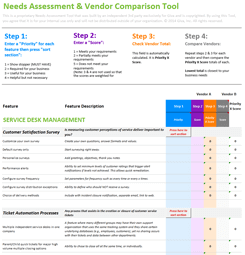
Our software evaluation checklist and free ITSM software needs analysis template (a requirements and vendor-scoring sheet) help you write down what you'll test.
Configure or Customize?
Configure first, and customize only when a need has good answers to the seven questions below. Configuring means using the tool's native, vendor-supported settings, and customizing means going beyond them with bespoke workflows, scripts or hard-coded rules. Over-customizing is a common way for an implementation to go wrong, so favor a tool that meets most of your needs out of the box.
Helen Clarke, an ITIL Master, argues that over-customization builds up gradually, makes upgrades risky and recreates workarounds outside the tool, though the article admits customization can speed early success. Teams sometimes call that accumulated cost technical debt.
Clarke's checklist has seven questions to answer before you approve any customization:
- What problem does the change solve, a real service outcome or only user discomfort?
- Is the need common, or an edge case?
- Can native, vendor-supported configuration meet it, and will the change survive an upgrade?
- Who will own it for the next 12 to 24 months, and is it documented?
- How does it affect reporting and data quality?
- What would not customizing cost, and could guidance or training close the gap?
- How will the change be reviewed or removed?
If an answer is weak, use configuration instead or leave the request for a later wave.
What to Implement First, and What Waits
Info-Tech recommends starting with incident management and service requests, then change management, then asset management, with a knowledge base started in the first stage. Which practice goes first also depends on your biggest pain points and how mature each practice already is, so treat that order as a default and adjust it. Other sources start elsewhere:
- A Small Poll: An ITSM.tools poll asked which practices organizations adopted in the first phase of an ITIL introduction. Selected results, with every other practice at 38 percent or lower:
- Incident Management: 84 percent
- Service Request Management: 77 percent
- Change Enablement: 50 percent
- Knowledge Management: 33 percent
- Asset Management: 31 percent
- The Framework Owner: PeopleCert's ITIL site says most organizations traditionally start with ITIL in one of two places, a new or replacement tool's capabilities or a specific pain point. It also reports advice from David Sweeney, lead author of ITIL Strategy (Version 5), to start ITIL adoption with a continual improvement register (a running list of improvement ideas and their priorities).
- A Documented Change of Plan: Emirates National Oil Company, a government-owned oil company in the United Arab Emirates, wanted "everything in one phase." Its visioning then showed that some service domains had very low maturity, and its ITIL work ended up running in four phases (ISACA Journal, 2017, co-written by its ITSM manager, so self-reported and old). Phase 1 already included incident, problem and change management (Part 1).
First Release and What Waits
The first release is what's live at go-live, and later waves follow. Here is a suggested plan for each wave:
Capability |
First release |
Later waves |
Why |
|---|---|---|---|
Incident management and service request management |
Yes |
Extend as volumes grow |
Info-Tech's first stage, and the two highest scores in the ITSM.tools practices poll above |
A trimmed knowledge base |
Yes, a small reviewed set |
Grow it from ticket patterns |
Info-Tech starts a knowledge base in its first stage. Keep the set small, because knowledge management ranked lowest among practices working well in one benchmark (see "After Go-Live") |
A continual improvement register |
Yes |
Review it at each wave |
David Sweeney's advice, as reported on PeopleCert's ITIL site, is about starting ITIL adoption, and a first-release register applies it to a tool |
Change enablement (change management) |
No |
Wave 2, starting with a light lane for low-risk changes |
Approvals fit better once intake is stable |
Problem management |
No |
Later, once incident data shows repeat causes |
Repeat causes only show up once there's enough incident history |
Asset management and Configuration Management Database (CMDB) |
No |
Later, scoped small |
A small, accurate set beats a large, stale one |
Portal and service catalog |
A portal with a few request types |
Add catalog items one at a time |
A portal with a few request types gets people off email and spreadsheets before you build a full catalog (see our service catalog article and self-service portal article) |
Service level targets |
Loose starting targets, with tracking turned on |
Tighten targets once baseline data exists |
Decide the targets in the design phase (phase 2 of the six phases above), then tighten them with data |
Extension to other departments |
No |
Later, once incident, request and knowledge are stable |
Wait until the first release is stable before adding other departments (see our enterprise service management article) |
Should you implement all the ITSM modules at once or phase them? Plan all the practices into the roadmap with their dependencies and activate them in waves.
Our ITIL guiding principles article covers the "progress iteratively with feedback" principle that supports phasing.
A first release can keep the old tool's scope only if you make new design decisions and don't copy the old configuration. Review each old category, template and rule against your baseline and carry over only what still earns its place.
Where Automation and AI Fit
Usually, standardized workflows and strong knowledge practices are put ahead of automation and AI, and a narrow pilot ahead of wider use. The trade publication TechTarget advises you to "Standardize workflows before introducing automation" and "Pilot AI in targeted use cases before scaling." The Consortium for Service Innovation, a nonprofit support-industry group, says "AI delivers the most value when it is built on strong knowledge practices."
Some suggest cleaning the data first, and one service management vendor says to pilot narrowly and let the pilot show the gaps. We suggest a narrow pilot on a cleaned slice of tickets and articles. How long to wait depends on how stable your basics are.
For the details, see our ITSM automation article, help desk AI article and agentic AI in IT operations article (AI that takes multi-step actions on its own).
ITSM Digital Transformation: Scope the Implementation by Services and Outcomes
An implementation supports a digital transformation best when it's scoped by the services and outcomes the business needs, with the tool a secondary question. Digital transformation is business change that integrates technology across the whole organization, while IT transformation modernizes the IT department itself, and our IT transformation strategy article covers that second path.
The 2019 ITSM benchmarking report from AXELOS (the former owner of ITIL, now part of PeopleCert) describes ITSM's part as IT governance and control at the business-governance level. It also describes ITSM as "an enabler and a support to digital delivery" through "clarity around how services connect and how data is protected." If leadership calls the project ITSM digital transformation, start your first release by asking which services and outcomes the work is meant to improve.
The one measurement comes from self-rated survey data in The AXELOS ITSM Benchmarking Report 2022 (a survey AXELOS ran with ITSM.tools in Q4 2021). Of the organizations that rated their ITSM success "great," 57 percent also rated their digital transformation "great." Of the "good" ITSM group, only 8 percent did, and most (58 percent) rated their transformation "good." The "great" ITSM group was about 12 percent of respondents.
The same report offers a scoping clue, since only 29 percent thought they had mapped enough services to business outcomes and 38 percent were working on it.
Scoping an ITSM Implementation Inside a Digital Transformation
This table represents what a first release looks like when you start from the goal:
Transformation goal |
ITSM practice that serves it |
First release |
What waits |
|---|---|---|---|
Remove email and spreadsheet intake |
Request and incident management |
One portal with a few request types |
Automation, and experience level agreements (agreements that measure how people experience a service, not only response times), where a simple satisfaction measure comes first. See our experience level agreements article. |
Make changes faster and safer |
Change enablement |
A light approval lane for standard changes, but only when faster changes are the stated goal. Otherwise it starts in a later wave. |
Fuller governance |
Give people and systems reliable answers |
Knowledge management |
Reviewed top articles |
AI search |
Extend services beyond IT |
The same request and knowledge practices |
Nothing outside IT yet |
A second service desk on the same platform, once incident, request and knowledge are stable |
Data, Integrations and Cutover: What Moves and What Stays Behind
Leave most old closed ticket history behind and write a rule for tickets still open, because migrated history carries the old tool's fields, labels and problems with it. Info-Tech says to start with the assumption that you don't need to migrate old data, asks whether open tickets and perhaps the last year of critical tickets will do, and notes that you can keep an exported copy. In a 2020 HDI article, Sanjeev NC says "Do not migrate old tickets unless you absolutely have to."
What to Migrate and What to Archive
The sources agree on leaving most closed history behind and differ on open tickets and on whether any recent closed history comes across. Here's what to do by data type:
- Open Tickets: Move them or finish them in the old tool, and write the rule down (see the cutover rules below).
- Knowledge Articles: Review and trim them, and move only the articles people still use.
- Assets and Configuration Items: Bring a small, accurate set instead of everything.
- Users: Load them from your identity or HR system instead of copying the old tool's list.
- Service Level Definitions: Rewrite them during the design decisions in phase 2 and don't carry old targets over without checking them.
Reporting continuity and audit retention can justify keeping more, so check retention requirements with compliance before you delete anything.
Integrations and the Configuration Management Database (CMDB)
Decide the integration list before the build. The usual candidates are identity, email, monitoring and business systems such as HR.
A CMDB is a database of the items that make up your services, such as servers, applications and network devices, and how they connect. Scope it to two or three business services and build it in rounds, as a 2009 TechTarget article advises. The "Start with Critical Assets First" section of our IT asset management article makes a similar point about asset inventories, and our configuration management resource explains what a CMDB and configuration items are.
It is also recommended to decide where each field comes from before you import or build automations, so a later import or discovery scan doesn't overwrite a manual fix or leave automations running on stale data.
Cutover Rules for Open Tickets
Decide a date after which new tickets exist only in the new tool, and write the rule for tickets in flight. The University of Utah (2016) migrated its open incident tickets but kept older Requests for Change (RFCs) in the former tool, and its launch announcement says, "RFCs that were open three weeks prior to the launch remain in the former tool."
Texas A&M University's project FAQ describes a soft launch scheduled for May 2024. It says all new tickets go in the new tool, existing tickets "will be completed in the ticketing system they were opened in," and there are "currently no plans to migrate legacy ticket data." That's a plan, not a report of how it went.
Pilot, Phased or Big Bang: Choosing a Rollout Approach
Phase the rollout and start with one process or one group, because with a big-bang go-live, any problem that appears reaches the whole organization at once. Phased implementation lets organizations start simply, and feedback throughout and after each phase delivers incremental value.
But a fixed date, such as an old tool's announced end of life, can leave little room for a pilot, so count back from it early, as in the end-of-life cases above.
Pilot, Phased and Big Bang Rollouts Compared
Use this comparison to pick the approach that fits your situation:
Approach |
How it works |
When it fits |
Main risk |
Documented example |
|---|---|---|---|---|
Pilot with power users |
A small group uses the new tool on real work before everyone else |
You can run old and new side by side for a short time |
The pilot group's habits may not match the wider audience |
Sanjeev NC (HDI, 2020) advises a beta with a few power users and, as an alternative to migrating old tickets, says running two service desks in parallel has worked out many times and calls it "worth the pain". |
Phased launch |
One group or process goes live first, then the next |
Groups or processes can be separated cleanly |
A longer stretch with two tools and a split picture of the data |
UNC-Chapel Hill gave service desk agents early access so they could migrate their own data if needed, left them about a month of access to the old tool's data and ran a public progress page. |
Big bang |
Everyone switches on one date |
A hard deadline leaves little room for a pilot or phases |
Problems reach everyone at once |
No documented example. |
Giva's free 30-day trial comes with free setup help and starts with a default configuration, so a team can try its first-release decisions in a working system before it commits to a design (the default is a starting point to test decisions against, not a substitute for them). The ITSM software page covers setup help, and the start-up and training page explains the default configuration.
7 Go-Live Readiness Checks
Run these seven checks before you go live:
- Test real tickets with the pilot group, covering forms, routing rules and approval paths, so the test doubles as User Acceptance Testing (UAT).
- Try your categories and templates against recent tickets.
- Verify sign-in through your identity system and email intake.
- Write the open-ticket cutover rule.
- Deliver training by audience, since a link to the tool manual isn't enough, as Info-Tech notes.
- Name a support channel and staff hypercare.
- Agree on hold or rollback criteria in advance.
Getting People to Use the New Tool: An Adoption Plan by Audience
Adoption takes its own plan, because the Cegal article reports that "Within weeks, adoption slows" and people "drift back to old habits." The plan below sets out what each audience needs and how to spot drift early.
Adoption Plan by Audience
Here is a suggested adoption plan, and for generic stakeholder and communication steps, see our change management benefits article:
Audience |
What they need to hear and be able to do |
When |
How you'll see drift |
|---|---|---|---|
Agents |
Why the tool changed and how their daily work changes, taught hands-on |
Before the pilot and again before go-live |
Notes and work kept in email, spreadsheets or chat |
Approvers |
Where approvals arrive and how to approve in one step |
Before approval workflows go live |
Approvals arriving by email or waiting longer |
Requesters |
Where to ask for help and what happens next |
Before launch, and again at launch at the point where they ask |
Requests still arriving by phone and email |
Executives |
What's different in reporting and what comes next |
At each review |
Questions still answered from the old spreadsheets |
UNC-Chapel Hill's 2022 listening tour, which looked at the platform it already had, found requesters "largely indifferent to the platform," while efficient workflow management mattered a lot to the agents who process tickets. During the new tool's phased launch, few service desk agents joined office hours or webinars and user surveys drew few responses, which the case study says appeared to be a "no news is good news" situation. Sanjeev NC says "Rolling out an ITSM tool that only IT knows about is like opening a restaurant with no menu."
How would you know people are drifting? For example, a team notices that nobody came to the office hours, checks portal use against phone and email volume and finds tickets still arriving by phone weeks after launch. Build a way to see drift into the plan from the start, since the only drift numbers you'll have are your own.
After Go-Live: Hypercare and Measuring Success
The project doesn't end at go-live, because improvement work continues afterward. UW-Madison's August 12, 2026 update says daily office hours temporarily replaced the biweekly subteam meetings "to support post-go-live activities," and by October its project page said the team "continues to make enhancements." Someone has to own that ongoing work, which is the ownership point from the roles section. For the practices to keep up after launch, see our ITSM best practices article.
Hypercare
Define staffing and exit criteria before go-live, and schedule the first improvement review. The ITIL term is early life support, and our release and deployment management page describes returning to a pre-launch normal baseline, such as typical service desk call volume, as the exit idea. Choose the length yourself, using that baseline as the test.
Measuring Success
Pick three to five outcome measures, add adoption and satisfaction measures, and record a baseline for each before go-live. Candidates include:
- Incident resolution time, often reported as Mean Time to Resolution (MTTR)
- First contact resolution
- Repeat incident rate
- SLA compliance
- Portal usage and user feedback
- A Customer Satisfaction Score (CSAT) after each ticket
Track ticket volume alongside them, and give each audience its own view, since agents need a live queue while executives need trends. Review the measures at 30, 60 and 90 days and again at 12 months.
Record your baseline before go-live, because improvement can't be shown without one. The IT department of the City of Appleton, Wisconsin, for example, reported in its 2022 mid-year review that its new help desk software went live in January 2022 and that it had kept no help desk metrics before 2022.
In the AXELOS ITSM Benchmarking Report 2022 cited earlier, knowledge management ranked lowest among practices working well, so adopting a practice doesn't mean it works. Among organizations that had adopted it, 20 percent said it was working well (80 percent said it needs improving), against 52 percent working well among organizations that had adopted a service desk. Our IT service desk software article covers service desk Key Performance Indicators (KPIs), and our change management KPI article covers adoption KPIs.
9 Challenges That Stall an ITSM Implementation
The international implementation guidance for ISO/IEC 20000-1 names nine implementation challenges (ISO/IEC TS 20000-5:2022, committee infographic). Most are about people and planning and not software. They're named challenges, not measured rates, and each is paired here with what to do:
- Support across the organization is weak at the start. Name the sponsor in phase 1 and have them sign off scope and baseline.
- The drivers that were strong at the start change during the implementation. Recheck goals and scope at each phase's exit test.
- Senior management buy-in becomes a problem. Report progress to the sponsor against your baseline measures.
- The organization's culture resists the change. Use the adoption plan by audience.
- Teams run their own unofficial tools outside IT's view (shadow IT). Ask what those tools do for the teams and plan for it in a later wave.
- Costs get out of control. Budget all eight cost lines, including contingency.
- Mergers, acquisitions or transfers cause issues. Recheck scope, owners and integrations when the organization changes.
- Filling out a checklist becomes the goal. Tie each exit test to an outcome you can see.
- Implementation timeframes are unrealistic. Count back from any fixed deadline and size the first release to fit.
Public records show related problems in practice, though none matches the list above item for item and none is a measured rate:
- UNC-Chapel Hill's First Implementation: Two people instrumental in the purchase left, which put the project on hold, and once work resumed its change manager said "We were making all of our processes fit to a tool."
- A Welsh Health Board: A March 2022 draft internal audit follow-up says the delay in completing its recommended service management actions was mainly due to the departure of the previous Head of Service Management (Cwm Taf Morgannwg University Health Board).
- Oxford City Council: Its 2016 lessons-learned report says there was no overall project initiation document, only the supplier's technical one, so the service desk processes and communications plan weren't planned. It covered an IT outsourcing transition with a new service desk, so take it as a planning lesson.
The 2022 AXELOS and ITSM.tools benchmark also points to people and planning. In it, lack of senior-management buy-in was the obstacle named most often and the ITSM function lacking influence came a close second. Only 4 percent named lack of effective tools as their key challenge, though the report adds that the tool may be a contributing factor.
A 2013 systematic review of 37 ITSM and ITIL implementation studies, covering 2000 to 2012, reports senior management involvement, competence and training, communication and culture among the factors most often found important, and says the set of success factors "has not yet been tested and validated."
ITSM Implementation FAQs
-
How long does an ITSM implementation take?
Among public projects that went live, scoped ITSM implementations took about five to six months at the fast end and about 20 to 23 months at the slow end. No source publishes a typical duration, and scope, who has authority to decide, a partner's help and fixed deadlines appear to account for the difference, as the documented timelines earlier in this article show. Each duration starts from a different point, so when leadership asks for a date, give a range and label the scope.
-
How much does an ITSM implementation cost?
A typical ITSM implementation cost isn't published, and subscription prices depend on the tool, the edition and the number of agents, so get quotes for your own numbers. For scale, two public buyers planned about $150,000 and $200,000 for implementation services, plus subscription fees. The City of Pasadena's 2019 council report shows a $149,820 implementation base, and Illinois State University's 2024 board resolution estimated $200,000 for implementation and about $635,000 in subscription costs over 42 months. Those are planned figures and not benchmarks, and neither gives its number of agents. Budget the eight cost lines covered earlier in this article, including your own staff time and a contingency.
-
What are the 5 stages of ITSM?
The 5 stages of ITSM are the ITIL v3 service lifecycle stages, which are:
- Service strategy
- Service design
- Service transition
- Service operation
- Continual service improvement
ITIL 4 dropped the lifecycle for a service value system (its overall model for how an organization creates value) with a six-activity value chain, per the ITSM.tools summary. ITIL (Version 5) adds an eight-stage product and service lifecycle, according to PeopleCert. The five stages aren't part of ITIL 4.
-
What is the difference between ITIL and ITSM?
ITSM is the discipline of designing, delivering, supporting and improving IT services, and ITIL is a body of guidance for doing it. Other frameworks and standards, such as ISO/IEC 20000-1, cover the same ground, so ITIL is one way to do ITSM and not the only one.
-
Is ITIL 5 replacing ITIL 4?
ITIL (Version 5) is an evolution of ITIL 4, and PeopleCert says the two will run in parallel "for a period." PeopleCert calls Version 5 "an evolution rather than a revolution" and says ITIL 4 qualifications are recognized as prerequisites for higher ITIL (Version 5) certifications. It also says "the current plan" is to sunset ITIL 4 modules on December 31, 2027 (PeopleCert FAQ). ITSM.tools calls ITIL one of the most widely recognized service management frameworks globally.
That date concerns ITIL 4 training and certification modules, not an organization's use of ITIL 4 practices, so it doesn't mean ITIL 4 is retired. ITIL (Version 5) was introduced in early 2026, and an August 28, 2026 article on PeopleCert's ITIL site says the opportunity for many organizations lies in extending proven capabilities, not starting again.
-
Can a small company implement ITSM?
Yes, a small company can implement ITSM by scaling it down, though the advice here is practitioner guidance and not measured data. Info-Tech's small-enterprise outline (first published in 2015 and updated in 2023) lists eight priorities in order, starting with these four:
- Categories and status codes
- Prioritization
- Separating incidents from service requests
- Onboarding and offboarding workflows
Kristin Jones, writing in HDI's SupportWorld in 2019, says "You don't need full ITIL change management to make improvements." The outline doesn't define a team size, so judge by your ticket volume and risk.
-
What percentage of ITSM implementations fail?
We found no reliable failure rate for ITSM implementations, so be skeptical of any percentage you see quoted. The closest stand-in is the ITSM.tools poll in the introduction, which can't separate a tool problem from an implementation problem. The sources we read point at organizational causes instead, as the challenges section shows.
-
Do you need ITIL or ISO/IEC 20000 certification to implement ITSM?
No, you don't need an ITIL or ISO/IEC 20000 certification to implement ITSM, and we found no source that says you do. People earn ITIL certifications, and an organization can't be "ITIL compliant," according to ITSM.tools. An organization can be certified against ISO/IEC 20000-1, which is the standard to consider if certification is a goal.
-
How do you know if your ITSM digital transformation is working?
You know it's working when the outcomes you set before you started improve against your baseline. We found no study that measures a causal effect of ITSM on digital transformation, so pick outcomes you can track, such as:
- Service reliability
- Request cycle time
- Adoption
Related Giva Resources
- Internal Ticketing System: Definition, Top Features, Benefits, and How to Implement
- Incident Classification Fully Examined: Best Practices and How-To's
- Prioritizing IT Tickets When Everything Is Urgent: The 3-Layer Framework
- The Knowledge Management Process: Best-Practices How-To Guide for IT and Support Teams
- IT Incident Management: Process, Best Practices & Key Metrics Explained
- HR Service Management Complete Guide: Types, Tiers and How-To's
ITSM Implementation: Decide Early, Release in Waves, Own It After Go-Live
Start with the decisions and a small first release, and name the tool's owner before go-live. When leadership asks for a date, give a range with scope labels and use the six variables above to explain what could move it. Then fill in the decision register for the first release and schedule your reviews at 30, 60 and 90 days and 12 months.
Ready to Test Your First-Release Decisions in a Working System?
Your ITSM implementation starts with decisions only your team can make, such as how requests are categorized, who owns each process and what waits for a later wave. The tool records those decisions, so the sooner they're settled, the sooner the project becomes building, testing, training and rollout.
Giva's ITSM Software is ITIL-aligned out of the box, and you can start with service management and turn on more ITIL modules as you want them. Your free 30-day trial starts with a default configuration and comes with free setup help, so you can try your first-release decisions in a working system before you commit.
If you're also comparing tools, our free ITSM software needs analysis template helps you write down and prioritize the requirements you will test against your decisions, and our free ITIL self-assessment and readiness worksheet helps you gauge your ITIL readiness today.
Get a demo to see Giva's solutions in action, or start your own free, 30-day trial today!



Categories: IT, Help Desk