How a Well-Run IT Help Desk Actually Operates Day to Day
The escalation plan is clear. The shift-handoff process is documented in detail. Yet on a normal Tuesday afternoon both sit unused while the help desk team runs on habit and memory. Tickets age past their windows and context disappears at shift change. The well-run help desk that exists on paper looks very different from the one operating in real time.
This article walks through what a well-run help desk's day actually looks like. The goal is simple. Give managers and team leads a concrete operating flow they can hold their own team against. After reading, success will be measured against more than whether the policy document is "up to date."

Key Takeaways
- A well-run help desk is defined by what happens on a normal workday, not by what the policy document says. The rules only count if the team actually follows them. Busy queue or not!
- The daily rhythm has five repeating blocks. Morning triage, active queue management across tiers, escalation triggers that fire, structured shift handoffs, and a clear metrics cadence. When all five run consistently, help desk operations stay controlled.
- Routing and escalation are not the same thing. Routing happens at intake. Escalation happens after assignment and when specific triggers are met. Blurring the two is one of the most common sources of customer frustration and lost context for agents.
- A written handoff is non-negotiable. Verbal updates alone almost always lose critical details. The next shift's morning triage only works when the previous shift leaves a clear, written record.
- Metrics only help when they are reviewed on the right cadence. Check high-risk tickets in real time. Review backlog and response times daily. Look at deeper trends weekly or monthly. If you wait until the end of the month, it's already too late.
When "Well-Run" Means Policy and Practice Match
A well-run help desk is one where the written triage, tier, and escalation policies actually predict what happens on a normal day. It is not just what the manual says should happen. It's what really happens.
Our Help Desk Best Practices article focuses on the importance of documented processes and the problems that arise when consistency breaks down. This article shows what the day looks like when those processes are actually followed.
We cover tiers and roles in detail in our Help Desk Description of Duties article, so we won't repeat them here.
The Five-Block Daily Rhythm of a Well-Run Help Desk
An effective help desk follows a repeating five-block daily rhythm. These five blocks should happen every working day, whether ticket volume is light or heavy.
Block |
What Happens |
Where The "Say-Do" Gap Appears |
|---|---|---|
Morning Triage |
Review and prioritize the queue left by the previous shift |
No real handoff → morning becomes recovery instead of triage |
Active Queue Management |
Tickets move cleanly across Tier 1, 2, and 3 with clear ownership |
Tier boundaries exist on paper but not in how tickets actually move |
Escalation Triggers |
Specific triggers cause tickets to escalate at the right time |
Escalation policy exists but rarely fires on a busy day |
Shift Handoff |
Written + brief verbal transfer of open issues and context |
Handoffs happen as casual conversations (or not at all) |
Metrics Cadence |
Real-time, daily, and weekly reviews of the right metrics |
Metrics only get looked at for monthly reports |
Morning Triage: Starting With the Queue the Last Shift Left Behind
Morning triage is highly dependent on whether the last shift completed a proper handoff. If the handoff is weak or missing, the first 30-45 minutes of the day become a recovery exercise instead of real triage.
A reliable way to keep this consistent is to assign a triage owner. This can be one person or a rotating role. In either case, this individual owns the morning review of the queue. It is not simply "whoever logs in first."
The morning check should include:
- How long each ticket has already been open
- Whether any tickets are approaching or past their SLA
- Whether any high-priority items were left unresolved
Tickets should always be ordered by impact and urgency, not by arrival time. First-in-first-out is the easiest default, but it is usually the wrong approach because it ignores business impact. For the detailed decision logic, see Giva's IT Ticket Prioritization: The 3-Layer Framework. This keeps the help desk team focused on the work that matters most.
Active Queue Management Across Tier 1, 2, and 3
Active queue management means continuously monitoring, prioritizing, and intervening in open tickets. The goal is to prevent tickets from stagnating, protect first-contact resolution rates, and keep SLAs on track.
-
Tier 1
These are the higher-volume, lower-complexity tickets, though a self-service portal has usually already handled the simplest of them, like a password reset, before a ticket is even created. What's left still needs rapid triage and fast movement toward resolution. Remote support software that lets an agent take control of a user's screen, instead of walking over to a desk, keeps that movement fast. Auto-escalation rules help move tickets that meet clear parameters.
The real risk is letting the queue become a parking lot. Regular sweeps and clear assignment rules keep these tickets moving. Even when a ticket needs to escalate, Tier 1 often retains ownership of the customer relationship and updates. The technical work may move up, but the original agent stays responsible for communication.
-
Tier 2
These tickets are the ones that need deeper investigation or specialized knowledge. Active management here is less about pure speed and more about clear ownership and steady progress. Key practices include:
- Regular status updates to the customer and team lead
- A defined timeline for next steps
- Clean documentation of what has already been tried before any escalation
Documentation before escalation is critical. Without it, Tier 3 wastes time repeating the same diagnostics. If progress stalls, escalate early rather than going silent.
-
Tier 3
These are lower volume but the most complex of tickets. Tier 2 handles deeper investigation within the team's normal tools and access. Tier 3 goes further. Specialized expertise, vendor involvement, development-level changes, or high-stakes accounts that need extra care. Volume may be low, but each ticket usually takes more time and coordination. Ownership and documentation discipline still apply. The team escalating the ticket must hand over a clear record of what has already been tried so the specialist can start without repeating work.
For the detailed definitions of what each tier is responsible for, again see Giva's Help Desk Description of Duties.
The goal of active queue management is not to redefine those roles. It is to make sure the boundaries hold up in real time on a normal day.
Escalation Triggers That Actually Fire
Earlier we noted that routing and escalation are often blurred together. In a well-run help desk, the two should stay clearly separate:
- Routing happens at intake. It is based on rules, keywords, or categories and decides where the ticket should go first.
- Escalation happens after a ticket is already assigned. It is triggered only when specific conditions are met.
A written escalation policy is not the same as triggers that actually fire. The triggers in the table below only matter if service desk agents use them under real pressure.
Trigger Type |
What It Means |
Same-Day Example |
|---|---|---|
Time / SLA |
No meaningful update within a set window on a high-priority ticket |
A P2 ticket has had no update for 45 minutes |
Severity |
The issue is critical enough to escalate immediately, regardless of time |
A company-wide outage (P1) is reported |
Technical / Functional |
The issue exceeds the current tier's access or tools |
Tier 1 cannot change a firewall rule or server setting |
Knowledge-Gap |
No knowledge-base article or standard procedure solves it |
Agent has followed all known steps and is stuck |
Hierarchical |
Needs management attention (VIP, repeated SLA misses, political sensitivity) |
A VIP user is affected or the same SLA has been missed twice |
Having the table is not the test. The test is whether these triggers fire on a busy Tuesday without a manager having to step in.
For guidance on building and configuring the actual escalation policy, see Giva's What Is Incident Escalation? How to Plan Triggers & Policies.
The Shift Handoff That Keeps Context Intact
Shift handoff should be treated as a required, documented process, not just some hallway conversation. An effective handoff is what makes the next shift's morning triage actual triage instead of a scramble to figure out what happened at closing the day before.
A proper handoff has two parts. A short written log and a brief verbal update between the outgoing and incoming agent. The written log should include:
- Shift window (time period being handed over)
- Open escalations
- Ongoing outages or major incidents
- Pending follow-ups
- Outgoing and incoming agent
When details are missing, the incoming support teams have to figure things out themselves and often make assumptions about tickets already in progress. Don't look at these handoffs as long or formal. They just need to be consistent and complete every time.
The Daily Metrics Cadence (Not Just a Metrics List)
Most help desks have a long list of metrics. Very few review them on a consistent schedule. The difference between a reactive desk and a controlled one is not the number of metrics tracked. It is how often you look at them. Use the self-check list below to establish a review cadence that will keep your help desk running effectively and efficiently.
Break the review into three clear levels:
-
Real-time
During the shift, watch the numbers that can still be fixed today: open tickets at risk of missing their SLA, current queue depth, and any tickets that have gone quiet (on either the agent or customer side).
-
Daily
At the end of the day or first thing the next morning, review First-Response Time (FRT), Mean (Average) Time to Resolution (MTTR), backlog size, and how many tickets aged past their target. These show whether the day stayed under control.
-
Weekly or monthly
Look at longer trends here: Customer Satisfaction Score (CSAT) from quick post-ticket surveys, reopen rates, and escalation patterns. A dip in CSAT often points to a specific training need before it shows up anywhere else. These numbers reveal deeper issues that daily checks will miss.
The cadence itself is what most teams get wrong. Checking high-risk tickets only at month-end is too late. Checking every metric every hour is too tedious. A well-run desk treats help desk performance metrics as a daily operating tool, not just material for a monthly report.
For the full catalog of individual metrics and definitions, see Giva's 35 Unique Help Desk Metrics for the Best Agent Performance.
And for a practical way to think about volume and workload fairness, use the Controllable Ticket Load framework in What's a Reasonable Ticket Volume for an IT Support Analyst?
Where AI Shows Up Inside the Daily Rhythm
AI is already showing up inside the daily help desk flow. It's not replacing the process. It's improving parts of it.
Two clear examples:
-
Auto-triage and routing at intake
AI can help categorize and route tickets faster at the start of the day. This supports morning triage and active queue management.
-
AI-drafted handoff summaries
AI can help draft the written portion of a shift handoff so the outgoing agent leaves a clearer log for the incoming agent.
The common concern is whether AI will replace the IT help desk. The answer is no. AI is changing which parts of the work humans still need to do by hand, especially routine triage and documentation. Judgment, ownership, escalation decisions, and customer communication still require people. The strongest results come when AI strengthens a well-run human process rather than trying to replace it. In addition, your human clients will appreciate interacting with other humans, not some canned, robotic response.
Signs the Gap Between Policy and Practice Is Showing
How do you know if a written policy is not matching daily practice? Look for these signs:
- Tickets sit past their SLA window with no one noticing until a customer follows up
- Shift handoffs happen as a quick verbal aside (or not at all) with nothing written down
- Agents cannot clearly explain what actually triggers an escalation beyond "when it feels too hard"
- The morning starts with people reconstructing what happened on the closing shift instead of reading a handoff log
- Metrics are pulled mainly for a monthly report and are rarely reviewed during the day or week
- Tier boundaries exist on the org chart but do not match how tickets actually move
- Ownership of escalated tickets becomes unclear once they leave Tier 1
- Documentation of troubleshooting steps is missing or incomplete when tickets move up
These are the everyday signals that the gap between policy and practice is open.
How should that gap be addressed? A well-run desk also treats the gap itself differently once it's found:
- When a trigger doesn't fire or a handoff gets missed, the fix is a look at the process, not a search for who to blame
- A major outage gets a quick heads-up message to affected users instead of waiting for the phone to ring with complaints
- Time gets set aside most weeks for deliberate training, not just reacting to whatever the queue brings
None of that shows up on a policy document, but all of it is part of what keeps the gap between policy and practice from reopening.
Frequently Asked Questions
-
What's a reasonable number of tickets for a help desk agent to handle in a day?
There is no single reliable number that fits every team. Common "tickets-per-day" averages are often misleading because they ignore ticket complexity, channel mix, and how much of the queue an agent can actually handle.
-
Will AI replace the IT help desk?
No. AI is already changing which parts of the daily rhythm humans still do by hand, especially routine triage and documentation. Judgment, ownership, escalation decisions, and direct customer communication still need people. The strongest results come when AI supports a well-run process rather than trying to replace it.
-
What's the difference between a help desk and an IT service desk?
A help desk is mainly tactical and reactive. Its core job is to restore service quickly by handling incidents and user support questions.
An IT service desk has a wider scope. In addition to incident management, it usually also owns service requests, knowledge management, and change-related work, and often serves as the single point of contact for IT.
-
What are the most common problems that slow down a help desk's daily operations?
The most frequent issues are undocumented shift handoffs, escalation triggers that exist on paper but rarely fire, and tickets that age past their SLA window without anyone noticing. These gaps quietly hurt operational efficiency and customer satisfaction over time.
Related Giva Resources
- How to Set Up IT Help Desk Escalation Rules That Actually Work
- Prioritizing IT Tickets When Everything Is Urgent: The 3-Layer Framework
- Help Desk Management: The Complete Guide for IT and Support Teams
- Ticket Resolution Notes Best Practices: Write Notes That Help the Next Person
Building a Rhythm the Team Runs Without Thinking About It
A well-run help desk is not the one with the best-written policy document. It is the one where an ordinary Tuesday actually matches that document.
The five-block rhythm gives you a clear standard to measure against. The self-check list in the previous section is the fastest way to see where policy and practice have drifted apart.
The real goal is not a perfect policy document. It is a rhythm the team runs without having to think about it. Use the self-check list above to test whether your ordinary Tuesday already matches that standard.
Run the Rhythm on a System Built to Support It
Every block in this daily rhythm depends on information actually being where the next person needs it. The triage owner needs last night's queue, Tier 2 needs what Tier 1 already tried, the incoming shift needs the outgoing shift's handoff notes, and a team lead needs SLA status without having to ask around for it. That's a lot to hold together by memory and habit alone.
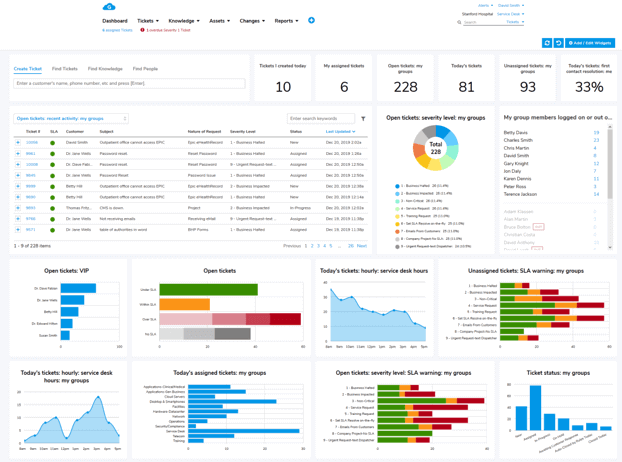
Giva's Help Desk Software gives a team a single system of record for the whole rhythm described above, with queue views, SLA timers, escalation history, and handoff notes all live in one place, so the information a well-run day depends on doesn't have to survive on memory alone.
Whether your team is already running most of this rhythm or still finding where the gaps are, the goal is the same: a policy that actually predicts what happens on an ordinary Tuesday, not just what a document says should happen.
Get a demo to see Giva's solutions in action, or start your own free, 30-day trial today!



Categories: Help Desk